Restoring from older PBX version causing issues

Hi,
No i haven't change a thing, it is installed and enabled in the Feature codes. i have PBX 2.6.0.3, I cannot see it in the page. what i mean in the PBX GUI i have no option for PhoneBook under setup or Tools (in the left hand panel). the only one i see is Asterisk phonebook under the tools tab in the left panel?
please advise

thank you
 
You might not have the module loaded. Go to FreePBX - Modules and check for updates. There is a module called Phonebook (or something like that) that you can download.
 
Hi,
I have checked for updates, load modules but nothing it seems their..
I see it in the install as enable but no link in the set up menu
I will un install the phonebook and reinstall again
 
On my box is is labeled as "Directory" instead of phonebook.
 
It will show up under Setup - Module Admin - Check for updates online. Look under CID & Number Management - Phonebook Directory - Action install if not installed. Provides a dial-by-name directory for phonebook entries. If you look under Feature Codes, it should show up - dial 411.
 
Hi,
I have checked under Setup-Module admin-CID & Number Management (it does exist and enable) so is the Speed dial functions.
Also i can see it under Feature codes showning up dial 411.
But i cannot see it to configure it in my navigation left side bar, neither it exist as Directory. I will send you a screen shot of the Module admin.
it is weired as i checked other system i have in production and the Phonebook exist..
Very Weired?
 
Just dial 411, that's all it does. Under FreePBX Tool Tab menus do you see it there? (Not the Setup tab)
 
I got it to work, you are right it was made auto in the system, not much config. what is the chance to change the dial 411 to # like 4 or 5 in the PVR. if i do that would it require any entry in the PVR or announcement?

Thank you
 
I believe that you just have to change it in the Feature codes menu.
 
Nice, I am liking this system more and more. I have tried to change the annoucement of the phonebook instead of spelling the user full first and last name everytime when entering the first 3 digit but it did not work. it kept spelling the entire thing, i have few users that their last name more than 12 caracter. Anychance to set it up for just speling one or the other?
 
On another topic, do you have any experience with Polycom SoundStation IP 6000 to make the config work with pbx/asterisk. i have it online with dial tone but it seems it cannot receive or dial a number. Polycom only have config with their product (3X).

Guidnance please
 
Have your users log into their voicemail box and record their names. Then the system will say their name in their own voice.
 
First of all, I would like to thank everyone here for helping me out with this project. My Bosses are very impressed with the server and Asterisk.. 2 thumbs up, my Friends. Thank you so much.

Just have couple more questions please to brush up my system.
- for the phonebook, the system will prenounce the user name letter by letter any-way to change it for just say the name instead of spelling it? i can get the user to record their names but would like to have control over it?
- My Asterisk server is in my network now and i have a VPN connection to my network working from home. I can access the phone server using Putty, but i cannot get the GUI to work remotely thru the VPN? any idea? my server IP is 192.168.5.xxx when on VPN remotely my system will have 192.168.200.xxx i wonder if i should add this subnet to the asterisks box? but where?

Thank you again again for all of your help.
 
dbaddour,

If you add these two lines to /etc/asterisk/voicemail.conf under [general]

Code:
[general]
forcegreetings = yes
forcename = yes
minpassword = 5
and set the extension's voicemail password to the same value as the extension (ext. 200 / vmpwd 200), this will force the user to go through setting up their voice mailbox. It requires them to change their VM password (you can require a certain length - we require five numbers - use minpassword to set) record their name, their unavailable message, and their busy message.

My first thought on your VPN question: firewall / fail2ban. Make sure your 192.168.200.xxx isn't being blocked as there are default rules for Apache in fail2ban. You probably want to exclude that IP range or address if you trust it.

I went through the same thing you're going through on the voice mail setup. :) Make sure that when they change their VM passwords, they're not using something stupid like 12345, five repeating numbers, etc. This is the minimum... the passwords can be longer, if they like.
Check out /etc/fail2ban/jail.conf and look for ignoreip= . Check iptables and make sure you're not getting your IP listed - iptables -L -n .
 
Hi,

I have the IPtable disabled, nothing in the /etc/fail2ban/jail.conf in ignoreip and nothing in the iptables -L -n...

Strange,

so if they record their name or messages with the voicemail, the phonebook will pick their name as they dial the first 3 dig. for their extension?

thank you
 
Yes, it will announce their name instead of spelling it out when doing the lookup. At least, that's how it works on BRONZE for us. ;)

From your remote machine, what do you get if you telnet 192.168.5.X 80 (whatever your server IP is)? Does it time-out or do you get a connection.

If you get a connection, type some random characters in and see if you get the an error response from apache. If you don't get any response or it times-out, something must be blocked.
 
that is the error i am getting:
"
The following error was encountered:
  • Access Denied. Access control configuration prevents your request from being allowed at this time. Please contact your service provider if you feel this is incorrect.
Your cache administrator is......"

For putty i use [email protected] and i am in... but not the GUI, i tried with IE and FireFox the same error?

I did open port forwading 80 on the SME gateway and the same

THank you
 
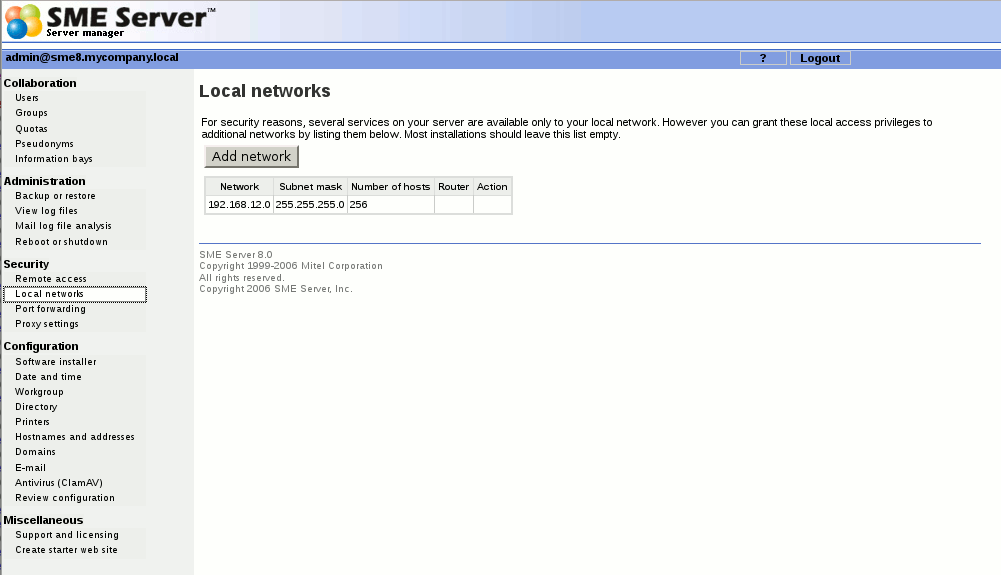
Based upon " Your cache administrator is......" info, you have a possibly misconfigured web proxy. I would guess that it doesn't know anything about your 192.168.200.0 network.

I've never used SME Server. It looks like you may need to add the above network, below. Your kind of on your own here unless someone else knows for sure.

Local-networks.png


Your other alternative would be to change the default listening port for apache to something other than port 80.

A word of advice, you should also consider the security implications of having any ports forwarded to to your PBX. You can find plenty of information in the forums regarding security (or the lack thereof).:eek:
 

Members online

Forum statistics

Threads
26,686
Messages
174,407
Members
20,257
Latest member
Dempan
Get 3CX - Absolutely Free!

Link up your team and customers Phone System Live Chat Video Conferencing

Hosted or Self-managed. Up to 10 users free forever. No credit card. Try risk free.

3CX
A 3CX Account with that email already exists. You will be redirected to the Customer Portal to sign in or reset your password if you've forgotten it.
Back
Top