
I have a 4-extension spa942. On the old PBX I had a button (extension) for private, and a button for company (and then some internal numbers on the last two buttons).
But how do I do this here? I can use the prefix I've tried setting up, but the family doesn't remember using the prefixes
I have created a dialplan for default use:
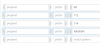
In Denmark we dial international with 00 as the first digits, our emergency number is 112 (as normal in Europe), nearest police (non-emergency) is 114, our normal numbers are 8 digits.
This part seems to work. But how do I force a specific extension (it is also seperately registered to incredible pbx of course) to use a specific outbound route?
But how do I do this here? I can use the prefix I've tried setting up, but the family doesn't remember using the prefixes
I have created a dialplan for default use:
In Denmark we dial international with 00 as the first digits, our emergency number is 112 (as normal in Europe), nearest police (non-emergency) is 114, our normal numbers are 8 digits.
This part seems to work. But how do I force a specific extension (it is also seperately registered to incredible pbx of course) to use a specific outbound route?



 Phone System