GOOD NEWS Announce Callee with RingGroup

Gregorywest

Member
Joined
Jun 11, 2018
Messages
118
Reaction score
14
Not sure if anyone has ever done anything like this.

What I would like to have happen if before a ring group is made to ring, an automatic page/intercom be played on all the ring group phones.

IE if some calls Mr. Smith, the follow-me is set to invoke the ring group mrsmith. Before all the phones start to ring I would like the PBX to play a brief announcement "Call for Mr Smith" then have the phones ring. This would cut down on people going to their phone just to check if it is a call they want or not.

Anyone done something like this?
 
This type of function is not part of the stock FreePBX gui to Asterisk or any commercial FreePBX modules that I know of. Almost anything can be done with Asterisk via custom config files but this is not something I have seen done. It would require either custom name recordings or automated text-to-speech to create the name file to speak. Then you'd have to kick off a paging announcement. It isn't impossible but you'd have to put a lot of work into it.

If you've been in a CVS pharmacy, whatever system they use will announce "One call Holding for Pharmacy" over the phone speakers but they are using a proprietary system.

Sounds to me like you need more DID's and/or to install a wireless telephony system so the people can keep the phone on them and eliminate the telephone chaos you seem to have.
 
@Gregorywest

I once set up a "Park and announce" extension which would be used during times the receptionist was unavailable .

When a call was received when the receptionist was away, but staff was still available, the incoming call was parked, MOH was played, and a page was initiated advising that an "incoming call on extension 71 (or whichever parked position". Anyone could then retrieve the call by dialing the Park code. There is also a timeout to terminate the incoming call, but this could also be sent to voicemail, instead.

In this example, '3075' is the extension where the call first goes to, and '555' is the Ring Group in my case. You need to record an appropriate message to be played over the paging system, or intercom.

Insert the code below in the /etc/asterisk/extensions_custom.conf

Provided "as-is" for you to consider:

; Park incoming call and announce over Page or Intercom
exten => 3075,1,Answer()
exten => 3075,n,playback(pls-hold-while-try)
exten => 3075,n,Set(countum=1)
;exten => 3075,n,System(rm /var/lib/asterisk/sounds/custom/callername.wav)
exten => 3075,n,System(/usr/bin/flite "${CALLERID(name)} " -o /var/lib/asterisk/sounds/custom/temp.wav)
exten => 3075,n(resume),parkandannounce(silence/2:custom/callername:custom/CallHoldingOnExt:PARKED,20,LOCAL/555@from-internal)
exten => 3075,n(continue),Set(countum=$[${countum} + 1])
exten => 3075,n,gotoif($[${countum} <= 3 ]?resume)
exten => 3075,n,Playback(nbdy-avail-to-take-call)
exten => 3075,n,Playback(pls-try-call-later)
exten => 3075,n,Hangup()
;=======end=======================

Note: the smiley face should read 'colonP' or ': PARKED' with no space
 
Last edited by a moderator:
@Gregorywest

I once set up a "Park and announce" extension which would be used during times the receptionist was unavailable .

When a call was received when the receptionist was away, but staff was still available, the incoming call was parked, MOH was played, and a page was initiated advising that an "incoming call on extension 71 (or whichever parked position". Anyone could then retrieve the call by dialing the Park code. There is also a timeout to terminate the incoming call, but this could also be sent to voicemail, instead.

In this example, '3075' is the extension where the call first goes to, and '555' is the Ring Group in my case. You need to record an appropriate message to be played over the paging system, or intercom.

Insert the code below in the /etc/asterisk/extensions_custom.conf

Provided "as-is" for you to consider:

; Park incoming call and announce over Page or Intercom
exten => 3075,1,Answer()
exten => 3075,n,playback(pls-hold-while-try)
exten => 3075,n,Set(countum=1)
;exten => 3075,n,System(rm /var/lib/asterisk/sounds/custom/callername.wav)
exten => 3075,n,System(/usr/bin/flite "${CALLERID(name)} " -o /var/lib/asterisk/sounds/custom/temp.wav)
exten => 3075,n(resume),parkandannounce(silence/2:custom/callername:custom/CallHoldingOnExt:pARKED,20,LOCAL/555@from-internal)
exten => 3075,n(continue),Set(countum=$[${countum} + 1])
exten => 3075,n,gotoif($[${countum} <= 3 ]?resume)
exten => 3075,n,Playback(nbdy-avail-to-take-call)
exten => 3075,n,Playback(pls-try-call-later)
exten => 3075,n,Hangup()
;=======end=======================

Note: the smiley face should read 'colonP' or ': PARKED' with no space
That is pretty darn close to what I would like to do. let me give it a look at
 
One more note...

The sound file which you need to record, can be named anything you wish or course, but in the example above it is a wav file named 'CallHoldingOnExt' . The script doesn't need to see the 'wav' extension as part of the file name, which drove me a little nuts at first. (It doesn't take much!)
 
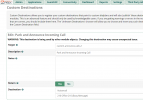
@MGD4me and @Gregorywest I'm not sure which version of FreePBX or Asterisk you are using but I had to make changes for this to work on IncrediblePBX2021 with FreePBX 15 and Asterisk 18.9. In my case I created a miscellaneous application which points to the custom destination. I have it announce on extension 295 with is a page group extension containing the IP phones to which the system will announce. I made this macro a custom destination in the GUI.

Also, if you get an error that flite is not found, do an apt install flite to add it to your system.

Code:
; Park incoming call and announce over Page or Intercom
[custom-announce-call]
exten => s,1,Answer()
exten => s,n,Playtones(ring)
exten => s,n,Wait(4)
exten => s,n,playback(thank_you_calling&silence/1&followme/pls-hold-while-try)
exten => s,n,Set(countum=1)
exten => s,n,System(/usr/bin/flite "${CALLERID(name)} " -o /var/lib/asterisk/sounds/en/custom/temp.wav)
exten => s,n(resume),parkandannounce(,rt(16)c(custom-announce-call,s,continue),silence/2:call-waiting:from:custom/temp:on:PARKED,LOCAL/295@from-internal)
exten => s,n(continue),Set(countum=$[${countum} + 1])
exten => s,n,gotoif($[${countum} <= 3 ]?thanks:vmail)
exten => s,n(thanks),Playback(queue-thankyou)
exten => s,n,GoTo(resume)
exten => s,n(vmail),Voicemail(210@default,u)
exten => s,n,Hangup()
;=======end=======================
 
Last edited:
I'm not sure which version of FreePBX or Asterisk you are using

The PBX that this feature was running on, is a very old PIAF of 5 or 6 years ago. So, I'm not surprised that you needed to tweak it to bring it up to a more current version.

Thanks for doing that... I'm sure someone else will benefit !
 
I also used system recordings instead of a custom one. The Flite voice is rather annoying so I might figure out how to use a different text-to-speech engine.
 
OK, the loop to repeat does not work as it is. The park times out to whatever timeout destination is set in the parking parameters so the three times through the loop never works. I'll have to spend some more time on that. As it stands, it will announce one time after the park and then not repeat as the park timeout breaks the call out of the macro.
 
OK. Got it to work. I've revised my original post above to have the announcement repeat 3 times and then jump to an extension's voicemail if the parked call is not picked up.
 
OK this looks AWESOME! Just figuring out how to code the syntax for it all to work.

The kick off would be a to an extension (there are only 4 extensions that this needs to work, so one set of code per extension.
@MGD4me and @Gregorywest I'm not sure which version of FreePBX or Asterisk you are using but I had to make changes for this to work on IncrediblePBX2021 with FreePBX 15 and Asterisk 18.9. In my case I created a miscellaneous application which points to the custom destination. I have it announce on extension 295 with is a page group extension containing the IP phones to which the system will announce. I made this macro a custom destination in the GUI.

Also, if you get an error that flite is not found, do an apt install flite to add it to your system.

Code:
; Park incoming call and announce over Page or Intercom
[custom-announce-call]
exten => s,1,Answer()
exten => s,n,Playtones(ring)
exten => s,n,Wait(4)
exten => s,n,playback(thank_you_calling&silence/1&followme/pls-hold-while-try)
exten => s,n,Set(countum=1)
exten => s,n,System(/usr/bin/flite "${CALLERID(name)} " -o /var/lib/asterisk/sounds/en/custom/temp.wav)
exten => s,n(resume),parkandannounce(,rt(16)c(custom-announce-call,s,continue),silence/2:call-waiting:from:custom/temp:on:PARKED,LOCAL/295@from-internal)
exten => s,n(continue),Set(countum=$[${countum} + 1])
exten => s,n,gotoif($[${countum} <= 3 ]?thanks:vmail)
exten => s,n(thanks),Playback(queue-thankyou)
exten => s,n,GoTo(resume)
exten => s,n(vmail),Voicemail(210@default,u)
exten => s,n,Hangup()
;=======end=======================
Two newbee questions. Never made a custom destination before, what does the creation of the custom destination look like? I am assuming it is: custom-announce-call,s,1

Where is the code placed? Is there a file for it, or a folder it is supposed to go into?
 
The code goes at the bottom of the
Code:
/etc/asterisk/extensions_custom.conf
file.

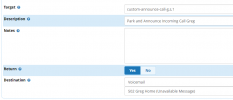
The target of the Custom Destination is the first line of the code that you added to the file above. It is the macro name followed by where you want the call to start within the macro (ie: s,1).

Keep in mind this code is using your parking lot so if there are a lot of calls, this will only park as many as you have parking slots in your system. If 4 phones are getting 4 or more calls all the time, this could become complicated and tax a small system.

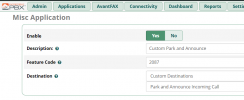
1637096810305.png

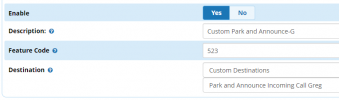
In the Miscellaneous application, the feature code is an unused extension number I assigned. You'd point the DID to that number.
1637096901021.png
 
Looking good! Hope the last two questions.

Which call to the voice mail is the code causing the voice mail to be invoked? The one at the end of the code above, or the entry in the Custom Destinations (or both).

If I wanted different voicemail boxes used for each of the 4 incoming trunks do I need 4 sents of code/destination/application, or do I just need 4 sets of desination/application?

Did some small changes for testing:
Code:
exten => s,n,System(/usr/bin/flite "${CALLERID(all)} " -o /var/lib/asterisk/sounds/en/custom/temp.wav)
exten => s,n,System(/usr/bin/flite "${CALLERID(dnid):-4} " -o /var/lib/asterisk/sounds/en/custom/temp2.wav)  // Say the last 4 digits of the DID called
exten => s,n(resume),parkandannounce(,rt(16)c(custom-announce-call,s,continue),silence/2:attention-required:call-waiting:for:custom/temp2:from:custom/temp:on:PARKED,LOCAL/859@from-internal)
exten => s,n(continue),Set(countum=$[${countum} + 1])
exten => s,n,Wait(4)  //  Wait 4 seconds between pages
exten => s,n,gotoif($[${countum} <= 3 ]?thanks:vmail)

I got it working off the incoming route. Is there a way I can get it to be called after the main extension has had a chance to ring? Sort of like the default route for the followme function?

Greg

P.S. Where do I send the beer to, this is awesome!
 
Last edited:
Looking good! Hope the last two questions.

Which call to the voice mail is the code causing the voice mail to be invoked? The one at the end of the code above, or the entry in the Custom Destinations (or both).

If I wanted different voicemail boxes used for each of the 4 incoming trunks do I need 4 sents of code/destination/application, or do I just need 4 sets of desination/application?

Did some small changes for testing:
Code:
exten => s,n,System(/usr/bin/flite "${CALLERID(all)} " -o /var/lib/asterisk/sounds/en/custom/temp.wav)
exten => s,n,System(/usr/bin/flite "${CALLERID(dnid):-4} " -o /var/lib/asterisk/sounds/en/custom/temp2.wav)  // Say the last 4 digits of the DID called
exten => s,n(resume),parkandannounce(,rt(16)c(custom-announce-call,s,continue),silence/2:attention-required:call-waiting:for:custom/temp2:from:custom/temp:on:PARKED,LOCAL/859@from-internal)
exten => s,n(continue),Set(countum=$[${countum} + 1])
exten => s,n,Wait(4)  //  Wait 4 seconds between pages
exten => s,n,gotoif($[${countum} <= 3 ]?thanks:vmail)

I got it working off the incoming route. Is there a way I can get it to be called after the main extension has had a chance to ring? Sort of like the default route for the followme function?

Greg

P.S. Where do I send the beer to, this is awesome!
#1 - The one on at the bottom of the script is primary. I only included a vmail destination on the Custom Destination for "just in case."

#2 - You need a different set of macros for each of the 4 extensions (unless you want to do a bunch of gotoif command lines. You can basically duplicate it but rename as custom-announce-call-1 and 2, etc. Remember to change the Custom Destination accordingly. If you want them to have music on hold when parked, remove the 'r' from the "rt(16)" parkandannounce command.

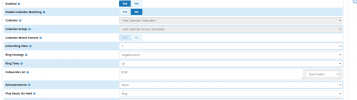
#3 - To have the phone ring first, route the DID to the extension. Enable the extension's find me / follow me and set the initial ring time for whatever you want but set the follow-me list to have the Custom Destination extension with a '#' behind the number. Turn off the "Confirm Calls" on this screen. I'm not sure how the no-answer destination on find me/follow me would work, if at all, unless perhaps if the parking lot is full. The original phone will stop ringing when the call forwards to the Custom Destination.

That way, the DID will ring the phone for the initial ring period then the find me / follow me location will be invoked and kick off the park and announce function.

Send the beer to @MGD4me since he provided the seed code for me to play with. :)
 
Last edited:
Also, I'd just make a custom recording to say the name of the person or department being called rather than the DNID. Or a custom recording that says "Attention Please! A call for John Smith from" then your flite recording of the callerid and another custom recording saying "is holding on" and then PARKED.

Look at some of the Text-to-Speech engines like on Nuance.com that let you test out the voices with your own words. There are also some websites that let you download an MP3 of the speech you generate that you can then use a local app to convert into ulaw,, g.722, etc.
 
Send the beer to @MGD4me since he provided the seed code for me to play with.

Thanks for the warm and fuzzies, but we are all in this together, and share what we (think we) know!! No problem.
 
So So So close....

Will put all the code in below. What is happening right now is the call comes in, rings the correct extension. After a few seconds the call is transferred to the Announce and Park. The caller gets the please wait message, the page goes out that there is a caller on extension 71. So far so good, but then the call is terminated/hang-up. Does not go to VM and does not wait for someone to answer.

There is the code:
Code:
; Park incoming call and announce over Page or Intercom
[custom-announce-call-g]
exten => s,1,Answer()
exten => s,n,Playtones(ring)
exten => s,n,Wait(4)
exten => s,n,playback(thank_you_calling&silence/1&followme/pls-hold-while-try)
exten => s,n,Set(countum=1)
exten => s,n,System(/usr/bin/flite "${CALLERID(all)} " -o /var/lib/asterisk/sounds/en/custom/temp.wav)
exten => s,n,System(/usr/bin/flite "${CALLERID(dnid):-4} " -o /var/lib/asterisk/sounds/en/custom/temp2.wav)
exten => s,n(resume),parkandannounce(,rt(16)c(custom-announce-call,s,continue),silence/2:attention-required:for:custom/GregCall:from:custom/temp:on:PARKED,LOCAL/859@from-internal)
exten => s,n(continue),Set(countum=$[${countum} + 1])
exten => s,n,Wait(4)
exten => s,n,gotoif($[${countum} <= 3 ]?thanks:vmail)
exten => s,n(thanks),Playback(queue-thankyou)
exten => s,n,GoTo(resume)
exten => s,n(vmail),Voicemail(502@default,u)
exten => s,n,Hangup()
;=======end=======================

1637257197389.png
1637257261155.png
1637257302056.png

Will keep working away at it, see if I can figure out why the hangup. Anyone have any ideas?
 
Found the problem!!!!! YEA!!!!

Code:
Old: exten => s,n(resume),parkandannounce(,rt(16)c(custom-announce-call,s,continue),silence/2:attention-required:for:custom/GregCall:from:custom/temp:on:PARKED,LOCAL/859@from-internal)
New: exten => s,n(resume),parkandannounce(,rt(16)c(custom-announce-call-g,s,continue),silence/2:attention-required:for:custom/GregCall:from:custom/temp:on:PARKED,LOCAL/859@from-internal)
                                                                                                                                        ||
The above line of code was not updated, once the change was made to this line everything works as expected!
Thank you everyone for your awesome help!!
 
A slight hiccup I have the announcement saying who is calling, problem is it is saying the name of the extension being called (ie the extension being called by the outside caller) not the name of the outside caller. How do I get the outside caller, or the outside callers number announced?
 

Members online

Forum statistics

Threads
26,687
Messages
174,409
Members
20,257
Latest member
Dempan
Get 3CX - Absolutely Free!

Link up your team and customers Phone System Live Chat Video Conferencing

Hosted or Self-managed. Up to 10 users free forever. No credit card. Try risk free.

3CX
A 3CX Account with that email already exists. You will be redirected to the Customer Portal to sign in or reset your password if you've forgotten it.
Back
Top