

KNERD
Well-Known Member
- Joined
- Mar 9, 2014
- Messages
- 2,133
- Reaction score
- 836
I see the API is already installed on Incredible PBX 2021, but not on FreePBX.
I thought I would try to learn some things about it.
It seems the API has been out since version 13, but their documentation is atrocious, though has improved a bit in the past year, or so.
I found a page that caught my attention:
 wiki.freepbx.org
It was not what the page is about, but rather the example they are showing. It is showing how to get a summary of all the calls made on the PBX, and the total duration of the calls. I am interesting in this area of the API.
I would like to get a summary of the calls per month rather than all calls.
This is where the documentation is lacking.
I tried the example somewhat:
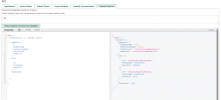
Notice it is using "allCrdrs" to retrieve the information. Their wiki is not even returning a search result for that.
So then I did the "Generate GraphQL Documentation based on scopes."
This what what it returns using the text "cdr."
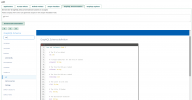
It turns out that "cdr" is for POST, not GET.
Anyone know how else to get more info on the API on what I am trying to do?
I thought I would try to learn some things about it.
It seems the API has been out since version 13, but their documentation is atrocious, though has improved a bit in the past year, or so.
I found a page that caught my attention:
PBX GUI - PBX GUI - Sangoma Documentation
It was not what the page is about, but rather the example they are showing. It is showing how to get a summary of all the calls made on the PBX, and the total duration of the calls. I am interesting in this area of the API.
I would like to get a summary of the calls per month rather than all calls.
This is where the documentation is lacking.
I tried the example somewhat:
Notice it is using "allCrdrs" to retrieve the information. Their wiki is not even returning a search result for that.
So then I did the "Generate GraphQL Documentation based on scopes."
This what what it returns using the text "cdr."
It turns out that "cdr" is for POST, not GET.
Anyone know how else to get more info on the API on what I am trying to do?


 Phone System