ALERT Buh-bye CentOS.

The IncrediblePBX2020.sh script is only for CentOS 7. IncrediblePBX2021.sh is for Debian 10.
When I run the the fax installer on the brand new install Debian system i get this error. I am not sure what i have to do in this case.
./incrediblefax2020-debian10.sh
Incredible Fax for Debian 10 requires PHP 5.6.
Run switch-to-php5.6 and then try again.
WARNING: Always run Incredible PBX behind a secure firewall.
 
You should be able to do this:

Code:
/root/switch-to-php5.6
 
@Eliad: PHP 5.6 should be installed by default with Incredible PBX 2021. You've got a bad install.
 
It is also on Debian is you have the correct download.
 
Please post command you are using to acquire the script.
from http://nerdvittles.com/?p=34086
wget http://incrediblepbx.com/IncrediblePBX2021.sh
chmod +x IncrediblePBX2021.sh
./IncrediblePBX2021.sh
I run it once more and i got a bunch of errors. On a hunch after I installed Debian I run apt-get update followed by apt-get upgrade, there was nothing to upgrade. Then I run again the above script followed by the incrediblefax script. this time pbxstatus is all green, looks it installed correctly, The odd thing this time incrediblefax installer did not ask for country code or the area code. Now I will have to get into the GUI and confirm everything is in place.
UPDATE. GUI for PBX and for Avantfax seems all ok
 
Last edited:
Don't run apt upgrade before the Incredible PBX install. apt upgrade gets run automatically at the end of the install before rebooting. Otherwise, your install may fail. You were lucky there was nothing to upgrade.
 
Don't run apt upgrade before the Incredible PBX install. apt upgrade gets run automatically at the end of the install before rebooting. Otherwise, your install may fail. You were lucky there was nothing to upgrade.
this install was quite strange, running it several times got me different results, finally i got a good one. I took a snapshot just in case. I plan to apply a restore from Centos7 system and I dont want to go through this again.
 
this install was quite strange, running it several times got me different results, finally i got a good one. I took a snapshot just in case. I plan to apply a restore from Centos7 system and I dont want to go through this again.

If you restore from a different OS, use the FreePBX backup and restore modules with identical FreePBX versions.
 
If you restore from a different OS, use the FreePBX backup and restore modules with identical FreePBX versions.
I was under the impression incrediblebackup2021 from a Centos7 2020 will be able to be restored to a Debian 2021 using incrediblerestore2021. Am I wrong?
Is not a big setup and I could use FreePBX backup and restore module instead. After that, i will have to make some custom changes for the Avantfax coverpage and the changes for voicemail to email transcription.
 
If you use Incredible Restore from CentOS to Debian, you'll end up with a mess. Just use the FreePBX backup but make sure the old system is updated to FreePBX 15 before you back it up. Cross-platform Incredible Backup/Restore will bring bits of CentOS things that will hose the Debian install.
 
Debian to Ubuntu backups should be compatible, as they put everything in the same location.
May not work the other way, if Ubuntu used to new of MariaDB. I’ll have to test it.
 
here we go again. This is another system which I would like to go to Debian. The install seems to not go well, At the end of install i get this message
Running Asterisk pre from Clearlydevices module
Unable to locate the FreePBX BMO Class 'Userman'A required module might be disabled or uninstalled. Recommended steps (run from the CLI): 1) fwconsole ma install userman 2) fwconsole ma enable userman
Running Asterisk pre from Clearlytrunking module
Clearly Client Server is not running
Running Asterisk pre from Smsclient module
SMS Client Server is not running
Running Asterisk pre from Ucp module
Unable to locate the FreePBX BMO Class 'Userman'A required module might be disabled or uninstalled. Recommended steps (run from the CLI): 1) fwconsole ma install userman 2) fwconsole ma enable userman

DAHDI NOT FOUND [Suggest Uninstalling the Dahdi Configuration Module]!
Shutting down MySQL...
Shutting down Apache...
Then I reboot the system and this is what the pbxstatus shows
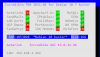
Capture.PNG
 
@Eliad: If you haven't figured it out yet, migrating from CentOS to Debian is dangerous. Do a clean IncrediblePBX2021.sh install on Debian 10 and then cut-and-paste your data from the old server. Doing backups and restores is not going to get any more reliable by continuing to try it. :death:
 
@Eliad: If you haven't figured it out yet, migrating from CentOS to Debian is dangerous. Do a clean IncrediblePBX2021.sh install on Debian 10 and then cut-and-paste your data from the old server. Doing backups and restores is not going to get any more reliable by continuing to try it. :death:
The above error I get on a clean ibpx2021 install on clean Debian and no Debian updates, no restore applied. I thought to do Debian version because I figured it will be more stable than an Ubuntu. I can certainly install it on an Ubuntu instead. The odd thing with the Debian clean install is the different results when i repeat the install, perhaps some of the repositories used by Debian are not always available and therefore I get this error. When I experimented with earlier Debian install there was not problem. This is way beyond my knowledge to try to troubleshoot it myself.
 
The above error I get on a clean ibpx2021 install on clean Debian and no Debian updates, no restore applied. I thought to do Debian version because I figured it will be more stable than an Ubuntu. I can certainly install it on an Ubuntu instead. The odd thing with the Debian clean install is the different results when i repeat the install, perhaps some of the repositories used by Debian are not always available and therefore I get this error. When I experimented with earlier Debian install there was not problem. This is way beyond my knowledge to try to troubleshoot it myself.

The install log in /root will tell you what's failing. Where are you hosting this??
 
Last edited:
A local Proxmox. I tried ipbx2021 script first by creating a VM then installing clean Debian from netinstall iso and I got this error. Then I tried installing in a CT by using Proxmox Debian template and I got this error again.
The other day when I got a successful install I did run debian update(was nothing to update) then the installer went ok, right now I am trying it again after i run apt-get update but not upgrade. I will get back to you with the results and if fails I will post the install log.
 

Members online

Forum statistics

Threads
26,686
Messages
174,407
Members
20,257
Latest member
Dempan
Get 3CX - Absolutely Free!

Link up your team and customers Phone System Live Chat Video Conferencing

Hosted or Self-managed. Up to 10 users free forever. No credit card. Try risk free.

3CX
A 3CX Account with that email already exists. You will be redirected to the Customer Portal to sign in or reset your password if you've forgotten it.
Back
Top