ALERT Buh-bye CentOS.

Migrate Incredible PBX 2020 for CentOS 7 to Incredible PBX 2021 for Debian 10

TIP:
If you have an existing Incredible PBX 2020 server with CentOS 7, here's the easy way to migrate. First, remove BOTH asternic_cdr and endpointman modules from your server. Then download http://incrediblebackup2021.tar.gz and untar. Make a backup of your server: /root/incrediblebackup2021. On the new Debian platform, go through the basic setup and download the Incredible PBX 2021 installer. Then mkdir /backup and copy your backup there from your old server. Make note of the name. Edit incrediblepbx2021.sh and change IMGFILE (line 32) to the name of your backup. Then save the file and run the script.
 
I'm letting the dust settle for a while and see what forms by the community But currently looking at Oracle Linux.

Oracle Linux been around for a while. Quick on updates, good repositories, good docs and
keep good selection of current downloads and more. They have a pretty good jump on this.
Probably test out the RPi4 64bit arm download next and convert over a couple of
test Centos 7 VM's using their conversion scripts.


Oracle Linux Downloads
Oracle Linux downloads are available in several forms:


Only downside I have with them is they have killed a couple of open source
projects in the past, but we'll see.
 
@ext-104: Oracle's stewardship of the MySQL project doesn't inspire much confidence. Jumping from IBM to Oracle reminds me of the kettle and the fire. :santa:
 
I can confirm IncrediblePBX installed in Proxmox 6.0. I tried both ways. Starting with Debian 10 Container Template and also starting from Debian 10. iso installed in a VM. This was done using the latest installer. Prior installer resulted in errors.
 
and Openoffice before giving it to Apache Foundation.

and screwing up OpenSolaris/ZFS

So far have done much better job with VirtualBox though.

I think they have been developing Oracle Linux since 2006? So far pretty good job.

We'll see, nice having choices though.
 
I've just finished installing the latest and greatest ;) on a $11/yr RackNerd KVM VPS :rolleyes:
It's a single core, 1GB RAM, 17GB SSD drive KVM deal I found here: https://my.racknerd.com/cart.php?a=add&pid=358

Once I became quickly acquainted with the VPS, which is so bare-bones that you just can't spend more than 10 minutes to figure out all the ins and outs, I went on installing Debian 10. It took about 5mn to fire up. It showed up version 10.1. Quick apt upgrade and another 5mn later it was at version 10.7.

Then I went on with @wardmundy 's install recipe which took a certain amount of time, but not sure how much, as I went on having dinner just after I typed the telephone country code in.

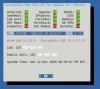
By the time I was back everything was nicely installed. Quick reboot and the following friendly status page showed up:
IncrediblePBX2021.B2_RackNerd_2.jpg
At this stage I first changed the root password and setup a new password for the admin GUI.

Next I installed checked Webmin, which worked flawlessly. In a couple of minutes I was accessing the even friendlier webmin dashboard to check out the machine's specifics. It didn't look bad at all for a super-entry level single core machine.

Anyway, it finally occurred to me that I should check the PBX dashboard. Just punched in the IP address and voila!
Everything seemed to work just fine. It's a bit intimidating when all you know is the 12/13 GUI, but it's quite intuitive to figure out what is where.

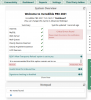
As I was checking the GUI I noticed a problem after the first time I went onto the dashboard. When dashboard is selected from the menu the window changes right away, the welcome banner shows up with the full wording and the progress bar underneath. It goes up to 96% and sits there without ever showing up the dashboard. The GUI is not frozen though, if I press on any menu item there is first a red color banner that appears on top of the window with the word "undefined" in the middle while the dashboard appears beneath it for a fraction of a second and the GUI moves on to showing up the function that I selected from the menu. So, I can no longer see the dashboard, although the very first attempt worked fine as I got to see everything including the news feeds etc in a bunch of frames.
If anyone can suggest how to figure out what's that "undefined" thing I am all ears :)

One other thing that I noticed is that the GUI is only http accessible (security risk). I know that my old version (12/13) didn't have ssl access to the GUI and I had to go modify apache to run https. Is this still the case or is it happening to me because I overlooked something?

Thanks for your help and input.

PS: I won't be running a PBX on the cloud anytime soon. But since I was also intrigued about what to expect if I did, I decided to give a try. In the process I decided to gamble a few dollars and see what I'll get for a rock bottom price.

PS2: Evvvventually the dashboard shows up. Not sure how long. I just noticed it. Maybe it's because of the cheap VPS that I have :rofl:
IncrediblePBX2021.B2_RackNerd_3.png

PS3: It's very possible that I'm mistaken about webmin not being there. I indeed tried to access it but on port #10000, having forgotten that asterisk has RTP there therefore webmin is shifted to 9001 (although RTP is using UDP and SSL is on TCP, therefore it's probably not the reason why iPBX has webmin on 9001:oops: ). So, I went on installing webmin, or so I thought. It probably said that it was already up to date, but I didn't pay much attention to the messages. Then when I tried again, since it didn't work on TCP#10000 once more - without thinking - I switched to 9001 at which time it worked. So probably webmin was already there and I was calling it on the wrong port.

PS4: Ok this is the last update, promise! As I was about to shut down the PBX I noticed the following message:
IncrediblePBX2021.B2_RackNerd_4.png
Any thoughts? Also the dashboard take about 3-4mn to show up when it's stuck with the "loading" progress bar at 96%.
:sleeping:
 
Last edited:
Any thoughts? Also the dashboard take about 3-4mn to show up when it's stuck with the "loading" progress bar at 96%.
This is sometimes due to the RSS news feeds. You can either check your DNS to make sure it can resolve the different feeds, or remove them entirely under Advanced Settings.
 
This is sometimes due to the RSS news feeds. You can either check your DNS to make sure it can resolve the different feeds, or remove them entirely under Advanced Settings.
Good hint, thanks. I edited out all the RSS news feeds in advanced settings. I still get the same slowdown except instead of happening at 96% it's now at 80% Something is still bugging it.

In the process I figured out that the fugitive error message alongside the red color banner with "undefined" says "There was an error asking for Overview. Check the error logs for more information". I went through all the log files but I haven't seen any errors, at best a few warnings. But for the untrained eyes without knowing what to search for the logs are not very helpful, I guess. I think the slow response on the dashboard has something to do with the "undefined" thing.

I also turned off the "PJSIP Allow transports reload" which made the earlier critical error go away from the dashboard.

Oh, I also disabled all the trunks for now as nothing is configured to be really operational beyond what was setup on the original setup.
 
@kenn10: I'm afraid the macro app (in deprecated section) of Applications got left out of menuselect enabled options. I've fixed it now, but you'll either need to start anew or recompile Asterisk 16 with macro enabled.
 
BUG: Couldn't login via SSH from desktop client. SOLVED in Beta3 together with missing app_macro Asterisk app for FreePBX.

Here's the fix for SSH:
Code:
sed -i 's|#PermitRootLogin prohibit-password|PermitRootLogin yes|' /etc/ssh/sshd_config
systemctl restart sshd
 
@Halea: Lack of HTTPS isn't a problem with Incredible PBX. Nobody but whitelisted IP addresses can access port 80.

The 96% dashboard hang is a tell-tale sign of a crappy VPS, performance-wise.

WebMin is preinstalled on port 9001. Run pbxstatus for its status. Login with root credentials.

Not sure about the PJsip message. Haven't seen that one.
 
I've just finished installing the latest and greatest ;) on a $11/yr RackNerd KVM VPS :rolleyes:
It's a single core, 1GB RAM, 17GB SSD drive KVM deal I found here: https://my.racknerd.com/cart.php?a=add&pid=358

Once I became quickly acquainted with the VPS, which is so bare-bones that you just can't spend more than 10 minutes to figure out all the ins and outs, I went on installing Debian 10. It took about 5mn to fire up. It showed up version 10.1. Quick apt upgrade and another 5mn later it was at version 10.7.

Then I went on with @wardmundy 's install recipe which took a certain amount of time, but not sure how much, as I went on having dinner just after I typed the telephone country code in.

By the time I was back everything was nicely installed. Quick reboot and the following friendly status page showed up:
View attachment 3139
At this stage I first changed the root password and setup a new password for the admin GUI.

Next I installed checked Webmin, which worked flawlessly. In a couple of minutes I was accessing the even friendlier webmin dashboard to check out the machine's specifics. It didn't look bad at all for a super-entry level single core machine.

Anyway, it finally occurred to me that I should check the PBX dashboard. Just punched in the IP address and voila!
Everything seemed to work just fine. It's a bit intimidating when all you know is the 12/13 GUI, but it's quite intuitive to figure out what is where.

As I was checking the GUI I noticed a problem after the first time I went onto the dashboard. When dashboard is selected from the menu the window changes right away, the welcome banner shows up with the full wording and the progress bar underneath. It goes up to 96% and sits there without ever showing up the dashboard. The GUI is not frozen though, if I press on any menu item there is first a red color banner that appears on top of the window with the word "undefined" in the middle while the dashboard appears beneath it for a fraction of a second and the GUI moves on to showing up the function that I selected from the menu. So, I can no longer see the dashboard, although the very first attempt worked fine as I got to see everything including the news feeds etc in a bunch of frames.
If anyone can suggest how to figure out what's that "undefined" thing I am all ears :)

One other thing that I noticed is that the GUI is only http accessible (security risk). I know that my old version (12/13) didn't have ssl access to the GUI and I had to go modify apache to run https. Is this still the case or is it happening to me because I overlooked something?

Thanks for your help and input.

PS: I won't be running a PBX on the cloud anytime soon. But since I was also intrigued about what to expect if I did, I decided to give a try. In the process I decided to gamble a few dollars and see what I'll get for a rock bottom price.

PS2: Evvvventually the dashboard shows up. Not sure how long. I just noticed it. Maybe it's because of the cheap VPS that I have :rofl:
View attachment 3140

PS3: It's very possible that I'm mistaken about webmin not being there. I indeed tried to access it but on port #10000, having forgotten that asterisk has RTP there therefore webmin is shifted to 9001 (although RTP is using UDP and SSL is on TCP, therefore it's probably not the reason why iPBX has webmin on 9001:oops: ). So, I went on installing webmin, or so I thought. It probably said that it was already up to date, but I didn't pay much attention to the messages. Then when I tried again, since it didn't work on TCP#10000 once more - without thinking - I switched to 9001 at which time it worked. So probably webmin was already there and I was calling it on the wrong port.

PS4: Ok this is the last update, promise! As I was about to shut down the PBX I noticed the following message:
View attachment 3141
Any thoughts? Also the dashboard take about 3-4mn to show up when it's stuck with the "loading" progress bar at 96%.
:sleeping:
Proxmox 6.2 install using Debian 10 container template it takes about 30 min to install, granted the server is not a very fast one to begin with. For some reason the install takes a long time to unpack webmin. After the install I did access the GUI and it works fine, no delays.
What I noticed though, after the full install when you reboot the server it takes literarily seconds to have it back up and running. Centos 7 version takes a while to load.
 
@Halea: Lack of HTTPS isn't a problem with Incredible PBX. Nobody but whitelisted IP addresses can access port 80.

The 96% dashboard hang is a tell-tale sign of a crappy VPS, performance-wise.

WebMin is preinstalled on port 9001. Run pbxstatus for its status. Login with root credentials.

Not sure about the PJsip message. Haven't seen that one.
Regarding webmin, it was installed properly as shown on the status page visible in the depiction i posted first. But of course I didn't really read its content, but just the fact that "things" were UP :mad2:

Also, trying to unhook the update utility (update-IncrediblePBX) from the root login function. I thought it would be in "/ etc/motd" but it isn't. Can you point me to the right config file? Thanks.
(The utility seems to be overriding the prompt setting PS1 every time it is run, and it puts back the warning message with each refresh of the prompt which is a bit of a nuisance)
 
Did I find an Easter Egg in the forum software?
If I type /etc /motd (without the space in betwen as it should be) anywhere in the post I get a "Oops, We ran into a problem" message on both Firefox and Chrome when I preview or attempt to post.
/ etc/motd works,
/etc /motd works,
/etc/mot works.
 
@Halea: That's a placeholder for the Automatic Update Utility to distribute security fixes. But, if you want to disable it, it's in

/~/.bash_profile
 
Last edited:
Did I find an Easter Egg in the forum software?
If I type /etc /motd (without the space in betwen as it should be) anywhere in the post I get a "Oops, We ran into a problem" message on both Firefox and Chrome when I preview or attempt to post.
/ etc/motd works,
/etc /motd works,
/etc/mot works.

You need to put / marks in italics to keep the forum from blocking links to code.
 
Proxmox 6.2 install using Debian 10 container template it takes about 30 min to install, granted the server is not a very fast one to begin with. For some reason the install takes a long time to unpack webmin. After the install I did access the GUI and it works fine, no delays.
What I noticed though, after the full install when you reboot the server it takes literarily seconds to have it back up and running. Centos 7 version takes a while to load.
As I write this post I'm in the process of copying out the HDD of the VPS to my Proxmox. Barring any compatibility issues I should have it up and running in no time and see how its performance is affected, especially the dashboard access delay issue.

I always found Proxmox's storage access very fast, almost as par with the host's drive access speed, especially with lvm-thin. Is this what you use?
 
As I write this post I'm in the process of copying out the HDD of the VPS to my Proxmox. Barring any compatibility issues I should have it up and running in no time and see how its performance is affected, especially the dashboard access delay issue.

I always found Proxmox's storage access very fast, almost as par with the host's drive access speed, especially with lvm-thin. Is this what you use?
For the Proxmox I use zfs filesystem because I use replication to a second server.
 

Members online

No members online now.

Forum statistics

Threads
26,687
Messages
174,410
Members
20,257
Latest member
Dempan
Get 3CX - Absolutely Free!

Link up your team and customers Phone System Live Chat Video Conferencing

Hosted or Self-managed. Up to 10 users free forever. No credit card. Try risk free.

3CX
A 3CX Account with that email already exists. You will be redirected to the Customer Portal to sign in or reset your password if you've forgotten it.
Back
Top