
You are using an out of date browser. It may not display this or other websites correctly.
You should upgrade or use an alternative browser.
You should upgrade or use an alternative browser.
ALERT Buh-bye CentOS.
- Thread starter Samot
- Start date

Halea
Well-Known Member
- Joined
- Aug 12, 2016
- Messages
- 1,164
- Reaction score
- 917
In terms of being able to login into the iPBX GUI I agree with you that the built in firewall would protect the machine against unauthorized access. But it won't protect against eavesdropping and monitoring the GUI traffic on TCP#80 which would be sent in the clear.@Halea: Lack of HTTPS isn't a problem with Incredible PBX. Nobody but whitelisted IP addresses can access port 80.
Anyone with a sniffer on the circuit that connects the VPS to the GUI user's desktop could intercept the traffic, analyze it and find out about sensitive information like the trunk registration passwords, etc. which unless I'm mistaken are not being encrypted by the PBX.
The interception through the WAN connection in a datacenter is not a far fetched thought as many VPSes are connected (logically or physically) to the same (hard or soft) ethernet switches.
I think a hacker could rent a VPS, script out an "intercept and dump" type utility on the ethernet interface which most likely is in promiscuous mode, otherwise virtualization of the network interface would require dedicated hardware and be costly. The net result is that all the PBX GUI traffic over TCP#80 in the clear for that networking neighborhood would be found out and looked into.
The trunk registration and phone registration info theft look like the most significant issue, but for corporate environment the theft of CDR might turn out to be even more critical.
Accessing the GUI either through a VPN or through stunnel will alleviate the risk. So, iPBX should actually ban access to TCP#80 altogether and implement one of the two solutions (stunnel being the easiest) and force the users to use it by default.
PS: A third alternative is to channel the TCP#80 traffic to the GUI through an ssh tunnel.
Last edited:
Halea
Well-Known Member
- Joined
- Aug 12, 2016
- Messages
- 1,164
- Reaction score
- 917
I use "shutdown -Ph now" and it seems to work with iPBX2021 too.The script for reboot does shut down elegantly the asterisk. shutdown -h now does not.
Hmm, I tried your suggestion, it does shutdown but does not shutdown asterisk in a orderly fashion as reboot script doesI use "shutdown -Ph now" and it seems to work with iPBX2021 too.
Halea
Well-Known Member
- Joined
- Aug 12, 2016
- Messages
- 1,164
- Reaction score
- 917
Then try it with +1 instead of "now" to give it 1 minute before shutting down. Maybe Asterisk needs a bit more time to properly exit. Normally shutdown issues an "init" command which is respected by all processes running in the background, but who knows maybe Asterisk treats it differently.Hmm, I tried your suggestion, it does shutdown but does not shutdown asterisk in a orderly fashion as reboot script does

wardmundy
Nerd Uno
- Joined
- Oct 12, 2007
- Messages
- 20,461
- Reaction score
- 6,192
The script for reboot does shut down the asterisk elegantly. shutdown -h now does not.
Use halt.
wardmundy
Nerd Uno
- Joined
- Oct 12, 2007
- Messages
- 20,461
- Reaction score
- 6,192
@Halea: There's a module in FreePBX to add https support. We also have written a tutorial about it. I'll update it for Debian 10 once we get this release out the door.
Halea
Well-Known Member
- Joined
- Aug 12, 2016
- Messages
- 1,164
- Reaction score
- 917
Ok, I think I'm done with testing for now! I moved the VPS HDD to my Proxmox and made it work with a couple of virtual driver changes. Unfortunately the dashboard access delay thing is still there. Whatever is causing the delay somehow got in there during install time while I was running it on the VPS. It seems to be related to some variable or something that didn't get installed initially and the logic flow is looking for it every time the dashboard is being accessed. I guess I have to reinstall it and see what happens next.
For the ssl thing, to remain on solid ground I actually installed stunnel and blocked port 80 access on the firewall. When I get my permanent solution in place I'll look into the module or adjust Apache. But with the millions of ways one can setup Apache there also are a millions of ways to create potential hacking/failure points on that web server. So my motto is don't fix it unless it's "really" broken!
The dingy VPS for 3 cents a day turned out to be quite good. Just got OpenVPN installed on it and it's usable as a pfsense gateway VPN around 300 mbps.
Thank you all for your help.
For the ssl thing, to remain on solid ground I actually installed stunnel and blocked port 80 access on the firewall. When I get my permanent solution in place I'll look into the module or adjust Apache. But with the millions of ways one can setup Apache there also are a millions of ways to create potential hacking/failure points on that web server. So my motto is don't fix it unless it's "really" broken!
The dingy VPS for 3 cents a day turned out to be quite good. Just got OpenVPN installed on it and it's usable as a pfsense gateway VPN around 300 mbps.
Thank you all for your help.
The FreePBX certman module and jerrm/fpbx-lewatch: Monitor FreePBX letsencrypt certificate generation and temporarily allow http connection for certman. (github.com) are all you need.@Halea: There's a module in FreePBX to add https support. We also have written a tutorial about it. I'll update it for Debian 10 once we get this release out the door.
wardmundy
Nerd Uno
- Joined
- Oct 12, 2007
- Messages
- 20,461
- Reaction score
- 6,192


wardmundy
Nerd Uno
- Joined
- Oct 12, 2007
- Messages
- 20,461
- Reaction score
- 6,192
Just curious about incrediblefax. Has that been updated to work with Debian?
Yeah. Debian 10 isn't a problem but PHP 7 is. Considering whether to drop back to PHP 5.6 so we can get it to work. There are lots of broken pieces. If you'd like to wrestle with it, start with the incrediblefax2020-raspi installer for Raspbian 10 that's on SourceForge. Our Raspbian 10 release uses PHP 5.6.
wardmundy
Nerd Uno
- Joined
- Oct 12, 2007
- Messages
- 20,461
- Reaction score
- 6,192
So here's the deal with Incredible Fax. AvantFax only works with PHP 5.6, not 7.3. Not sure how much effort it would take to make AvantFax compliant with PHP 7.3, but the original developers are gone, and I don't want to tackle it.It involves reading the MySQL database for AvantFax in a different way for those that are curious.
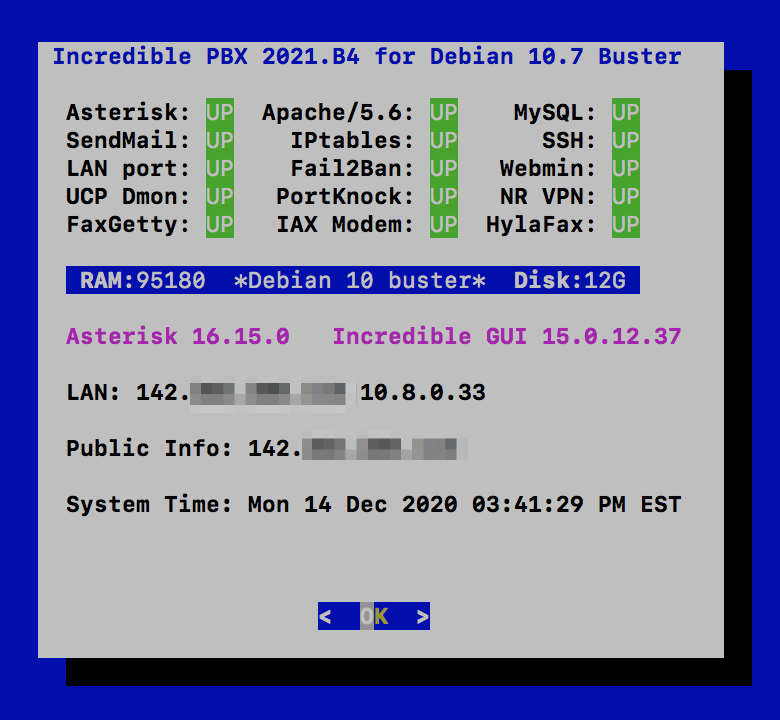
But there's good news. We can load both PHP versions easily and switch to PHP 5.6 for those that want to use AvantFax. Then the Incredible Fax installer for Raspbian 10 works and is now included in Beta4. FreePBX 15 still works fine with PHP 5.6 so you really don't lose anything in terms of functionality.
New Beta4 release loads both 5.6 and 7.3 and makes PHP 5.6 the default. Now this Debian release works just like the CentOS 7 and Raspbian 10 platforms. For those that don't want to use AvantFax, we've included scripts to let you switch to 7.3 and back to 5.6. And, in pbxstatus, the Apache line now shows which PHP version is the current default, e.g. Apache/5.6 or Apache/7.3.
OpenVPN client script now included in Beta4 as well.
But there's good news. We can load both PHP versions easily and switch to PHP 5.6 for those that want to use AvantFax. Then the Incredible Fax installer for Raspbian 10 works and is now included in Beta4. FreePBX 15 still works fine with PHP 5.6 so you really don't lose anything in terms of functionality.
New Beta4 release loads both 5.6 and 7.3 and makes PHP 5.6 the default. Now this Debian release works just like the CentOS 7 and Raspbian 10 platforms. For those that don't want to use AvantFax, we've included scripts to let you switch to 7.3 and back to 5.6. And, in pbxstatus, the Apache line now shows which PHP version is the current default, e.g. Apache/5.6 or Apache/7.3.
OpenVPN client script now included in Beta4 as well.
Last edited:
I understand AvantFax is the client to the Hylafax server. Perhaps another way is to use another client for the Hylafax? I did look up this possibility and what I found is to say the least confusing for an amateur as myself.So here's the deal with Incredible Fax. AvantFax only works with PHP 5.6, not 7.3. Not sure how much effort it would take to make AvantFax compliant with PHP 7.3, but the original developers are gone, and I don't want to tackle it.It involves reading the MySQL database for AvantFax in a different way for those that are curious.
But there's good news. We can load both PHP versions easily and switch to PHP 5.6 for those that want to use AvantFax. Then the Incredible Fax installer for Raspbian 10 works and is now included in Beta4. FreePBX 15 still works fine with PHP 5.6 so you really don't lose anything in terms of functionality.
New Beta4 release loads both 5.6 and 7.3 and makes PHP 5.6 the default. Now this Debian release works just like the CentOS 7 and Raspbian 10 platforms. For those that don't want to use AvantFax, we've included scripts to let you switch to 7.3 and back to 5.6. And, in pbxstatus, the Apache line now shows which PHP version is the current default, e.g. Apache/5.6 or Apache/7.3.
OpenVPN client script now included in Beta4 as well.
wardmundy
Nerd Uno
- Joined
- Oct 12, 2007
- Messages
- 20,461
- Reaction score
- 6,192
Not aware of any web-based substitute for AvantFax. More importantly, PHP 7.3 doesn't buy us anything at this juncture with FreePBX 15. If that changes, folks can make the choice whether to stick with AvantFax and PHP 5.6 or move on to PHP 7.3 without AvantFax. Running switch-to-php7.3 script takes 5 seconds.
wardmundy
Nerd Uno
- Joined
- Oct 12, 2007
- Messages
- 20,461
- Reaction score
- 6,192
Enabling Gmail As SendMail SMTP SmartHost with Debian 10
This was not intuitive so here is the documented procedure for enabling Gmail as an SMTP Smarthost with Incredible PBX 2021. If the Gmail account you wish to use with this has two-factor authentication turned on, then you will need to first acquire an App Password for your account.Then use the app password instead of your regular Gmail password below.
Next, login to your server as root and issue the following commands. When the nano editor opens for client_info, on all three lines, replace user_id with your Gmail account name (without @gmail.com) and replace password with your Gmail password or app password.
UPDATE: If you're just installing Incredible PBX 2021, /root/enable-gmail-smarthost-for-sendmail script is now available as part of the install so you can avoid manually entering the commands below and simply run the script..
Assuming sendmail restarted successfully, send yourself a test email to make sure outbound email is functioning properly.
This was not intuitive so here is the documented procedure for enabling Gmail as an SMTP Smarthost with Incredible PBX 2021. If the Gmail account you wish to use with this has two-factor authentication turned on, then you will need to first acquire an App Password for your account.Then use the app password instead of your regular Gmail password below.
Next, login to your server as root and issue the following commands. When the nano editor opens for client_info, on all three lines, replace user_id with your Gmail account name (without @gmail.com) and replace password with your Gmail password or app password.
UPDATE: If you're just installing Incredible PBX 2021, /root/enable-gmail-smarthost-for-sendmail script is now available as part of the install so you can avoid manually entering the commands below and simply run the script..
Code:
cd /usr/bin
rm -f makemap
ln -s /usr/sbin/makemap /usr/bin/makemap
cd /etc/mail
hostname -f > genericsdomain
sed -i 's|sendmail-cf|sendmail/cf|' Makefile
wget http://incrediblepbx.com/sendmail.mc.gmail
sed -i 's|sendmail-cf|sendmail/cf|' sendmail.mc.gmail
m4 sendmail.mc.gmail > sendmail.cf
chown root /etc/mail
chmod 0755 /etc/mail
touch genericstable
chown smmta:smmsp genericstable
makemap -r hash genericstable.db < genericstable
mkdir -p auth
chmod 700 auth
cd auth
echo AuthInfo:smtp.gmail.com \"U:smmsp\" \"I:user_id\" \"P:password\" \"M:PLAIN\" > client-info
echo AuthInfo:smtp.gmail.com:587 \"U:smmsp\" \"I:user_id\" \"P:password\" \"M:PLAIN\" >> client-info
echo AuthInfo:smtp.gmail.com:465 \"U:smmsp\" \"I:user_id\" \"P:password\" \"M:PLAIN\" >> client-info
nano -w client-info
### insert Gmail credentials and save the file.
makemap -r hash client-info.db < client-info
chown root:smmsp client-info.db
cd ..
chown root:smmsp /etc/aliases
newaliases
chown root:smmsp /etc/aliases.db
make
systemctl restart sendmail
systemctl status sendmail
Assuming sendmail restarted successfully, send yourself a test email to make sure outbound email is functioning properly.
Code:
echo "test" | mail -s testmessage [email protected]
Last edited:
I did a fresh install of the IncrediblePBX and then used the included incrediblefax . I tried this twice and i got this. This an install in a Proxmox 6.2 container. I checked incrediblepbx install log and there is nothing about the fax install. During the install I noticed it no longer asked me for the area code.So here's the deal with Incredible Fax. AvantFax only works with PHP 5.6, not 7.3. Not sure how much effort it would take to make AvantFax compliant with PHP 7.3, but the original developers are gone, and I don't want to tackle it.It involves reading the MySQL database for AvantFax in a different way for those that are curious.
But there's good news. We can load both PHP versions easily and switch to PHP 5.6 for those that want to use AvantFax. Then the Incredible Fax installer for Raspbian 10 works and is now included in Beta4. FreePBX 15 still works fine with PHP 5.6 so you really don't lose anything in terms of functionality.
New Beta4 release loads both 5.6 and 7.3 and makes PHP 5.6 the default. Now this Debian release works just like the CentOS 7 and Raspbian 10 platforms. For those that don't want to use AvantFax, we've included scripts to let you switch to 7.3 and back to 5.6. And, in pbxstatus, the Apache line now shows which PHP version is the current default, e.g. Apache/5.6 or Apache/7.3.
OpenVPN client script now included in Beta4 as well.
Attachments
I was pretty sure I used the latest fax installer. To make sure I did another install starting with clean Debian. Same result. This is in a Proxmox 6.2 container. Later today I will try it in a Proxmox 6.2 VM just to make sure this is not isolated to just CT.@Eliad: Be sure you ran the right fax installer. An earlier beta release included an old CentOS script. The correct file name is incrediblefax2020-debian10.sh.
wardmundy
Nerd Uno
- Joined
- Oct 12, 2007
- Messages
- 20,461
- Reaction score
- 6,192
We've updated the Nerd Vittles tutorial for Incredible PBX 2021 to document the functions performed by all of the scripts in /root.


Forum statistics
Get 3CX - Absolutely Free!
Link up your team and customers  Phone System Live Chat Video Conferencing
Hosted or Self-managed. Up to 10 users free forever. No credit card. Try risk free.

Verify your Email
Check your inbox!
We’ve sent you an email. Click on the button in the email body to verify your email address – (if you can not find it, check your spam folder).
Upon verification you will be directed to the 3CX setup wizard.