I did the Fax install in the Proxmox 6.2 in a VM instead of the CT. This time incrediblefax script installed correctly. CT is more efficient and would be nice to be able to install the fax. But if not possible then at least I can install it in a VM.I was pretty sure I used the latest fax installer. To make sure I did another install starting with clean Debian. Same result. This is in a Proxmox 6.2 container. Later today I will try it in a Proxmox 6.2 VM just to make sure this is not isolated to just CT.

You are using an out of date browser. It may not display this or other websites correctly.
You should upgrade or use an alternative browser.
You should upgrade or use an alternative browser.
ALERT Buh-bye CentOS.
- Thread starter Samot
- Start date

wardmundy
Nerd Uno
- Joined
- Oct 12, 2007
- Messages
- 20,460
- Reaction score
- 6,192
OpenVPN Setup with Incredible PBX 2021
This wasn't intuitive either so here's the procedure assuming you have created an incrediblepbx2021.ovpn template for Incredible PBX 2021 on your OpenVPN server AND disabled the setenv line in the .ovpn file:
1. Copy incrediblepbx2021.ovpn from OpenVPN server to /etc on Incredible PBX 2021 server.
2. Then ...
3. Then...
4. OpenVPN IP address should now be included on the LAN line in pbxstatus:
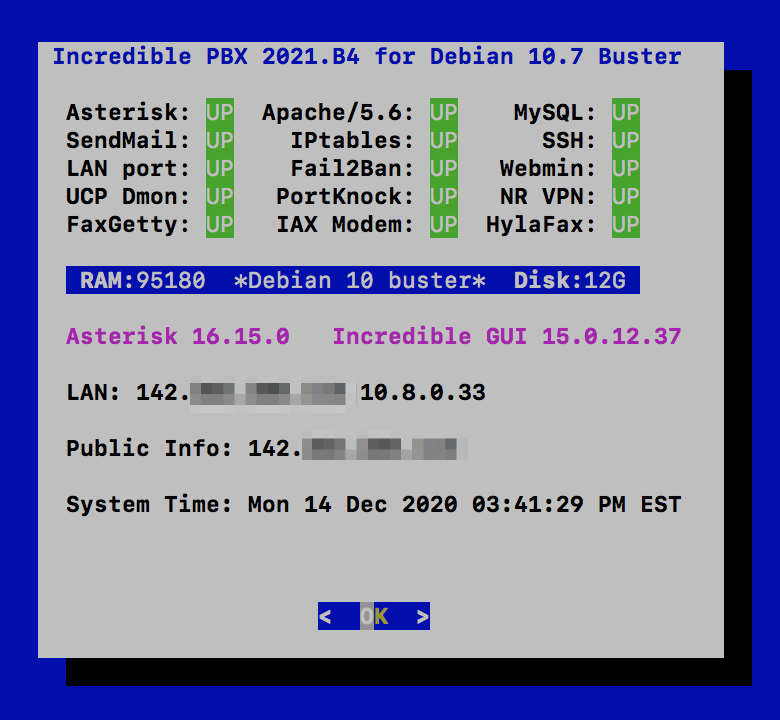
This wasn't intuitive either so here's the procedure assuming you have created an incrediblepbx2021.ovpn template for Incredible PBX 2021 on your OpenVPN server AND disabled the setenv line in the .ovpn file:
Code:
#setenv opt block-outside-dns # Prevent Windows 10 DNS leak1. Copy incrediblepbx2021.ovpn from OpenVPN server to /etc on Incredible PBX 2021 server.
2. Then ...
Code:
cp -p /root/openvpn-start /etc/.
echo "[Unit]
Description=openvpn2021
ConditionPathExists=/etc/openvpn-start
After=rclocal.service
[Service]
Type=forking
ExecStart=/etc/openvpn-start /etc/incrediblepbx2021.ovpn
TimeoutSec=0
StandardOutput=tty
RemainAfterExit=yes
PermissionsStartOnly=true
SysVStartPriority=99
[Install]
WantedBy=multi-user.target" > /etc/systemd/system/openvpn2021.service
Code:
systemctl enable openvpn2021.service
reboot
4. OpenVPN IP address should now be included on the LAN line in pbxstatus:
Last edited:

kenn10
Well-Known Member
- Joined
- Dec 16, 2007
- Messages
- 4,746
- Reaction score
- 3,130
Ward,Enabling Gmail As SendMail SMTP SmartHost with Debian 10
Assuming sendmail restarted successfully, send yourself a test email to make sure outbound email is functioning properly.
Code:echo "test" | mail -s testmessage [email protected]
I've installed IncrediblePBX2021 Beta 4. I installed sendmail for Gmail per the instructions. My system did not have the mailutils package. I received this when sending a test message:
Code:
# mail test
bash: mail: command not found
The need for mailutils was mitigated with this:
Code:
apt-get install mailutilsI don't know if this is unique to my Free Range Cloud or not but it might need to be in the main install script to cover all bases.
kenn10
Well-Known Member
- Joined
- Dec 16, 2007
- Messages
- 4,746
- Reaction score
- 3,130
@wardmundy adding these lines to the systemwide bash.bashrc in the /etc directory gives us a more Centos like coloration in the ls command and adds ll as a command.
Code:
export LS_OPTIONS='--color=auto'
eval "`dircolors`"
alias ls='ls $LS_OPTIONS'
alias ll='ls -l $LS_OPTIONS'
wardmundy
Nerd Uno
- Joined
- Oct 12, 2007
- Messages
- 20,460
- Reaction score
- 6,192
Ward,
I've installed IncrediblePBX2021 Beta 4. I installed sendmail for Gmail per the instructions. My system did not have the mailutils package. I received this when sending a test message:
Code:# mail test bash: mail: command not found
The need for mailutils was mitigated with this:
Code:apt-get install mailutils
I don't know if this is unique to my Free Range Cloud or not but it might need to be in the main install script to cover all bases.
Added both to beta4 script. Thanks.
Last edited:
kenn10
Well-Known Member
- Joined
- Dec 16, 2007
- Messages
- 4,746
- Reaction score
- 3,130
@wardmundy there is a typo in the incrediblebackup2021:
Code:
./incrediblebackup2021: line 121: ssystemctl: command not found
^ double 's' in systemctlkenn10
Well-Known Member
- Joined
- Dec 16, 2007
- Messages
- 4,746
- Reaction score
- 3,130
@wardmundy something else missing from Debian by default: nslookup. The ./add-fqdn command doesn't work without it.
Code:
apt install dnsutilswardmundy
Nerd Uno
- Joined
- Oct 12, 2007
- Messages
- 20,460
- Reaction score
- 6,192
GO-PUBLIC-2021 Is Ready
I think we're ready for the pioneers again. GO-PUBLIC-2021 is a rework of the 2020 edition that supports BOTH Incredible PBX 2020 and Incredible PBX 2021 platform. Follow the existing tutorial for warnings and tips.
I think we're ready for the pioneers again. GO-PUBLIC-2021 is a rework of the 2020 edition that supports BOTH Incredible PBX 2020 and Incredible PBX 2021 platform. Follow the existing tutorial for warnings and tips.
Code:
cd /root
wget http://incrediblepbx.com/go-public-2021.tar.gz
tar zxvf go-public-2021.tar.gz
rm -f go-public-2021.tar.gz
./GO-PUBLIC-2021
kenn10
Well-Known Member
- Joined
- Dec 16, 2007
- Messages
- 4,746
- Reaction score
- 3,130
@wardmundy maybe its just me but I find the light purple type for Asterisk and Incredible GUI really hard to read. I know esthetics is not a high priority. This is just an observation.
kenn10
Well-Known Member
- Joined
- Dec 16, 2007
- Messages
- 4,746
- Reaction score
- 3,130
Worked flawlessly to upgrade to Public on Debian 10 system.GO-PUBLIC-2021 Is Ready
I think we're ready for the pioneers again. GO-PUBLIC-2021 is a rework of the 2020 edition that supports BOTH Incredible PBX 2020 and Incredible PBX 2021 platform. Follow the existing tutorial for warnings and tips.
Code:cd /root wget http://incrediblepbx.com/go-public-2021.tar.gz tar zxvf go-public-2021.tar.gz rm -f go-public-2021.tar.gz ./GO-PUBLIC-2021

wardmundy
Nerd Uno
- Joined
- Oct 12, 2007
- Messages
- 20,460
- Reaction score
- 6,192
@wardmundy maybe its just me but I find the light purple type for Asterisk and Incredible GUI really hard to read. I know esthetics is not a high priority. This is just an observation.
View attachment 3151
Code:
sed -i 's|Z5|Z4|' /usr/local/sbin/pbxstatuswardmundy
Nerd Uno
- Joined
- Oct 12, 2007
- Messages
- 20,460
- Reaction score
- 6,192
Worked flawlessly to upgrade to Public on Debian 10 system.
One bug in your version unfortunately. Be sure to issue the following command BEFORE you reboot Incredible PBX 2021 PUBLIC!!
Code:
sed -i 's|/usr/local/sbin/iptables-restart|/etc/blockem.sh|' /etc/rc.localDownload now has been patched.
kenn10
Well-Known Member
- Joined
- Dec 16, 2007
- Messages
- 4,746
- Reaction score
- 3,130
Update: Bad news. I rebooted after checking that everything was working after the go-public script was run. No fwconsole commands work, or take a very long time to respond. Freepbx is either not running or cannot connect to asterisk. Asterisk did load and everything seems to be there from the CLI.Worked flawlessly to upgrade to Public on Debian 10 system.
I did an incrediblerestore2021 of the backup I took prior to the go-public script and the system is still hosed.

Argghhh. Now I see your comment just above this one. Do I need to do a total reinstall from scratch to recover?
wardmundy
Nerd Uno
- Joined
- Oct 12, 2007
- Messages
- 20,460
- Reaction score
- 6,192
Update: Bad news. I rebooted after checking that everything was working after the go-public script was run. No fwconsole commands work, or take a very long time to respond. Freepbx is either not running or cannot connect to asterisk. Asterisk did load and everything seems to be there from the CLI.
I did an incrediblerestore2021 of the backup I took prior to the go-public script and the system is still hosed.
Argghhh. Now I see your comment just above this one. Do I need to do a total reinstall from scratch to recover?
Sorry I didn't get the patch posted in time. If you can get access to run /etc/blockem.sh, it'll fix things up.
kenn10
Well-Known Member
- Joined
- Dec 16, 2007
- Messages
- 4,746
- Reaction score
- 3,130
Whew! That fixed it.Sorry I didn't get the patch posted in time. If you can get access to run /etc/blockem.sh, it'll fix things up.

wardmundy
Nerd Uno
- Joined
- Oct 12, 2007
- Messages
- 20,460
- Reaction score
- 6,192
Disabling Unprotected IPv6
Just a heads up that IPv6 is not protected by the TM3 firewall. This is fixed in the Beta 5 release today.
Here's how to check for IPv6 and disable it in Debian 10 on earlier releases...
Just a heads up that IPv6 is not protected by the TM3 firewall. This is fixed in the Beta 5 release today.
Here's how to check for IPv6 and disable it in Debian 10 on earlier releases...
Code:
test=`ifconfig | grep inet6`
if [ -z "$test" ]; then
 echo "IPv6 not enabled."
else
 echo "Disabling IPv6..."
 echo "net.ipv6.conf.all.disable_ipv6 = 1" > /etc/sysctl.d/70-disable-ipv6.conf
 sysctl -p -f /etc/sysctl.d/70-disable-ipv6.conf
 echo "IPv6 has been disabled."
fiwardmundy
Nerd Uno
- Joined
- Oct 12, 2007
- Messages
- 20,460
- Reaction score
- 6,192
Upgraded upgrade-asterisk16 Script
Here's the new script in Beta 5:
Here's the new script in Beta 5:
Code:
#!/bin/bash

echo "This utility updates Asterisk 16 to the very latest release."
read -p "Press Enter to proceed at your own risk or Ctrl-C to abort..."
cd /usr/src
rm -rf asterisk-16*
wget http://downloads.asterisk.org/pub/telephony/asterisk/asterisk-16-current.tar.gz
tar zxvf asterisk-16*
rm -f asterisk-16*.tar.gz
cd asterisk-16*
contrib/scripts/get_mp3_source.sh
contrib/scripts/install_prereq install
make distclean
wget http://incrediblepbx.com/menuselect-incredible16-debian10.tar.gz
tar zxvf menuselect*.tar.gz
CFLAGS='-DENABLE_SRTP_AES_256 -DENABLE_SRTP_AES_GCM' ./configure  --libdir=/usr/lib64 --with-pjproject-bundled --with-jansson-bundled
make menuselect.makeopts
menuselect/menuselect --enable-category MENUSELECT_ADDONS menuselect.makeopts
menuselect/menuselect --enable-category MENUSELECT_CODECS menuselect.makeopts
menuselect/menuselect --disable-category MENUSELECT_TESTS menuselect.makeopts
menuselect/menuselect --enable CORE-SOUNDS-EN-GSM --enable MOH-OPSOUND-WAV --enable EXTRA-SOUNDS-EN-GSM --enable cdr_mysql menuselect.makeopts
menuselect/menuselect --disable test_named_lock --disable test_res_pjsip_scheduler --disable test_file --disable test_bridging --disable test_res_pjsip_scheduler menuselect.makeopts
menuselect/menuselect --disable test_res_rtp menuselect.makeopts
menuselect/menuselect --enable app_macro menuselect.makeopts
make menuselect.makeopts
make menuselect
read -p "Press Enter to proceed at your own risk or Ctrl-C to abort..."
make && make install && ldconfig
fwconsole restart
Last edited:
wardmundy
Nerd Uno
- Joined
- Oct 12, 2007
- Messages
- 20,460
- Reaction score
- 6,192



Forum statistics
Get 3CX - Absolutely Free!
Link up your team and customers  Phone System Live Chat Video Conferencing
Hosted or Self-managed. Up to 10 users free forever. No credit card. Try risk free.

Verify your Email
Check your inbox!
We’ve sent you an email. Click on the button in the email body to verify your email address – (if you can not find it, check your spam folder).
Upon verification you will be directed to the 3CX setup wizard.