TIPS Connection but no audio

JimTN

New Member
Joined
Sep 13, 2022
Messages
4
Reaction score
0
I am setting up an IncrediblePBX system on a RPi and have made reasonable progress on it. I can connect to my SIP Service Provider pjsip trunk and receive calls on one of my DIDs that is set up for the pjsip.

The audio is good for incoming calls. The problem is that there is no audio in either direction for outgoing calls even though they ring through and connect. If I change the pjsip authentication settings from OUTGOING to BOTH I have audio on outgoing calls but incoming calls do not connect.

I have focused on the pjsip settings since that is the only "knob" that seems to make a difference but it may be another problem entirely.

TIA! - Jim
 
Have you checked settings -> SIP Settings -> External address... if its not right, you'll get what you're saying.

The audio is on the RTP ports. Most asterisk systems are set RTP 10000 - 20000.
 
Thank you @krzykat. I didn't have anything in the External Address spot originally but clicked Detect Network Settings along with Submit/Update. I then had incoming audio on an outgoing call but no outgoing audio on the same outgoing call. This lasted for one call only! The next outgoing call was back to no audio on the outgoing calls.
 
Do you have ports 10000-20000 UDP forwarded in your router to point to the RasPi? Those are the basic port range where the audio is delivered. If they ports stop at your router, you won't get audio.
 
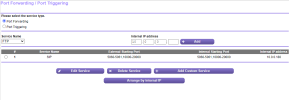
Thank you, @kenn10. Yes I have UDP forwarded as shown here: I tried changing from UDP forwarding to TCP/UDP forwarding but it made no difference: I can receive calls with audio but cannot make calls with audio.

PortFwd.png
 
Thank you @krzykat. I didn't have anything in the External Address spot originally but clicked Detect Network Settings along with Submit/Update. I then had incoming audio on an outgoing call but no outgoing audio on the same outgoing call. This lasted for one call only! The next outgoing call was back to no audio on the outgoing calls.
Try to do a reboot and try again please. I've seen where you need to restart things for it to use properly, but the symptom with that is usually calls that last 31 seconds.
 
Thank you, @kenn10. Yes I have UDP forwarded as shown here: I tried changing from UDP forwarding to TCP/UDP forwarding but it made no difference: I can receive calls with audio but cannot make calls with audio.

View attachment 4367
Who is your carrier? Let's make sure that things are setup properly with ports to that carrier.
 
Also what type firewall is in front of the RasPi?? Have you forwarded UDP. 10000-20000 from the firewall to the RasPi's LAN address.
 
Thanks to all! After poking around the forum I found Ward's post about CrownCloud hosting so I decided to ditch the local Raspberry Pi approach and go with the hosted Rocky Linux IncrediblePBX 2022. So I will leave this thread and start another with a whole host of new questions!
 
I much prefer hosted for MOST things. Gets rid of a lot of those port forwarding issues. Not only that, but many of them have backups. I don't use CrownCloud, but make sure you have proper backups.
 
If changing the authentication setting affects audio but not call connection, you might want to check your SIP NAT settings and RTP ports. Make sure your firewall isn't blocking RTP packets and that your SIP ALG (if enabled on your router) isn't interfering.

You could also try specifying a different codec in your pjsip settings—sometimes mismatched codecs cause one-way or no audio issues. If your provider supports G711 (ulaw/alaw), that’s usually a safe bet.

If you need to convert any recordings or troubleshooting logs into a different format for easier sharing, this tool might help: https://www.movavi.com/video-converter/ogm-converter.html. Hope you get it sorted!
 
Last edited:
Regarding port forwarding on the router = I do not have ports 10000-20000 UDP forwarded my router, because that is not necessary for registered trunks, internal phones can connect fine, via the (private) local lan network(s) such as 192.168.0.0, 10.0.0.0

External phones come in via the WAN generally need ports 10000-20000 UDP forwarded on the router

Sip ALG should be turned off on your (hardware) router
 
Make sure you have Allow Transports Reload enabled in Sip Settings -> chan_pjsip.

Its required for providers that do not proxy RTP. Incoming audio would work fine, since the headers would have been updated with the source's ip but if you call out, it would need it.
 
Get 3CX - Absolutely Free!

Link up your team and customers Phone System Live Chat Video Conferencing

Hosted or Self-managed. Up to 10 users free forever. No credit card. Try risk free.

3CX
A 3CX Account with that email already exists. You will be redirected to the Customer Portal to sign in or reset your password if you've forgotten it.
Back
Top