ALERT FreePBX ARI Exploit

A better practice would be to have ARI and webrtc listening on different ports since they are completely different functions/purposes.
Well I think step one would be to make the allow_origins locked down instead of allowing connections from anywhere. If you're using WebRTC via the UCP or directly on the server, then that's all you need to allow. That IP and/or FQDN of the server. If you're using a remote server, same thing. Right now with allow_origins not set it defaults to * which allows the ARI to be sourced from any remote system.

Unfortunately, you can't split which port they use. While they are both different functions they both use websockets which requires the HTTP server. The HTTP web server only allows one bind address/port for each HTTP and HTTPS. Right now at most that can be done is changing the default ports and using allow_origins in ARI.
 
I think that believing anything is 'unimpeachable' is not useful, buffer overruns, thus possible unprotected access to services on localhost could be problematic as could be any second derivative leaks that the target might use, also if there is any obfuscated code involved, then you are out on a limb whilst doing postmortems
 
Last edited:
Just adding a data point

8088 and 8089 closed here

IPBX 2021.01 PUBLIC on Deb 10.13 (Ast 18.1.1 Inc GUI 15.0.22.23)
 
what a S*&show read. I think the best thing to do is to get things secure. Then find out why. Then figure out why it won't happen again. But to mess around with "this can't happen" when several people HAVE had it happen doesn't help anything. Call it user error all day long if you want, but CLOSE that hole. If people end up with one of those 10K phone bills and they are successful in pointing blame to Sangoma .... not good.
That would get verrrrry interesting if there were a big phone bill because of a hole in a commercial product. :innocent:
 
On 2023-02-28 17:31, Demetris Papapetrou wrote to support [at] incrediblepbx.com:
Dear Sir/Madam,

I am writing to inform you of a number of security vulnerabilities
affecting IncrediblePBX, that I managed to detect with the help of my
friend Kyriacos Palechoros. The specific research was performed as a
response to the recent attacks on FreePBX systems around the world,
with the aim to identify the 0-day vulnerability that the attackers
utilized. We are confident enough to assume that we identified the
vulnerability exploited in the wild but we cannot be 100% sure since
very little traces were left behind by the attackers.
Below you can find the details of the security vulnerabilities we
found. If you have any questions, please feel free to contact us.
We would also like to inform you that we follow the principle of
responsible disclosure for any 0-day vulnerabilities we discover and
that we are plan to publish our findings after coordination with you.
A CVE request ID will be submitted once this email is sent.

Vulnerability Type: Hardcoded Credentials
Affected products:
Product: IncerdiblePBX Linux
Versions: 2020,2021,2022,2027 (incl. CrownCloud images)

Attack Type: Remote
Affected Components: Asterisk REST Interface (ARI)

Vulnerability Description: IncrediblePBX Linux versions 2020, 2021,
2022 and 2027 contain hardcoded credentials for the Asterisk REST
Interface (ARI), Asterisk Manager and Asterisk Database. This could
allow remote attackers to reconfigure Asterisk and make external and
internal calls via HTTP(S) and Web Socket requests sent to the API.
Database credentials could, under certain circumstances, allow
malicious attackers to gain access to the database and retrieve useful
information (e.g. extension passwords), download operating system
files or upload malicious files to it (e.g. a webshell).

Attack Vector: To exploit the vulnerability, attackers must connect to
either port 8088/tcp (HTTP/WS) or 8089/tcp (HTTPS/WSS) and
authenticate with the ARI service using the hardcoded credentials of
the vulnerable software/distribution version.

Impact: Attackers can utilize the ARI functionality via ports 8088
and/or 8089 to create Asterisk apps and endpoints, make internal and
external calls, retrieve authentication and system information that
could help in formulating more advanced attacks.

Vulnerability Type: Insecure Permissions
Affected products:
Product: IncerdiblePBX Linux
Versions: 2020,2021,2022,2027 (incl. CrownCloud images)

Attack Type: Remote
Affected Components: Asterisk REST Interface (ARI)

Vulnerability Description: IncrediblePBX Linux versions 2020, 2021,
2022 and 2027, add in their Asterisk list of global variables the
AMPDBUSER, AMPDBPASS, AMPMGRUSER, AMPMGRPASS variables which expose
cleartext authentication credentials for the Asterisk Database
(MariaDB/MySQL) and Asterisk Manager Interface.

Attack Vector: To exploit the vulnerability, attackers must connect to
either port 8088/tcp (HTTP/WS) or 8089/tcp (HTTPS/WSS), authenticate
with the ARI service and issue a request to the specific API endpoint,
as follows: /ari/asterisk/variable?variable=AMPDBPASS

Impact: Information Disclosure

Kind Regards,

Demetris Papapetrou
The following reply has been sent:

Code:
Thanks for your update. We are aware of the ARI vulnerability issue. TCP Ports 8088 and 8089 have 
always been blocked by the included and preconfigured IPtables firewall on all Incredible PBX servers.
In addition, the ARI function is restricted to the 127.0.0.1 (localhost) IP address.

Please advise if you have additional concerns or issues. And thanks again for writing.
--— Ward Mundy
 
One of my biggest rubs with FreePBX is that it has *always* stored this stuff in plaintext or in global vars.
 
One of my biggest rubs with FreePBX is that it has *always* stored this stuff in plaintext or in global vars.
That's why security settings have always been critically important when using FreePBX components. Less than 8 years ago, there was NO FIREWALL distributed with FreePBX (August 4, 2015 to be exact). And it was about 3 years ago that the FreePBX firewall could be started by default when the CentOS server booted. I can't remember exactly when a default configuration was available for deployment, but my recollection is it wasn't available in the early days.
 
On 2023-02-28 17:31, Demetris Papapetrou wrote to support [at] incrediblepbx.com:

The following reply has been sent:

Code:
Thanks for your update. We are aware of the ARI vulnerability issue. TCP Ports 8088 and 8089 have
always been blocked by the included and preconfigured IPtables firewall on all Incredible PBX servers.
In addition, the ARI function is restricted to the 127.0.0.1 (localhost) IP address.

Please advise if you have additional concerns or issues. And thanks again for writing.
--— Ward Mundy
Thanks for being transparent and sharing what concerns others have with IncrediblePBX
 
On 2023-03-02 11:00am, Demetris Papapetrou wrote:
Dear Ward,

I agree with you but during the recent attacks we have realized that numerous companies have opened their ARI port on the Internet in order to allow WebRTC clients to connect to it. Because administrators are not aware that a default ARI password exists on the system (FreePBX web UI before 16.0.33 does not indicate that there is a default freepbxuser account), they never change the password. In conjunction with fail2ban's inability to monitor and block authentication attempts on the ARI service, hackers can spray the default credentials until they find the right one. Once they find the correct password they can retrieve the database credentials and if access to the database is allowed remotely, they can download and upload files on the file system among other things. Certain companies that have fallen victim to the attacks have found a webshell on their FreePBX portal. Last but not least, based on information published on the freepbx community site we have a strong indication that there might be a Remote Code Execution/Command Injection vulnerability in ARI that is still unknown to the community but is actively exploited by malicious actors.

I should mention that other vendors that had the same vulnerability, have set their installation scripts to disable the ARI service and also generate a random ARI username and password during each system installation. Lastly, I do not know if the recent FreePBX update (16.0.33) that checks for the existence of the default ARI password and issues a warning message on the UI, covers IncrediblePBX, because I haven't reviewed or tested the code yet. Therefore, I recommend that you performed the same changes as the other vendors to keep the unaware administrators safe from attacks.

And our reply:

Thanks again for reaching out. Incredible PBX users did receive the ARI
alert from Sangoma in their dashboards. However, unlike Sangoma's FreePBX
platforms, Incredible PBX does not expose itself to the Internet. Only
whitelisted IP addresses can connect to Incredible PBX servers in any
way. Thus, there is no ability by an anonymous attacker to launch random
authentication attempts. More specifically for ARI, not only does our
firewall block TCP ports 8088 and 8089 access, but our Asterisk/FreePBX
configuration restricts ARI access exclusively to the localhost IP
address. For these reasons, our platform does not support WebRTC because
we are not convinced that it is secure... as recent events have proven.
Hope this helps clarify the Incredible PBX configuration for you and
your associates.
 
For the overly paranoid and those not using Incredible PBX, these bash commands may help you sleep better:
Code:
fwconsole setting HTTPTLSBINDADDRESS 127.0.0.1
fwconsole setting HTTPBINDADDRESS 127.0.0.1
A=$SRANDOM$SRANDOM$SRANDOM$SRANDOM
B=${A:1:15}
fwconsole setting FPBX_ARI_USER $B
A=$SRANDOM$SRANDOM$SRANDOM$SRANDOM
C=${A:0:30}
fwconsole setting FPBX_ARI_PASSWORD $C
rm /tmp/*
fwconsole reload
fwconsole restart

Verify your new settings:
Code:
fwconsole setting HTTPTLSBINDADDRESS
fwconsole setting HTTPBINDADDRESS
fwconsole setting FPBX_ARI_USER
fwconsole setting FPBX_ARI_PASSWORD
 
Last edited:
wow hi ward! happy easter!! so without me sounding totally like a NOOB, ssh into and just copy paste your commands verbatim? P.S. I love Incredible PBX and am using it all the time!
 
wow hi ward! happy easter!! so without me sounding totally like a NOOB, ssh into and just copy paste your commands verbatim? P.S. I love Incredible PBX and am using it all the time!
Note Ward's comment in post #30 is for those *not* using IPBX.

By default IPBX supposedly doesn't open these ports. You can check by running a netstat at cli and checking for ports 8088 and 8089 listening or otherwise open.
 
For the overly paranoid and those not using Incredible PBX, these bash commands may help you sleep better:
Code:
fwconsole setting HTTPTLSBINDADDRESS 127.0.0.1
fwconsole setting HTTPBINDADDRESS 127.0.0.1
A=$SRANDOM$SRANDOM$SRANDOM$SRANDOM
B=${A:1:15}
fwconsole setting FPBX_ARI_USER $B
A=$SRANDOM$SRANDOM$SRANDOM$SRANDOM
C=${A:0:30}
fwconsole setting FPBX_ARI_PASSWORD $C
rm /tmp/*
fwconsole reload
fwconsole restart

Verify your new settings:
Code:
fwconsole setting HTTPTLSBINDADDRESS
fwconsole setting HTTPBINDADDRESS
fwconsole setting FPBX_ARI_USER
fwconsole setting FPBX_ARI_PASSWORD
Query: When I did this on both RPi4b, and on OCL Ubuntu20.04
I get the exact same password on both for the latter password ????
Code:
fwconsole setting FPBX_ARI_PASSWORD
I failed to check the original default password to see if they changed. (Both behind firewall ).

P.S. Edit - On another OCL instance Always Free I do have a different all numerical [0-9] password - the default had changed. Will update latter next.
Ah BUT Does this work ok on 2027 on U22.04 ?
 
Last edited:
Query: When I did this on both RPi4b, and on OCL Ubuntu20.04
I get the exact same password on both for the latter password ????

I failed to check the original default password to see if they changed. (Both behind firewall ).

P.S. Edit - On another OCL instance Always Free I do have a different all numerical [0-9] password - the default had changed. Will update latter next.
Ah BUT Does this work ok on 2027 on U22.04 ?
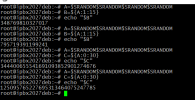
Regardless of the distro and architecture the commands to generate random username & password work just fine for me.

Depending on when you deployed your systems the original install script didn't have the ARI patch implemented but Ward did add the code to do so in later revisions.

randomized.png
 
For the overly paranoid and those not using Incredible PBX, these bash commands may help you sleep better:
@wardmundy Code in post #30 requires bash v 5.1 and above
The following produces 32 hex digits in $A.

( filename= ari-randomise-hex-pw )
Tested on RPi Incredible 2021 bash v 5.0 debian 10 buster
and should work on oracle ubuntu 20.04 focal with bash v5.0
Bash:
#!/bin/bash
echo "  Existing ARI Settings:"
fwconsole setting HTTPTLSBINDADDRESS
fwconsole setting HTTPBINDADDRESS
fwconsole setting FPBX_ARI_USER
fwconsole setting FPBX_ARI_PASSWORD

read -p "Changing ARI credentials - Press [Enter] to proceed,  or [Ctrl + C] to abort."

fwconsole setting HTTPTLSBINDADDRESS 127.0.0.1
fwconsole setting HTTPBINDADDRESS 127.0.0.1
## A=$SRANDOM$SRANDOM$SRANDOM$SRANDOM$SRANDOM$SRANDOM  # REQUIRES bash v 5.1
## Generate 32 random hex digits with 'hexdump -vn16 -e'4/4 "%08X" 1 "\n"' /dev/urandom
A=$( hexdump -vn16 -e'4/4 "%08x" 1 "\n"' /dev/urandom )
B=${A:1:15}
fwconsole setting FPBX_ARI_USER $B
## A=$SRANDOM$SRANDOM$SRANDOM$SRANDOM$SRANDOM$SRANDOM  # REQUIRES bash v 5.1
A=$( hexdump -vn16 -e'4/4 "%08x" 1 "\n"' /dev/urandom )
C=${A:0:32}
fwconsole setting FPBX_ARI_PASSWORD $C
rm /tmp/* >/dev/null 2>&1
fwconsole reload
fwconsole restart
echo "  ARI bind addresses, ARI user, and ARI password have been changed"
echo " "

Edit: changed "%08X" uppercase, to "%08x" for lowercase format
added the second hex A= string line
A=$( hexdump -vn16 -e'4/4 "%08x" 1 "\n"' /dev/urandom )
 
Last edited:
@wardmundy Code in post #30 requires bash v 5.1 and above
The following produces 32 hex digits in $A.

( filename= ari-randomise-hex-pw )
Tested on RPi Incredible 2021 bash v 5.0 debian 10 buster
and should work on oracle ubuntu 20.04 focal with bash v5.0
Bash:
#!/bin/bash
echo "  Existing ARI Settings:"
fwconsole setting HTTPTLSBINDADDRESS
fwconsole setting HTTPBINDADDRESS
fwconsole setting FPBX_ARI_USER
fwconsole setting FPBX_ARI_PASSWORD

read -p "Changing ARI credentials - Press [Enter] to proceed,  or [Ctrl + C] to abort."

fwconsole setting HTTPTLSBINDADDRESS 127.0.0.1
fwconsole setting HTTPBINDADDRESS 127.0.0.1
## A=$SRANDOM$SRANDOM$SRANDOM$SRANDOM$SRANDOM$SRANDOM  # REQUIRES bash v 5.1
## Generate 32 random hex digits with 'hexdump -vn16 -e'4/4 "%08X" 1 "\n"' /dev/urandom
A=$( hexdump -vn16 -e'4/4 "%08x" 1 "\n"' /dev/urandom )
B=${A:1:15}
fwconsole setting FPBX_ARI_USER $B
## A=$SRANDOM$SRANDOM$SRANDOM$SRANDOM$SRANDOM$SRANDOM  # REQUIRES bash v 5.1
A=$( hexdump -vn16 -e'4/4 "%08x" 1 "\n"' /dev/urandom )
C=${A:0:32}
fwconsole setting FPBX_ARI_PASSWORD $C
rm /tmp/* >/dev/null 2>&1
fwconsole reload
fwconsole restart
echo "  ARI bind addresses, ARI user, and ARI password have been changed"
echo " "

Edit: changed "%08X" uppercase, to "%08x" for lowercase format
added the second hex A= string line
A=$( hexdump -vn16 -e'4/4 "%08x" 1 "\n"' /dev/urandom )

Thanks, very helpful.
 
Get 3CX - Absolutely Free!

Link up your team and customers Phone System Live Chat Video Conferencing

Hosted or Self-managed. Up to 10 users free forever. No credit card. Try risk free.

3CX
A 3CX Account with that email already exists. You will be redirected to the Customer Portal to sign in or reset your password if you've forgotten it.
Back
Top