
You are using an out of date browser. It may not display this or other websites correctly.
You should upgrade or use an alternative browser.
You should upgrade or use an alternative browser.
TUTORIAL FreePBX Call Logs / Reports : A newbie's guide
- Thread starter drmurdoch
- Start date


drmurdoch
Member
- Joined
- May 26, 2008
- Messages
- 607
- Reaction score
- 21
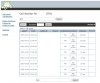
Here is a screenshot of my call logs from today. I tried to delete the private information.
Call 1 and Call 2: I am calling my voicemail (*97) from ext. 701.
Call 8: I hovered over the Channel name ... which resulted in the popup containing the entire channel name.
Call 9: an Outgoing call. from ext 701 to 1-90x-XXX-XX22, lasting 1 min 35 seconds.
Call 10: an Incoming call. from 90x-XXX-XX69 (caller ID: M AN) to ring group 700. The call was answered and it lasted 3min 27 seconds.
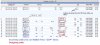
Tips: Hover over the channel to see the full Channel text (as I did with Call #8)
Note: the ZAP channels are my Ma Bell lines.
Call 1 and Call 2: I am calling my voicemail (*97) from ext. 701.
Call 8: I hovered over the Channel name ... which resulted in the popup containing the entire channel name.
Call 9: an Outgoing call. from ext 701 to 1-90x-XXX-XX22, lasting 1 min 35 seconds.
Call 10: an Incoming call. from 90x-XXX-XX69 (caller ID: M AN) to ring group 700. The call was answered and it lasted 3min 27 seconds.
Tips: Hover over the channel to see the full Channel text (as I did with Call #8)
Note: the ZAP channels are my Ma Bell lines.
drmurdoch
Member
- Joined
- May 26, 2008
- Messages
- 607
- Reaction score
- 21
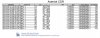
You can export the Call Logs to .pdf or a .csv file.

Just click on the appropriate icon to start the exporting.
When I click "Export PDF file"
I receive a file called: Asterisk CDR 2014-07-02.pdf from my PBX. (I did this on July 2nd 2014).
Here is an example of a .pdf log.
Just click on the appropriate icon to start the exporting.
When I click "Export PDF file"
I receive a file called: Asterisk CDR 2014-07-02.pdf from my PBX. (I did this on July 2nd 2014).
Here is an example of a .pdf log.

islandtech
Wassamassaw
- Joined
- Jan 11, 2009
- Messages
- 756
- Reaction score
- 174
IIRC
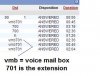
VMB= reason for going to vm this case dsetination was busy
VMU= destination unavailable etc
VMB= reason for going to vm this case dsetination was busy
VMU= destination unavailable etc
drmurdoch
Member
- Joined
- May 26, 2008
- Messages
- 607
- Reaction score
- 21
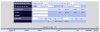
You are using an old version of FreePBX (2.9 or earlier). If you were current you would see that searching by CID is possible.
It is old (2.6). I'm scared to update to 2.7 as all is well

I'll add searching by caller ID to the long list of reasons I should update my PIAF.
Not Strictly Necessary
New Member
- Joined
- Jun 30, 2014
- Messages
- 7
- Reaction score
- 1
Thank you very much for posting this. This looks very straightforward.
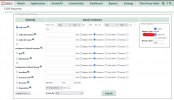
Believe it or not, Call Logs does not appear under the Reports tab on my system. I have tried to find a way to add it under Module Admin, but no joy. Is there a way to add this manually? Status output (PIAF-Green) below:
PIAF Installed Version = 3.0.6.5 under *HARDWARE* │
│ FreePBX Version = UNKNOWN │
│ Running Asterisk Version = 11.10.2 │
│ Asterisk Source Version = 11.10.2 │
│ Dahdi Source Version = 2.9.1.1 │
│ Libpri Source Version = 1.4.15 │
│ IP Address = 192.168.1.15 on eth0 │
│ Operating System = CentOS release 6.5 (Final) >< │
│ Kernel Version = 2.6.32-431.20.3.el6.x86_64 - 64 Bit │
│ Incredible Version = 11.10
Any assistance appreciated.
Believe it or not, Call Logs does not appear under the Reports tab on my system. I have tried to find a way to add it under Module Admin, but no joy. Is there a way to add this manually? Status output (PIAF-Green) below:
PIAF Installed Version = 3.0.6.5 under *HARDWARE* │
│ FreePBX Version = UNKNOWN │
│ Running Asterisk Version = 11.10.2 │
│ Asterisk Source Version = 11.10.2 │
│ Dahdi Source Version = 2.9.1.1 │
│ Libpri Source Version = 1.4.15 │
│ IP Address = 192.168.1.15 on eth0 │
│ Operating System = CentOS release 6.5 (Final) >< │
│ Kernel Version = 2.6.32-431.20.3.el6.x86_64 - 64 Bit │
│ Incredible Version = 11.10
Any assistance appreciated.
Not Strictly Necessary
New Member
- Joined
- Jun 30, 2014
- Messages
- 7
- Reaction score
- 1
Thanks.

phonebuster
New Member
- Joined
- May 28, 2022
- Messages
- 4
- Reaction score
- 1
This doesn't explain how to get the CDR outside of the PBX. I can't even imagine how to email missed calls.
phonebuster
New Member
- Joined
- May 28, 2022
- Messages
- 4
- Reaction score
- 1
How could I get these missed calls automatically deposited into a .txt file without even signing into the GUI
Second Thank you, for the reply 8 years later
Second Thank you, for the reply 8 years later
phonebuster
New Member
- Joined
- May 28, 2022
- Messages
- 4
- Reaction score
- 1
Yeah, you think so. I'm a scambaiter. I go after all the call centers and I flood their numbers. If there are any tricks you know and would like to share I would be happy with any questions my friend. We shut down over 200 number per day lol.

kenn10
Well-Known Member
- Joined
- Dec 16, 2007
- Messages
- 4,639
- Reaction score
- 3,006
@phonebuster We all hate spammers and scammers but the spirit of this forum does not support or approve of offensive tactics. We use passive defense methods such as call intercept IVR's and services such as NoMoRobo to weed out malicious calls. You're on your own to figure out what you want to do.
phonebuster
New Member
- Joined
- May 28, 2022
- Messages
- 4
- Reaction score
- 1
That's respectable and alright. Doesn't hurt to ask before blasting lol
I would love to know how you shut down even one! Can you show us more?Yeah, you think so. I'm a scambaiter. I go after all the call centers and I flood their numbers. If there are any tricks you know and would like to share I would be happy with any questions my friend. We shut down over 200 number per day lol.

KNERD
Well-Known Member
- Joined
- Mar 9, 2014
- Messages
- 2,051
- Reaction score
- 792
Write a PHP script and pull the info you want out , then put it into a text file. DoneHow could I get these missed calls automatically deposited into a .txt file without even signing into the GUI
Second Thank you, for the reply 8 years later


Get 3CX - Absolutely Free!
Link up your team and customers  Phone System Live Chat Video Conferencing
Hosted or Self-managed. Up to 10 users free forever. No credit card. Try risk free.

Verify your Email
Check your inbox!
We’ve sent you an email. Click on the button in the email body to verify your email address – (if you can not find it, check your spam folder).
Upon verification you will be directed to the 3CX setup wizard.