

dallas
Well-Known Member
- Joined
- Oct 21, 2007
- Messages
- 1,034
- Reaction score
- 332
I have 2 Incredible PBXs. One in my home (Incredible PBX/FAX 2021.01 for Raspberry Pi4) the other in Oracle Cloud (Incredible PBX for Oracle Cloud with Ubuntu 20.04).
I am trying to setup a PJSIP trunk between them. Because the Pi4 is behind a firewall with no ports forwarded it needs to register to the Oracle PBX.
When the Pi4 registers the Oracle log shows "Registration from '<sip:Oracle@IP of Oracle PBX>' failed for 'External Address of Pi4 PBX:5061' - wrong password."
The error in the Pi4 log shows "403 Forbidden fatal response received from 'sip:IP of Oracle PBX' on registration attempt to 'sip:Oracle@IP of Oracle PBX', retrying in 30 seconds".
20 seconds later "Contact Oracle/sip:Oracle@IP of Oracle PBX is now reachable". The FreePBX Asterisk Info report on both PBXs show offline.
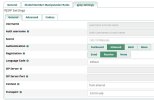
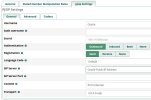
Here are the Trunk PJSIP Settings from each PBX.
I am trying to setup a PJSIP trunk between them. Because the Pi4 is behind a firewall with no ports forwarded it needs to register to the Oracle PBX.
When the Pi4 registers the Oracle log shows "Registration from '<sip:Oracle@IP of Oracle PBX>' failed for 'External Address of Pi4 PBX:5061' - wrong password."
The error in the Pi4 log shows "403 Forbidden fatal response received from 'sip:IP of Oracle PBX' on registration attempt to 'sip:Oracle@IP of Oracle PBX', retrying in 30 seconds".
20 seconds later "Contact Oracle/sip:Oracle@IP of Oracle PBX is now reachable". The FreePBX Asterisk Info report on both PBXs show offline.
Here are the Trunk PJSIP Settings from each PBX.


 Phone System