TIPS I got my cell phone going with a new spam blocker ...

Halea

Well-Known Member
Joined
Aug 12, 2016
Messages
1,136
Reaction score
880
A sudden increase in the number of daily spam calls as well as BS sms/mms messages on my cell phone made me look around for an Android app to limit the nuisance.
The following open source app, found on F-Droid, turned out to be the best one for the task, even though its setup was a bit more complicated:
https://f-droid.org/packages/spam.blocker/
For those looking for a spam blocker (phone calls, sms, mms text) which does a good job, I'll recommend it.
In a nutshell, I have always been the proponent of blocking all calls except those coming from friends, family and business identified in my contacts.
This app allows me to do a bit more intelligent filtering starting on that foundation.
The priority thing is to be well understood to avoid pitfalls. It took me about a couple of hours to get everything working.
If you have a favorite too, please let us know.
It's a shame that in this day and age spam is becoming a bigger issue instead of going away.
 
It's a shame that cell phone providers don't offer a way to implement "press 7 to complete this call" or something similar. We've finally chosen to forward all of our cellphone calls to a VoIP DID that implements this strategy. It's reduced our spam calls to almost zero. You can get a $1/month DID from CallCentric that provides free, unlimited inbound calling which works perfectly with any PBX using our "press 7" script. Then I answer the incoming calls on my cell phone using Groundwire registered to the destination extension on the PBX.
 
Last edited:

Blocking Call Scammers and Robocalls with Incredible PBX​

As election season kicks into high gear, expect robocalls to go through the roof. Not that the diehard scammers care but Congress exempted all politicians from the rules pertaining to robocalls. And then there are those that spoof a phone number similar to yours in order to treat you to the latest car warranty deal or Caribbean vacation. So here’s a way to block 99% of these callers, almost all of whom depend upon autodialers and call center software to distribute calls to live operators once you answer the call.

The design is simple to implement with Incredible PBX. Instead of answering incoming calls with a standard AutoAttendant or IVR, we’ll play a brief announcement followed by a request that the caller "press 7″ or some other number to be connected. When the caller doesn’t press the requested number within a brief number of seconds, Incredible PBX will hangup the call.

Many SIP providers support the early media feature which lets two SIP user agents communicate before a call is actually answered. If your provider supports this and you pay by the minute for inbound call traffic, then we’ll show you how to use the early media feature to block these callers without ever answering the calls and incurring charges. The easiest way to determine whether your SIP provider supports early media is to implement the early media code below and try a test call. If you hear the greeting message after dialing your own number, then early media is supported. If not, use the other dialplan code.

Incredible PBX already includes all the tools you’ll need to implement this. We’ll use a little modified Announcement dialplan code to greet the caller with Allison’s Generic Welcome message: "Thank you for calling. Please hold a moment while we locate someone to take your call." Then we’ll tack on an extra message which says: "To continue in English, press 7." If you’d prefer a different number, you can modify the dialplan code below accordingly.

Add this early media dialplan code to the end of /etc/asterisk/extensions_custom.conf. If you prefer a number other than 7, then replace "7″ in both lines 4 and 6 below:

[hello-caller]
exten => s,1,Progress
exten => s,n(begin),Noop(Playing announcement Howdy as Early Media)
exten => s,n,Set(TIMEOUT(response)=10)
exten => s,n,Playback(custom/nv-GenericWelcome&silence/1&continue-in-english&press-7,noanswer)
exten => s,n,WaitExten(,)
exten => 7,1,Goto(ivr-1,s,1)
exten => t,1,Hangup
exten => i,1,Hangup
exten => fax,1,Noop(Fax detected!)
exten => fax,2,Goto(custom-fax-iaxmodem,s,1)
;--== end of [hello-caller] ==--;


In the FreePBX GUI, add a new Custom Destination:
Target: hello-caller,s,1
Description: Scam Blocker
In the FreePBX GUI, modify the Inbound Route for each DID and set the Destination to Custom Destination: Scam Blocker. Save your settings and reload your dialplan.

Now place a test call to your DID and see if you hear the greeting message. If so, you’re done.

If not, edit /etc/asterisk/extensions_custom.conf and replace the [hello-caller] context at the bottom of the file with the following. You can replace "7″ on lines 6 and 8, if desired. Then reload your dialplan: asterisk -rx "dialplan reload". Then place another test call.

[hello-caller]
exten => s,1,GotoIf($["${CHANNEL(state)}" = "Up"]?begin)
exten => s,n,Answer
exten => s,n,Wait(1)
exten => s,n(begin),Noop(Playing announcement Howdy)
exten => s,n,Set(TIMEOUT(response)=10)
exten => s,n(play),Background(custom/nv-GenericWelcome&silence/1&continue-in-english&press-7,nm)
exten => s,n,WaitExten(,)
exten => 7,1,Goto(ivr-1,s,1)
exten => t,1,Hangup
exten => i,1,Hangup
exten => fax,1,Noop(Fax detected!)
exten => fax,2,Goto(custom-fax-iaxmodem,s,1)
;--== end of [hello-caller] ==--;
 

Keeping the Spammers At Bay With FusionPBX and FS PBX​


We have a tried-and-true solution to blocking the scammers and politicians. It forces callers to press a number before being routed to your phones.

Here’s how to deploy our Press7 inbound call option. First, download the press7.mp3 file onto your desktop. Then choose Applications -> Recordings -> Upload and choose the MP3 file you downloaded to your desktop. Save the file and then play it once to be sure it works.

Next, we want to create a simple IVR with an option7 that points to your extension and a timeout option that hangs up the call. Navigate to Applications -> IVR Menus -> Add. Fill in the form as shown below and then click SAVE.

Name: Press7
Extension: 777
Greet Long: press7.mp3
Options:
Option: 7
Destination: your-extension-number
Enabled: True
TimeoutL 6000
Exit Action: Hangup
Context: Your-FQDN
Enabled: True

Finally, edit the Inbound Route created above: Dialplan -> Destinations -> Inbound. In the Action pull-down menu, choose the 777 IVR option. Then SAVE your changes. Now try out a test call to your DID.
 
Just use a current Pixel phone and spam calls and SMS/MMS can be blocked automatically using AI and a virtual assistant. I have two SIMs on my phone and they both get spam constantly. It shows up in the call or sms history but I'm never bothered with having to take the call or look at the spam messages.

On the phone, if a call comes in and has a number that does not appear in my contact list, has no caller-id, or is marked by the carrier as potential spam, a phone-based assistant answers the call and asks pertinent questions. If the caller actually stays on the phone, the transcript of what they are saying displays and I can choose whether to take the call or not. In most cases, there is no response and the assistant just hangs up the call. If I reject the call while the person is talking, they are forwarded to the carrier voice mail.

I can't understand why the grossly over-priced iPhones and Samsung phones can't implement something similar on their products. Also, Verizon can activate anti-spam on their cellular subscribers if requested. FYI, Pixel-9 phones have recently been on sale for $249 from my carrier and some of the others as well. They're a bit more expensive now but with the release of the Pixel-10 imminent, the price of the Pixel 9 will plummet again. Pixel gives you monthly OS and security updates for 5 years 7 years now. The offer below is from US Mobile. I bought one for my spouse a month ago for $249.
1754516051560.png
 
Last edited:
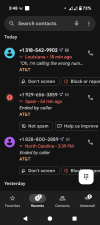
Here's an example of spam calls coming in on my Pixel 9 phone. Handled without me touching it.

share_2885424111810756850.png
 
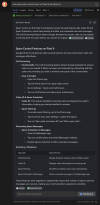
I wonder if it's possible to do the same on a non-Pixel-n smartphone by simply setting up Google Assistant as the spam control app in Android settings?! Since according to the following, the heavy lifting is essentially done by G.Assistant.
1754601765478.png
 
I don't know if that works on non Pixel phones. It may by now if the phone has enough processing power. Some of the features weren't available until Android 15. I'm on Android 16 now and the call screening was improved in this version. You should give it a try. I think it is a lot easier than call forward or additional software on the phone.

Also, you can now have the assistant do STT as you hold a conversation so that you can keep a record of what was said on a call.
 
I'm in the process of building an app for this. The android and ios os's limit the interaction with the call in real time but we can still show and update caller information. Trying to build it to be as usable as possible but low cost and not shady with data. Getting the data accurate is the toughest part but with a combination of providers and ai processing i think ive nailed it.
 
It's a shame that cell phone providers don't offer a way to implement "press 7 to complete this call" or something similar. We've finally chosen to forward all of our cellphone calls to a VoIP DID that implements this strategy. It's reduced our spam calls to almost zero. You can get a $1/month DID from CallCentric that provides free, unlimited inbound calling which works perfectly with any PBX using our "press 7" script. Then I answer the incoming calls on my cell phone using Groundwire registered to the destination extension on the PBX.

Telus up here in Canada offers call control (as they call it). No one else does though.
 

Members online

Latest Posts

Forum statistics

Threads
26,740
Messages
174,732
Members
20,300
Latest member
gandalf
Get 3CX - Absolutely Free!

Link up your team and customers Phone System Live Chat Video Conferencing

Hosted or Self-managed. Up to 10 users free forever. No credit card. Try risk free.

3CX
A 3CX Account with that email already exists. You will be redirected to the Customer Portal to sign in or reset your password if you've forgotten it.
Back
Top