
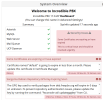
Got this email today from one of my instances -
Incredible PBX 17.0.28
Some Certificates are expiring or have expired:
Certificate named "default" is going to expire in less than a month. Please
update this certificate in Certificate Manager</br>
Is it time to rebuild this Vultr instance again? Or is there an upgdate/upgrade available?
After CLI Login --
Incredible PBX 17.0.28 'Dashboard'
Connected to Asterisk 22.5.1 currently running on ipbx2 (pid = 2284)
Retrieving... lastupdate2024
Updates available as of Sun May 10 14:13:44 EDT 2026: 13
Checking for update20241. INSTALLED: Automatic Update Utility test OK
Checking for update20242. INSTALLED: Updated Asterisk log rotate
Checking for update20243. INSTALLED: Discarding root mail notices
Checking for update20244. INSTALLED: Voicemail hints enabled
Checking for update20245. INSTALLED: UCP bug fix. Clear browser cache before use .
Checking for update20246. INSTALLED: 412 Call by Code updated
Checking for update20247. INSTALLED: BulkVS whielist updated
Checking for update20248. INSTALLED: incrediblebackup2021 script updated
Checking for update20249. INSTALLED: pbxstatus public IP query updated
Checking for update202410. INSTALLED: Yahoo News (951) query resurrected
Checking for update202411. INSTALLED: Skipped cosmetic fix to web login screen
Checking for update202412. INSTALLED: iptables-custom whitelist updated for DIDf orSale
Checking for update202413. NOT FOUND. Installing... update202413
Updating IncrediblePBX module for bug fix...
No repos specified, using: [standard,unsupported] from last GUI settings
framework is the same as the online version, unable to upgrade
Updating Hooks...Done
Chowning directories...Done
No repos specified, using: [standard,unsupported] from last GUI settings
core is the same as the online version, unable to upgrade
Updating Hooks...Done
Chowning directories...Done
No repos specified, using: [standard,unsupported] from last GUI settings
incrediblepbx is the same as the online version, unable to upgrade
Updating Hooks...Done
Chowning directories...Done
Reload Started
Reload Complete
core, framework, incrediblepbx modules updated.
Updates and notifications completed.
Incredible PBX 17.0.28
Some Certificates are expiring or have expired:
Certificate named "default" is going to expire in less than a month. Please
update this certificate in Certificate Manager</br>
Is it time to rebuild this Vultr instance again? Or is there an upgdate/upgrade available?
After CLI Login --
Incredible PBX 17.0.28 'Dashboard'
Connected to Asterisk 22.5.1 currently running on ipbx2 (pid = 2284)
Retrieving... lastupdate2024
Updates available as of Sun May 10 14:13:44 EDT 2026: 13
Checking for update20241. INSTALLED: Automatic Update Utility test OK
Checking for update20242. INSTALLED: Updated Asterisk log rotate
Checking for update20243. INSTALLED: Discarding root mail notices
Checking for update20244. INSTALLED: Voicemail hints enabled
Checking for update20245. INSTALLED: UCP bug fix. Clear browser cache before use .
Checking for update20246. INSTALLED: 412 Call by Code updated
Checking for update20247. INSTALLED: BulkVS whielist updated
Checking for update20248. INSTALLED: incrediblebackup2021 script updated
Checking for update20249. INSTALLED: pbxstatus public IP query updated
Checking for update202410. INSTALLED: Yahoo News (951) query resurrected
Checking for update202411. INSTALLED: Skipped cosmetic fix to web login screen
Checking for update202412. INSTALLED: iptables-custom whitelist updated for DIDf orSale
Checking for update202413. NOT FOUND. Installing... update202413
Updating IncrediblePBX module for bug fix...
No repos specified, using: [standard,unsupported] from last GUI settings
framework is the same as the online version, unable to upgrade
Updating Hooks...Done
Chowning directories...Done
No repos specified, using: [standard,unsupported] from last GUI settings
core is the same as the online version, unable to upgrade
Updating Hooks...Done
Chowning directories...Done
No repos specified, using: [standard,unsupported] from last GUI settings
incrediblepbx is the same as the online version, unable to upgrade
Updating Hooks...Done
Chowning directories...Done
Reload Started
Reload Complete
core, framework, incrediblepbx modules updated.
Updates and notifications completed.


 Phone System