NEW IncrediblePBX 2026-Debian13-Ubuntu26.04 + VM platforms

Hello all, I upgraded one of our locations to FreePbx 17 and have had nothing but issues. It appears to loose configurations and is really unreliable. I would like to switch to Nerdvittles Version. I have faith in Ward's work and have used it over the years. I have downloaded the new files and will install. Best to all.
 
Let us know how it goes for you., and if there's any issues.
 
Hello all, I upgraded one of our locations to FreePbx 17 and have had nothing but issues. It appears to loose configurations and is really unreliable. I would like to switch to Nerdvittles Version. I have faith in Ward's work and have used it over the years. I have downloaded the new files and will install. Best to all.
Incredible PBX is not going to solve issues that exist within FreePBX. Incredible PBX sits on top of FreePBX so an issue in the Ring Group module, for example, will exist on both systems because FreePBX controls the Ring Group module.

What do you mean by it looses configuration? What configuration is it losing? What exactly isn't working?
 
Let's focus on the Incredible PBX 2026 for @Wonecue and see if he still has issues. Troubleshooting upgrades from older versions to FreePBX 17 is an endless task, unsuitable for mere mortals. :Angel anim:
 
Just installed Incredible PBX 2026 on Debian 13.6. The install takes over resolv.conf and totally eliminates the DNS servers I have listed in the interfaces file.

No DNS names resolve now.

What did the install change? Did it switch to systemd-resolved?
 
Just installed Incredible PBX 2026 on Debian 13.6. The install takes over resolv.conf and totally eliminates the DNS servers I have listed in the interfaces file.

No DNS names resolve now.

What did the install change? Did it switch to systemd-resolved?
You can reset resolv.conf to anything you like. The installer changes it to 8.8.8.8 and 1.1.1.1 IIRC.
Issue chattr -i /etc/resolv.conf before editing the file.
 
You can reset resolv.conf to anything you like. The installer changes it to 8.8.8.8 and 1.1.1.1 IIRC.
Issue chattr -i /etc/resolv.conf before editing the file.
Thank you, that worked.

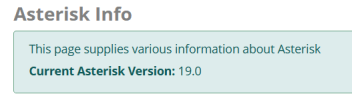
I'm just browsing through the settings on the web interface, and the Asterisk Info says I'm on version 19.0. I selected version 22 during install.

1788295883997.png
 
From the root login to your system, issue this commands to verify what you are running. FreePBX may or not realize your version number.

Code:
asterisk -rvvvvv
core show version

If it shows Asterisk 22, you're good. If not, something went poorly during your install. IncrediblePBX-2026 does not reference or download Asterisk 19 in any way, shape or form.

The other place to check is via the GUI at Settings > Advanced Settings and look for the field below. It should be empty or set to 22 in your case:
1788298066606.png
If you restored a FreePBX backup from an older system, that field might be set to whatever it was in the backup.
 
Last edited:
From the root login to your system, issue this commands to verify what you are running. FreePBX may or not realize your version number.

Code:
asterisk -rvvvvv
core show version

If it shows Asterisk 22, you're good. If not, something went poorly during your install. IncrediblePBX-2026 does not reference or download Asterisk 19 in any way, shape or form.

The other place to check is via the GUI at Settings > Advanced Settings and look for the field below. It should be empty or set to 22 in your case:
View attachment 6526
If you restored a FreePBX backup from an older system, that field might be set to whatever it was in the backup.

Your second suggestion solved it. I cleared that setting and it's reporting properly now.

Thanks
 

Forum statistics

Threads
26,784
Messages
175,049
Members
20,341
Latest member
Meferg1150
Get 3CX - Absolutely Free!

Link up your team and customers Phone System Live Chat Video Conferencing

Hosted or Self-managed. Up to 10 users free forever. No credit card. Try risk free.

3CX
A 3CX Account with that email already exists. You will be redirected to the Customer Portal to sign in or reset your password if you've forgotten it.
Back
Top