
You are using an out of date browser. It may not display this or other websites correctly.
You should upgrade or use an alternative browser.
You should upgrade or use an alternative browser.
PIONEERS IncrediblePBX for Debian 12, Ubuntu 24.04 or Ubuntu 22.04 with Asterisk-21, FreePBX-17 and PHP 8.2
- Thread starter kenn10
- Start date


kenn10
Well-Known Member
- Joined
- Dec 16, 2007
- Messages
- 4,671
- Reaction score
- 3,043
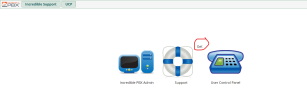
@wardmundy @Tonyclewis Works great. Loaded it on my test systems without issue. One bit of weirdness with the login screen:

wardmundy
Nerd Uno
- Joined
- Oct 12, 2007
- Messages
- 20,306
- Reaction score
- 6,018
@wardmundy @Tonyclewis Works great. Loaded it on my test systems without issue. One bit of weirdness with the login screen:
View attachment 5459
Yep. The Get is supposed to be down in front of Support.
wardmundy
Nerd Uno
- Joined
- Oct 12, 2007
- Messages
- 20,306
- Reaction score
- 6,018
Code to install PortKnocker is apparently missing from the current installer:
publicip=`curl https://ipinfo.io/ip`
publicip=`curl https://ipinfo.io/ip`
Code:
apt-get install knockd -y
sed -i 's|START_KNOCKD=0|START_KNOCKD=1|' /etc/default/knockd
test=`ifconfig | grep eth0`
if [ -z "$test" ]; then
 test2=`ifconfig | grep wlan0`
 if [ -z "$test2" ]; then
  devport=`ifconfig | head -n 1 | cut -f 1 -d ":"`
  echo "KNOCKD_OPTS=\"-i $devport\"" >> /etc/default/knockd
 else
  echo 'KNOCKD_OPTS="-i wlan0"' >> /etc/default/knockd
 fi
fi

echo "[options]" > /etc/knockd.conf
echo "       logfile = /var/log/knockd.log" >> /etc/knockd.conf
echo "" >> /etc/knockd.conf
echo "[opencloseALL]" >> /etc/knockd.conf
echo "        sequence      = 7:udp,8:udp,9:udp" >> /etc/knockd.conf
echo "        seq_timeout   = 15" >> /etc/knockd.conf
echo "        tcpflags      = syn" >> /etc/knockd.conf
echo "        start_command = /usr/sbin/iptables -I INPUT -s %IP% -j ACCEPT" >> /etc/knockd.conf
echo "        cmd_timeout   = 3600" >> /etc/knockd.conf
echo "        stop_command  = /usr/sbin/iptables -D INPUT -s %IP% -j ACCEPT" >> /etc/knockd.conf
chmod 640 /etc/knockd.conf
# randomize ports here
lowest=6001
highest=9950
knock1=$[ ( $RANDOM % ( $[ $highest - $lowest ] + 1 ) ) + $lowest ]
knock2=$[ ( $RANDOM % ( $[ $highest - $lowest ] + 1 ) ) + $lowest ]
knock3=$[ ( $RANDOM % ( $[ $highest - $lowest ] + 1 ) ) + $lowest ]
sed -i 's|7:udp|'$knock1':tcp|' /etc/knockd.conf
sed -i 's|8:udp|'$knock2':tcp|' /etc/knockd.conf
sed -i 's|9:udp|'$knock3':tcp|' /etc/knockd.conf
systemctl restart knockd
systemctl enable knockd
echo " "
echo "Knock ports for access to $publicip set to TCP: $knock1 $knock2 $knock3" > /root/knock.FAQ
echo "UPnP activation attempted for UDP 5060 and your knock ports above." >> /root/knock.FAQ
echo "To enable knockd on your server, issue the following commands:" >> /root/knock.FAQ
echo "  chkconfig --level 2345 knockd on" >> /root/knock.FAQ
echo "  service knockd start" >> /root/knock.FAQ
echo "To enable remote access, issue these commands after yum -y install nmap:" >> /root/knock.FAQ
echo "nmap -p $knock1 --max-retries 0 $publicip && nmap -p $knock2 --max-retries 0 $publicip && nmap -p $knock3 --max-retries 0 $publicip" >> /root/knock.FAQ
echo "Or install iOS PortKnock or Android DroidKnocker on remote device." >> /root/knock.FAQ
kenn10
Well-Known Member
- Joined
- Dec 16, 2007
- Messages
- 4,671
- Reaction score
- 3,043
I deliberately left out PortKnocker until a more final version with bells and whistles is ready to go. It does not seem like it is widely used. Work on the auto-update for IncrediblePBX is needed and a new FreePBX backup image in a fixed location to install the base extensions and trunks. I don't think a complete incrediblebackup/restore is needed like in the 2027 version if necessary bits and pieces can be downloaded as it is installed.Code to install PortKnocker is apparently missing from the current installer:
Asteridex and Phonebook are gone in FreePBX-17 but the spam blocker can be modified to use the allowlist module for the whitelist.
Asteridex and Phonebook are gone in FreePBX-17 but the spam blocker can be modified to use the allowlist module for the whitelist.
What if anything provides this functionality if these tool tools are no longer there? I use Phone Book for Caller Id.
kenn10
Well-Known Member
- Joined
- Dec 16, 2007
- Messages
- 4,671
- Reaction score
- 3,043
Download the allowlist module. It serves as phonebook and you can use it for superfecta lookups as well.What if anything provides this functionality if these tool tools are no longer there? I use Phone Book for Caller Id.
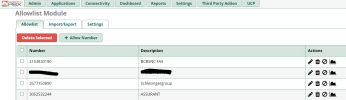
I was able to export my phonebook in a csv file and import it to allowlist using the bulk import. You have to massage the phonebook csv and add a header row for it to import into allowlist.
Allowlist is available under FreePBX-16 so you can work on export/import and then it gets backed up with the FreePBX backup and can be imported into FreePBX-17 using bulk import.
Last edited:
kenn10
Well-Known Member
- Joined
- Dec 16, 2007
- Messages
- 4,671
- Reaction score
- 3,043
@phonebuff Correction. I do not see allowlist in the CID Superfecta module at this time. Lorne said it was there so it may be pending a future release. I'll submit a ticket to FreePBX.
wardmundy
Nerd Uno
- Joined
- Oct 12, 2007
- Messages
- 20,306
- Reaction score
- 6,018
AsteriDex has been updated for FreePBX 17 to AsteriDex 17:
Code:
cd /
wget https://filedn.com/lBgbGypMOdDm8PWOoOiBR7j/Debian12/asteridex17.tar.gz -O asteridex17.tar.gz
tar zxvf asteridex17.tar.gz
rm -f asteridex17.tar.gz
cd /var/www/html/asteridex17/mysql
./loadmysql.sh
cd /root
fwconsole ma install asteridex
./sig-fix
./sig-fixwardmundy
Nerd Uno
- Joined
- Oct 12, 2007
- Messages
- 20,306
- Reaction score
- 6,018
You really don't need the Phonebook module to take advantage of its functionality. Take a look at this old Nerd Vittles article which used the same Asterisk database. Give me a few days to tweak it a bit.
kenn10
Well-Known Member
- Joined
- Dec 16, 2007
- Messages
- 4,671
- Reaction score
- 3,043
Whomever you have making the module mods for PHP 8.2, maybe you can get phonebook updated too. I tried but I believe there is a change in the FreePBX files in /var/www/html/admin/ that prevent what I was doing from working. I don't have sufficient knowledge of the internal plumbing of FreePBX to figure it out.You really don't need the Phonebook module to take advantage of its functionality. Take a look at this old Nerd Vittles article which used the same Asterisk database. Give me a few days to tweak it a bit.
wardmundy
Nerd Uno
- Joined
- Oct 12, 2007
- Messages
- 20,306
- Reaction score
- 6,018
Ha ha. Whomever be me, and decoding FreePBX spaghetti code is above my pay grade. But the sub-log-caller context would let you collect and manipulate CallerIDs in any way desired, and I thought that was your concern. All the data gets stored in AsteriskDB just like what the Phonebook module does. So, if they ever fix it, all of your data should be populated just as if Phonebook never disappeared.Whomever you have making the module mods for PHP 8.2, maybe you can get phonebook updated too. I tried but I believe there is a change in the FreePBX files in /var/www/html/admin/ that prevent what I was doing from working. I don't have sufficient knowledge of the internal plumbing of FreePBX to figure it out.
Last edited:
A couple versions ago, Phonebook functionality in FreePBX was replaced with Contact Manager. Set up an External contact group and add all your phone book entries. Use the Caller ID Lookup Sources to enable Contact Manager as a source. In Inbound Route, choose the Contact Manager as the caller ID name source.
kenn10
Well-Known Member
- Joined
- Dec 16, 2007
- Messages
- 4,671
- Reaction score
- 3,043
I already converted my version of that to use the allowlist module which is stored in the asteriskdb. It works well. Lorne had suggested doing that as there are no plans to convert the phonebook module on the FreePBX side. It's pretty easy to export the phone book and bulk import it into the allowlist database.But the sub-log-caller context would let you collect and manipulate CallerIDs in any way desired,
@billsimon I dug into the Contact Manager for conversion of the whitelist that I use for spam blocking and whitelisting of known callers. Without seeing a relational database diagram, Contact Manager seems entirely too complicated for the need. I never figured out a clear database connection between the name and the assorted phone numbers. They have a UID on the name but it isn't used on the phone numbers table for association and the group number, user number and phone number connections are not what I would expect for the many-to-one relationship of names and numbers. I did not decipher how to relate a phone number query to the name but I didn't waste a lot of time on it. In any case, I just need a single table row with CID name and number in two columns and the allowlist module handles that nicely.
I also notice that in FreePBX-17, CID Superfecta still allows a lookup into the phonebook database, even though the phonebook module is no longer there. Hopefully, they will update to allow lookup by allowlist entry and I submitted an enhancement request.
kenn10
Well-Known Member
- Joined
- Dec 16, 2007
- Messages
- 4,671
- Reaction score
- 3,043
@phonebuff @wardmundy it looks like my request to add allowlist as a Superfecta lookup source has been acted upon. Lorne Gaetz has put a version up to be merged into the Superfect module. See:

 github.com
fix #351 New superfecta source for Allowlist by lgaetz · Pull Request #352 · FreePBX/superfecta
New superfecta lookup source for fpbx Allowlist module. Basic fork of source-Asterisk_Phonebook.module
github.com
Last edited:
kenn10
Well-Known Member
- Joined
- Dec 16, 2007
- Messages
- 4,671
- Reaction score
- 3,043
The only value of the phonebook module was the ability to easily add or delete whitelist entries. The allowlist module also allows for that. CID Superfecta will also be modified (per Lorne Gaetz PR) to use the allowlist as a CID lookup source.You really don't need the Phonebook module to take advantage of its functionality. Take a look at this old Nerd Vittles article which used the same Asterisk database. Give me a few days to tweak it a bit.
wardmundy
Nerd Uno
- Joined
- Oct 12, 2007
- Messages
- 20,306
- Reaction score
- 6,018
Actually, current version of Superfecta is good news, too. It means you can use your existing Phonebook data without changing anything. And, with the sub-log-callermodule, you could keep it current. Knowing the FreePBX Devs, they'll probably take out the Phonebook option when they add allowlist.
kenn10
Well-Known Member
- Joined
- Dec 16, 2007
- Messages
- 4,671
- Reaction score
- 3,043
Allowlist uses the asteriskdb. The contact manager stuff is the nightmare. Install the module on one of your systems and take a look.@kenn10: Are you saying you modified the AllowList code to use the AsteriskDB??By default, it uses MySQL convoluted tables. If so, I'd love to see what you've done. Thanks.
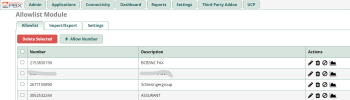
Example:
Code:
joecloud4*CLI> database show allowlist
/allowlist/2153830190                             : BCBSNC FAX
/allowlist/2677150890                             : Schlesingergroup
/allowlist/3052532244                             : ASSURANT
Last edited by a moderator:


Get 3CX - Absolutely Free!
Link up your team and customers  Phone System Live Chat Video Conferencing
Hosted or Self-managed. Up to 10 users free forever. No credit card. Try risk free.

Verify your Email
Check your inbox!
We’ve sent you an email. Click on the button in the email body to verify your email address – (if you can not find it, check your spam folder).
Upon verification you will be directed to the 3CX setup wizard.