PIONEERS IncrediblePBX for Debian 12, Ubuntu 24.04 or Ubuntu 22.04 with Asterisk-21, FreePBX-17 and PHP 8.2

@phonebuff @wardmundy A new addition was made to the CID Superfecta module to allow CID lookups from the allowlist entries. I received notice that allowlist has been added to the stream but I don't see the updated module in module admin yet. According to Lorne Gaetz who made the modification, allowlist query will be available in FreePBX-16 and 17 via Superfecta.
 
@phonebuff the CIDSuperfecta module now allows CID lookup from the allowlist module. I just got module updates for FreePBX-17 and the issue is resuolved with CID Superfecta 17.0.2.
 
Last edited:
HUGE kudos to @kenn10 on a terrific job getting Incredible PBX 2024 developed AND finished. There's now one installer for Incredible PBX 2024 that supports Debian 12, Ubuntu 24.04 LTS, and Ubuntu 22.04 with Asterisk 21 and FreePBX 17.

HINT: The Ubuntu 24.04 LTS platform gets you up to 12 years of support with their Ubuntu Pro Expanded Security Maintenance (extra 5 years) and Ubuntu Pro Legacy Support (extra 2 years). Details here.

INSTALL TIPS:

1. Download ubuntu-24.04-live-server-amd64.iso and build a bootable flash drive with balenaEtcher.
2. Configure hardware for first boot from flash drive, insert flash drive, and reboot
3. Walk through the simple install procedure after creating new user nerd and reboot
4. Login as nerd and set up root user account: sudo passwd root
5. Logout and back in as root and enable SSH root access:
Code:
apt install nano
nano -w /etc/ssh/sshd_config
# change PermitRootLogin line as follows:
PermitRootLogin yes
# save the file (Ctrl-X, Y, ENTER) and then restart SSH
systemctl restart ssh
deluser --remove-home nerd
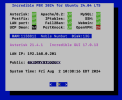
pbxstatus
6. Using SSH, login as root to local IP shown on pbxstatus above
7. Issue the following commands to kick off the IncrediblePBX2024 install:
Code:
cd /root
wget https://filedn.com/lBgbGypMOdDm8PWOoOiBR7j/Debian12/IncrediblePBX2024.sh
chmod +x IncrediblePBX2024.sh
./IncrediblePBX2024.sh
8. At the end of the install, enter a new admin password for access to the FreePBX GUI
9. reboot
10. Run /root/enable-gmail-smarthost-with-postfix with your Gmail app password to setup email
11. Using a browser, login to FreePBX GUI as admin at the IP address from above

Screenshot 2024-08-02 at 10.39.30 AM.png
 
Last edited:
We've all grown weary of SendMail with their latest "improvements." So here's the code that has been added to the iPBX2024 installer to replace it with Postfix...

Code:
cd /root
wget https://filedn.com/lBgbGypMOdDm8PWOoOiBR7j/Debian12/enable-gmail-smarthost-with-postfix
chmod +x enable-gmail-smarthost-with-postfix
rm -f enable-gmail-smarthost-for-sendmail
 
Last edited:
Activating Ubuntu 24.04 CT template with Proxmox 8

1. From CLI, enter the following commands:
Code:
pveam update
pveam available
pveam download local debian-10-standard_10.7-1_amd64.tar.gz
pveam download local debian-11-standard_11.6-1_amd64.tar.zst
pveam download local debian-12-standard_12.2-1_amd64.tar.zst
pveam download local ubuntu-22.04-standard_22.04-1_amd64.tar.zst

2. The 24.04 CT template became available around May 4th, but you need to add '24.04' => 1 to the list of my $known_versions in the file /usr/share/perl5/PVE/LXC/Setup/Ubuntu.pm

3. Then reboot proxmox making sure you have the second version of the template i.e. 24.04-2

New video show-and-tell for Incredible PBX 2024

 
Last edited:
I gave this a spin, using our 2021 FreePBX backup restored in.

When restarted I did get this:

There was an error during reload: Chan_sip module deprecated in Asterisk V21+​

Chan_sip module deprecated in Asterisk V21+

Convert the sip trunks to pjsip. Please Run: fwconsole trunks --converttopjsip .
However, it seems it shouldn't be "converttopjsip" but "convert2pjsip". However, even after making that change, it says nothing to convert:
```No SIP trunks found.```

But it won't go past that dialog so I'm not doing something right.
UPDATE:
I ran ```fwconsole trunks --list``` to see how many I had (1 to 99 with gaps) and so I ran this and it went though them and then I could RETRY the dialog to get by:
```for i in {1..99}; do fwconsole --convert2pjsip $i; done```

Now I have to get some trunks and extensions connected and test it out. {I disabled the trunks for now until I am ready to test]
 
Last edited:
FreePBX threw up that error because you had chan_sip endpoints and FreePBX-17 does not support chan_sip with Asterisk-21. It should, however, have converted trunks and extensions to chan_pjsip when the backup is loaded in. They probably have issues with whatever the latest backup/restore module is. It is also possible that you had some database corruption in your old system's backup. It is also possible that you had saved the contents of /etc/asterisk with your backup. If you restore the old /etc/asterisk/* files to the new system, you'll have untold problems due to differences in the .conf files.

Since there was a hiccup during the conversion, go to Settings > Advanced Settings and go down to the Dialplan and Operational section and set SIP Channel Driver to chan_pjsip. Save and apply changes.
1723113556084.png

Then go to Settings > Asterisk SIP Settings and make sure you have only the PJSIP tab (no Chan_sip) and double-check your ports for chan_pjsip to be sure they are set to what you want. If you have to set the ports to something different, be sure to save, apply changes and then do a fwconsole restart for the port changes to take effect.
 
Last edited:
IncrediblePBX2024 does not support chan_sip. FreePBX 17 does.

This is not a fight, it's about a widely-read forum that ranks highly on Google searches. If someone searches for information about FreePBX 17 or IncrediblePBX2024 wouldn't you care that they find accurate information? I only ask that you correct your post and otherwise I have no qualms or anything more to say about this.

edit: I see now it has been corrected; thanks.
Now you might want to correct your post that incorrectly says "IncrediblePBX2024 does not support chan_sip. FreePBX 17 does." Incredible PBX 2024 installs a default (current) version of Asterisk and FreePBX. It can support any available version of Asterisk that still is supported by its development team, just as FreePBX 17 does. With a current version of Asterisk, FreePBX 17 does NOT support chan_sip. Kinda surprising to see you now advocating for an older release of Asterisk with a somewhat misleading post. You know better.
 
Last edited:
Yeah I'm glad to delete what was written.

edit: however in general I would tend to advocate for the LTS releases of Asterisk. Currently I am installing v20.
 
We share your enthusiasm for LTS releases. We have one. It's called Incredible PBX 2027 which is rock-solid with Asterisk 20 until 2027. And it includes chan_sip with preconfigured support for numerous providers. :smartass:
 
Just reporting errors to help development, if it is my problem let me know. :) Having a problem after restoring the backup with UCP. I have the daemon disabled in the config, but when I try to login I get an error in a red box in the upper right corner "There was an error. See the console log for details.", the javascript console log shows a 403 error If I try the wrong password I get a password error, so this is something different.

ucp/ajax.php:1
Failed to load resource: the server responded with a status of 403 (Forbidden)

jsphpg_b010f040d71d0…ion=v17.0.4.20:2078
Forbidden: ajaxRequest declined
(anonymous) @ jsphpg_b010f040d71d0…ion=v17.0.4.20:2078
 
Last edited:
FreePBX threw up that error because you had chan_sip endpoints and FreePBX-17 does not support chan_sip with Asterisk-21. It should, however, have converted trunks and extensions to chan_pjsip when the backup is loaded in. They probably have issues with whatever the latest backup/restore module is. It is also possible that you had some database corruption in your old system's backup. It is also possible that you had saved the contents of /etc/asterisk with your backup. If you restore the old /etc/asterisk/* files to the new system, you'll have untold problems due to differences in the .conf files.
Anything is possible I suppose, but I don't see any issues on the existing system that would indicate database problems, and there are not any errors during the import process. It is the standard FreePBX backup, not an IncrediblePBX backup, so I would expect (maybe wrongly) that it would include only the files that should restore cleanly. There were no additional files added, just the modules selected.

As a further test, I just reimported the same backup file and this time it prompted me that there were chan_sip things defined and it would convert them during import, which it did, so it behaved differently with the same backup file than it did the first time.
 
As a further test, I just reimported the same backup file and this time it prompted me that there were chan_sip things defined and it would convert them during import, which it did, so it behaved differently with the same backup file than it did the first time.
That is definitely strange. I hope it is just an anomaly. I'm glad the import is good and your testing can proceed.
 
Since there was a hiccup during the conversion, go to Settings > Advanced Settings and go down to the Dialplan and Operational section and set SIP Channel Driver to chan_pjsip. Save and apply changes.
View attachment 5559
That option is not in my settings for whatever reason.
 
Under Settings > Advanced Settings, the first block allows you to turn on these things which will reveal all the options when set to "Yes."

Display Friendly Name Yes/No

Display Readonly Settings Yes/No

Override Readonly Settings Yes/No
 
Just reporting errors to help development, if it is my problem let me know. :) Having a problem after restoring the backup with UCP. I have the daemon disabled in the config, but when I try to login I get an error in a red box in the upper right corner "There was an error. See the console log for details.", the javascript console log shows a 403 error If I try the wrong password I get a password error, so this is something different.

ucp/ajax.php:1
Failed to load resource: the server responded with a status of 403 (Forbidden)

jsphpg_b010f040d71d0…ion=v17.0.4.20:2078
Forbidden: ajaxRequest declined
(anonymous) @ jsphpg_b010f040d71d0…ion=v17.0.4.20:2078
I dont know if it is helpful, but if I hit the URL ucp/ajax.php directly I get:

{"status":"false","message":"forbidden"}

Further, here are the apache2 logs when I try to login via the /ucp URL:

"GET /ucp/ HTTP/1.1" 200 4354 "-" "Mozilla/5.0 (Macintosh; Intel Mac OS X 10_15_7) AppleWebKit/537.36 (KHTML, like Gecko) Chrome/127.0.0.0 Safari/537.36 Edg/127.0.0.0" "GET /ucp/assets/css/compiled/main/lessphp_af7fd845f63af11dd9ca5bb378382c1b67b7e6a1.css?load_version=v17.0.4.20 HTTP/1.1" 200 1860 "[URL]http://192.168.5.55/ucp/[/URL]" "Mozilla/5.0 (Macintosh; Intel Mac OS X 10_15_7) AppleWebKit/537.36 (KHTML, like Gecko) Chrome/127.0.0.0 Safari/537.36 Edg/127.0.0.0" "GET /ucp/assets/css/compiled/main/bootstrap.min.css.map HTTP/1.1" 404 492 "-" "Mozilla/5.0 (Macintosh; Intel Mac OS X 10_15_7) AppleWebKit/537.36 (KHTML, like Gecko) Chrome/127.0.0.0 Safari/537.36 Edg/127.0.0.0" "GET /ucp/assets/js/compiled/main/bootstrap-toggle.min.js.map HTTP/1.1" 404 492 "-" "Mozilla/5.0 (Macintosh; Intel Mac OS X 10_15_7) AppleWebKit/537.36 (KHTML, like Gecko) Chrome/127.0.0.0 Safari/537.36 Edg/127.0.0.0" "GET /ucp/assets/js/compiled/modules/popover.js.map HTTP/1.1" 404 492 "-" "Mozilla/5.0 (Macintosh; Intel Mac OS X 10_15_7) AppleWebKit/537.36 (KHTML, like Gecko) Chrome/127.0.0.0 Safari/537.36 Edg/127.0.0.0" "GET /ucp/?load_version=17.0.19.1 HTTP/1.1" 200 4352 "[URL]http://192.168.5.55/ucp/[/URL]" "Mozilla/5.0 (Macintosh; Intel Mac OS X 10_15_7) AppleWebKit/537.36 (KHTML, like Gecko) Chrome/127.0.0.0 Safari/537.36 Edg/127.0.0.0" "POST /ucp/ajax.php?module=userman&command=checkPasswordReminder HTTP/1.1" 200 720 "[URL]http://192.168.5.55/ucp/[/URL]" "Mozilla/5.0 (Macintosh; Intel Mac OS X 10_15_7) AppleWebKit/537.36 (KHTML, like Gecko) Chrome/127.0.0.0 Safari/537.36 Edg/127.0.0.0" "POST /ucp/ajax.php HTTP/1.1" 403 713 "[URL]http://192.168.5.55/ucp/[/URL]" "Mozilla/5.0 (Macintosh; Intel Mac OS X 10_15_7) AppleWebKit/537.36 (KHTML, like Gecko) Chrome/127.0.0.0 Safari/537.36 Edg/127.0.0.0"
 
Last edited:
I suspect the FreePBX developers don't support restores going back that far. I'd recommend you try using the Bulk Handler module instead of Backup/Restore.
 
I suspect the FreePBX developers don't support restores going back that far. I'd recommend you try using the Bulk Handler module instead of Backup/Restore.
Backup/Restore can go as far back as the 2.10 release. It can handle restoring a backup from FreePBX v15.
 
Backup/Restore can go as far back as the 2.10 release. It can handle restoring a backup from FreePBX v15.
Apparently not. Perhaps you can diagnose the actual problem. We use stock FreePBX 17 modules.
 

Members online

No members online now.

Forum statistics

Threads
26,688
Messages
174,412
Members
20,259
Latest member
Fadeek86
Get 3CX - Absolutely Free!

Link up your team and customers Phone System Live Chat Video Conferencing

Hosted or Self-managed. Up to 10 users free forever. No credit card. Try risk free.

3CX
A 3CX Account with that email already exists. You will be redirected to the Customer Portal to sign in or reset your password if you've forgotten it.
Back
Top