
You are using an out of date browser. It may not display this or other websites correctly.
You should upgrade or use an alternative browser.
You should upgrade or use an alternative browser.
PIONEERS IncrediblePBX for Debian 12, Ubuntu 24.04 or Ubuntu 22.04 with Asterisk-21, FreePBX-17 and PHP 8.2
- Thread starter kenn10
- Start date

wardmundy
Nerd Uno
- Joined
- Oct 12, 2007
- Messages
- 20,306
- Reaction score
- 6,018

wardmundy
Nerd Uno
- Joined
- Oct 12, 2007
- Messages
- 20,306
- Reaction score
- 6,018
We finally have an excellent TTS solution for this build. It's not free, but it's cheap: $9.99 for 100,000 characters.
Once you get a fresh Incredible PBX 2024 base system installed and running, here are the steps to use SpeechGen as the TTS engine for 951 (News) and 947 (Weather by ZIP Code). You can review the dialplan code for those extensions to add other TTS services for your account.
Once you get a fresh Incredible PBX 2024 base system installed and running, here are the steps to use SpeechGen as the TTS engine for 951 (News) and 947 (Weather by ZIP Code). You can review the dialplan code for those extensions to add other TTS services for your account.
Code:
cd /
wget http://incrediblepbx.com/ipbx2024.tar.gz
mv /etc/asterisk/extensions_custom.conf /etc/asterisk/extensions_custom.bak
# warning: next line overwrites /etc/asterisk/extensions_custom.conf
tar zxvf ipbx2024.tar.gz
wget https://filedn.com/lBgbGypMOdDm8PWOoOiBR7j/Debian12/iPBX-custom.tar.gz
tar zxvf iPBX-custom.tar.gz
apt-get update
fwconsole reload
# order 100K SpeechGen tokens for $9.99 here: https://speechgen.io/en/ref/100/
# remember to add your SpeechGen API credentials in /var/lib/asterisk/agi-bin/speechgen.php
# SpeechGen tutorial here: https://nerdvittles.com/speechgen-io-a-near-perfect-tts-offering-for-asterisk/
Last edited:
wardmundy
Nerd Uno
- Joined
- Oct 12, 2007
- Messages
- 20,306
- Reaction score
- 6,018
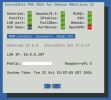
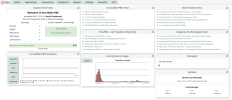
Finally, ran through this iPBX2024 install script for a Raspberry Pi 5. Just a couple of notes...Seems that it doesn't like the bash script, despite the renaming.
I zipped it and it looks like that works. Let me know how you go.
1. After installing RasPi OS, switch to boot from command line with raspi-config
2. Enable root SSH access (PermitRootLogin yes) in /etc/ssh/sshd_config and restart SSH
3. Set root password: sudo passwd root
4. Before you run the enable-gmail-smarthost-with-postfix script, run: apt install postfix with defaults.
5. Add SpeechGen TTS if TTS support is desired
Other than that, it's a terrific script. Thanks, @zigenz.
Last edited:
thyraven13
New Member
- Joined
- Jan 3, 2025
- Messages
- 2
- Reaction score
- 0
I am running the script in the Oct 22, 2024 post above and I keep having issues with Asterisk not installing / running when the setup completes. What information do you need to help me troubleshoot this? I have a Pi 5 running the native x64 Pi OS. This Pi 5 has 8GB of RAM. I also have a NVMe hat with a 256GB NVMe installed.
wardmundy
Nerd Uno
- Joined
- Oct 12, 2007
- Messages
- 20,306
- Reaction score
- 6,018
The log at /root/incrediblepbx-install-log.txt should tell you what has come unglued with Asterisk.I am running the script in the Oct 22, 2024 post above and I keep having issues with Asterisk not installing / running when the setup completes. What information do you need to help me troubleshoot this? I have a Pi 5 running the native x64 Pi OS. This Pi 5 has 8GB of RAM. I also have a NVMe hat with a 256GB NVMe installed.
thyraven13
New Member
- Joined
- Jan 3, 2025
- Messages
- 2
- Reaction score
- 0
Yea I am trying to decipher that but not seeing exactly where it failed on me. I did find:
menuselect/menuselect --check-deps menuselect.makeopts
member 'app_mysql' in category 'MENUSELECT_ADDONS' not found, ignoring.
member 'cdr_mysql' in category 'MENUSELECT_ADDONS' not found, ignoring.
member 'app_dahdiras' in category 'MENUSELECT_APPS' not found, ignoring.
member 'app_fax' in category 'MENUSELECT_APPS' not found, ignoring.
member 'cdr_syslog' in category 'MENUSELECT_CDR' not found, ignoring.
member 'chan_misdn' in category 'MENUSELECT_CHANNELS' not found, ignoring.
member 'chan_nbs' in category 'MENUSELECT_CHANNELS' not found, ignoring.
member 'chan_phone' in category 'MENUSELECT_CHANNELS' not found, ignoring.
member 'chan_vpb' in category 'MENUSELECT_CHANNELS' not found, ignoring.
member 'res_pktccops' in category 'MENUSELECT_RES' not found, ignoring.
member 'res_config_sqlite' in category 'MENUSELECT_RES' not found, ignoring.
Unable to find 'app_dahdiras' in category 'MENUSELECT_APPS'
Unable to find 'chan_misdn' in category 'MENUSELECT_CHANNELS'
Unable to find 'chan_nbs' in category 'MENUSELECT_CHANNELS'
Unable to find 'chan_phone' in category 'MENUSELECT_CHANNELS'
Unable to find 'res_config_sqlite' in category 'MENUSELECT_RES'
So I am guessing it blew up somewhere above that but everything else installs after hitting that snag.
menuselect/menuselect --check-deps menuselect.makeopts
member 'app_mysql' in category 'MENUSELECT_ADDONS' not found, ignoring.
member 'cdr_mysql' in category 'MENUSELECT_ADDONS' not found, ignoring.
member 'app_dahdiras' in category 'MENUSELECT_APPS' not found, ignoring.
member 'app_fax' in category 'MENUSELECT_APPS' not found, ignoring.
member 'cdr_syslog' in category 'MENUSELECT_CDR' not found, ignoring.
member 'chan_misdn' in category 'MENUSELECT_CHANNELS' not found, ignoring.
member 'chan_nbs' in category 'MENUSELECT_CHANNELS' not found, ignoring.
member 'chan_phone' in category 'MENUSELECT_CHANNELS' not found, ignoring.
member 'chan_vpb' in category 'MENUSELECT_CHANNELS' not found, ignoring.
member 'res_pktccops' in category 'MENUSELECT_RES' not found, ignoring.
member 'res_config_sqlite' in category 'MENUSELECT_RES' not found, ignoring.
Unable to find 'app_dahdiras' in category 'MENUSELECT_APPS'
Unable to find 'chan_misdn' in category 'MENUSELECT_CHANNELS'
Unable to find 'chan_nbs' in category 'MENUSELECT_CHANNELS'
Unable to find 'chan_phone' in category 'MENUSELECT_CHANNELS'
Unable to find 'res_config_sqlite' in category 'MENUSELECT_RES'
So I am guessing it blew up somewhere above that but everything else installs after hitting that snag.

ostridge
Guru
- Joined
- Jan 22, 2015
- Messages
- 1,814
- Reaction score
- 628
Perhaps some logical reason why the log isnot to be found at place & naming as all the other bits of felled treesThe log at /root/incrediblepbx-install-log.txt should tell you what has come unglued with Asterisk.
Bash:
# /var/log/incrediblepbx-install.log
kenn10
Well-Known Member
- Joined
- Dec 16, 2007
- Messages
- 4,671
- Reaction score
- 3,043
I suspect because the installation log is ephemeral and should be removed after a successful installation or easily found and read after a failed installation. It has been in the /root directory during install for as many versions of IncrediblePBX as I can remember.Perhaps some logical reason why the log isnot to be found at place & naming as all the other bits of felled treesJust so they are all found together?Bash:# /var/log/incrediblepbx-install.log
ostridge
Guru
- Joined
- Jan 22, 2015
- Messages
- 1,814
- Reaction score
- 628
Well it all depends:It's not free, but it's cheap: $9.99 for 100,000 characters.
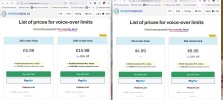
Left side is UK pricing; Right side via US proxy.
Over here vs Over there ! They are mucking about with the limits, and $9.99 it ain't.
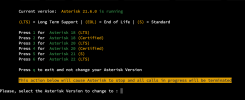
Just a heads up, I don't know if somebody has already tried it but I've successfully updated to Asterisk 22.1 LTS using my personal modified upgrade script and it works fine. Just remember to deselect g729a codec in menuselect
kenn10
Well-Known Member
- Joined
- Dec 16, 2007
- Messages
- 4,671
- Reaction score
- 3,043
Yeah, I would be careful as FreePBX-17 has not yet been cleared to run on it. You might run into some glitches so let us know if you find anything. Also, if there are problems running Asterisk 22.1 with FreePBX-17, please put in a ticket with the FreePBX issue tracker so they know about it.Just a heads up, I don't know if somebody has already tried it but I've successfully updated to Asterisk 22.1 LTS using my personal modified upgrade script and it works fine. Just remember to deselect g729a codec in menuselect
It's been cleared for sometime now.I would be careful as FreePBX-17 has not yet been cleared to run on it.
kenn10
Well-Known Member
- Joined
- Dec 16, 2007
- Messages
- 4,671
- Reaction score
- 3,043
Good to know. I had not seen mention of it in the FreePBX forums.It's been cleared for sometime now.
kenn10
Well-Known Member
- Joined
- Dec 16, 2007
- Messages
- 4,671
- Reaction score
- 3,043
Oh yeah. The FreePBX open source community is sure to see it there. Now we know.It was in the PBXact v17 announcement.
The announcement was in the community. There was discussion about it and allOh yeah. The FreePBX open source community is sure to see it there. Now we know.
kenn10
Well-Known Member
- Joined
- Dec 16, 2007
- Messages
- 4,671
- Reaction score
- 3,043
You are correct. I completely missed seeing this: https://community.freepbx.org/t/latest-updates-on-freepbx-17/102781/1The announcement was in the community. There was discussion about it and all


Get 3CX - Absolutely Free!
Link up your team and customers  Phone System Live Chat Video Conferencing
Hosted or Self-managed. Up to 10 users free forever. No credit card. Try risk free.

Verify your Email
Check your inbox!
We’ve sent you an email. Click on the button in the email body to verify your email address – (if you can not find it, check your spam folder).
Upon verification you will be directed to the 3CX setup wizard.