SOLVED iPBX 2027-D EOL install with Debian 11

rockeater

Member
Joined
May 22, 2013
Messages
36
Reaction score
18
I am trying to install a fresh copy of 2027-D on racknerd. There a a lot of debian org not found messages and it ends up stopping when trying to run mysql later. Is this a temporary debian problem or a bug that needs fixing?
 
I am trying to install a fresh copy of 2027-D on racknerd. There a a lot of debian org not found messages and it ends up stopping when trying to run mysql later. Is this a temporary debian problem or a bug that needs fixing?
I would strongly recommend you switch to Incredible PBX 2026. 2027-D with Debian 11 has reach EOL at the end of August, 2026.
 
@rockeater: Bottom line is you're going to have a nightmare of a time trying to cleanly install Debian 11 now. My recommendation would be to switch to Incredible PBX 2026-D. But, if you want to stick with Incredible PBX 2027, then switch to 2027-U with Ubuntu 22.04 which still works fine, or move to one of the virtual machine platforms which already has a 2027-D image built. This is typical Debian conduct, by the way. I had just forgotten that the deadline on the release had passed. :puke:
 
@rockeater: Bottom line is you're going to have a nightmare of a time trying to cleanly install Debian 11 now. My recommendation would be to switch to Incredible PBX 2026-D. But, if you want to stick with Incredible PBX 2027, then switch to 2027-U with Ubuntu 22.04 which still works fine, or move to one of the virtual machine platforms which already has a 2027-D image built. This is typical Debian conduct, by the way. I had just forgotten that the deadline on the release had passed. :puke:
Thanks for your quick answer. My racknerd only has 1 gig so I installed 2027-U. I tried 2026 on Debian 13, and it seemed to work, but went back to 2027. It did take about 3 Ubuntu installs to get an error free installation.
 
@tycho @rockeater & others wishing to install Incredible PBX 2027-D with Debian 11 EOL.

I spent 2-1/2 days with Gemini trying to rewrite the Debian 11 ISO installer now that Debian 11 has reached EOL.
HINT: Don't waste your time. There is a simple fix that only works when you do it manually. Here's how.
Start by running any Debian 11 ISO installer with at least 1GB RAM and at least 20 GB disk. Then here are the steps:

Choose Graphical Install
Select Language
Select Location
Configure Keyboard
Let DHCP setup do its thing
Set Hostname
Set Domain (optional)
Set Root password twice
Set new user: nerd
Set username: nerd
Set Nerd password twice
Choose Time zone
At Partition disks, click Continue 4 times
At write Changes, select Yes
After base system install, scan more media No
Configure package manager: United States
Choose Debian archive mirror: deb.debian.org
Leave HTTP proxy blank
After installing a dozen or so files, installer will fail
Click continue
Choose Execute a shell
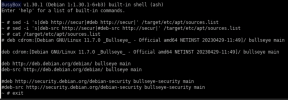
Issue 2 sed commands in screenshot to remove security repos
Verify security repos commented out using cat command and finally choose exit
1791369660547.png
Choose Select and install software and Continue
Choose No automatic updates when prompted
Choose No to participate in package usage survey
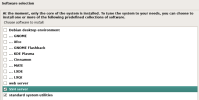
Make app selections shown in this screenshot to complete install
1791369720202.png
Install GRUB boot loader YES
Choose /dev device shown
Click Continue at Installation is complete to reboot

Proceed with normal Incredible PBX 2027-D install tutorial.
 
Last edited:
As this time, I would recommend they download the DVD.ISO. The netinstall ISO was built long before EOL. Even with an already installed system, apt will not set the archive repo and must be done manually with:


Code:
deb [check-valid-until=no] http://archive.debian.org/debian bullseye main contrib non-free
deb [check-valid-until=no] http://archive.debian.org/debian bullseye-updates main contrib non-free
deb [check-valid-until=no] http://archive.debian.org/debian bullseye-backports main contrib non-free

Inside of /etc/apt/sources.list
 
Did I mention the Debian dev team is really :001 9898:. Those ISO's are so crippled it is virtually impossible to modify the repo settings which meant the ISO was all but worthless after the EOL date unless you make these manual adjustments.

@KNERD: That ISO is HUGE. A better solution might be to complete the install as documented above. Enable remote SSH access. And then modify /etc/apt/sources-list as shown below. And then apt update.

Code:
deb [check-valid-until=no] http://archive.debian.org/debian bullseye main contrib non-free
deb [check-valid-until=no] http://archive.debian.org/debian bullseye-updates main contrib non-free
deb [check-valid-until=no] http://archive.debian.org/debian bullseye-backports main contrib non-free
 
Last edited:
Did I mention the Debian dev team is really :001 9898:. Those ISO's are so crippled it is virtually impossible to modify the repo settings which meant the ISO was all but worthless after the EOL date unless you make these manual adjustments.

@KNERD: That ISO is HUGE. A better solution might be to complete the install as documented above. Enable remote SSH access. And then modify /etc/apt/sources-list as shown below. And then apt update.

Code:
deb [check-valid-until=no] http://archive.debian.org/debian bullseye main contrib non-free
deb [check-valid-until=no] http://archive.debian.org/debian bullseye-updates main contrib non-free
deb [check-valid-until=no] http://archive.debian.org/debian bullseye-backports main contrib non-free
If there is a big demand, I could make a netinstall ISO with the archive repo included
 

Forum statistics

Threads
26,825
Messages
175,326
Members
20,377
Latest member
fulyalizm
Get 3CX - Absolutely Free!

Link up your team and customers Phone System Live Chat Video Conferencing

Hosted or Self-managed. Up to 10 users free forever. No credit card. Try risk free.

3CX
A 3CX Account with that email already exists. You will be redirected to the Customer Portal to sign in or reset your password if you've forgotten it.
Back
Top