SOLVED Missing Login Button or Login Does Nothing

mprhilL

Member
Joined
May 26, 2022
Messages
48
Reaction score
12
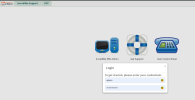
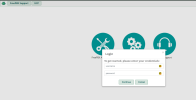
I moved my IncrediblePBX box and now when I try to log in to the web UI, I get the login box, where I put my user name and password, but the login button is missing. If I hit tab, it cycles through username, password, and the X to close. Hitting return does nothing. The box cuts off below the password box. Not only is there no login or cancel button, there is no space for one.

I tried rebooting via the SSH interface, but that didn't change anything. I'm wondering if I am paying the price for not shutting down the box before pulling the power.

Any suggestions?
 
It sounds like the login page is not properly loading.
Aside the usual refresh the browser cache, make sure that there is no extension barring javascript from executing etc, you might want to try to access the page by IP address rather than domain name if that's what you have been doing. It might help figuring out why the page is not loading completely.
I doubt that not properly powering off the machine would have cause this particular problem. That page is mostly static. (Unless during the "move" some data wasn't properly copied, but if that was indeed the case I would expect seeing worse problems or complete system failure)
Check your network and firewall settings too just in case.
 
"Move" in this case refers to a physical move: from my office to the network cubby. Same hardware, just in a new location.

I tried in two different browsers on my pc, and on my phone. All were missing the login button. I already access via IP address.
 
I have the same/similar issue. Although mine is a fresh install on a clean Ubuntu 24.04 vps using the incrediblepbx 2025 script. I am unable to log in to the admin panel due to no login button and when I ssh in the status takes a while to finally load. I am just using CTRL+C to bypass it right now.

One thing I did notice is this vps is unable to reach the ip for incrediblepbx.com. So I had to download the few files the script downloads from there and change the script to mv the file to the location needed and then let it untar and do its magic. So @mprhilL check and see if your machine can ping incrediblepbx.com now. That may be the common denominator.
 
Last edited:
I have the same/similar issue. Although mine is a fresh install on a clean Ubuntu 24.04 vps using the incrediblepbx 2025 script. I am unable to log in to the admin panel due to no login button and when I ssh in the status takes a while to finally load. I am just using CTRL+C to bypass it right now.

One thing I did notice is this vps is unable to reach the ip for incrediblepbx.com. So I had to download the few files the script downloads from there and change the script to mv the file to the location needed and then let it untar and do its magic. So @mprhilL check and see if your machine can ping incrediblepbx.com now. That may be the common denominator.
I just spun up another fresh install on a separate vps, this time using debian 12 and the Incrediblepbx2025.sh installer. Everything went through fine and install finished without craziness. I am able to log in via ssh and the updates check properly and the pbxstatus displays properly. This vps has no issues reaching incrediblepbx.com. However I still can not log into the admin web interface as it does not have the continue/cancel buttons. I am thinking there is something in the code keeping it from showing. I will dig into it.
 
My primary incrediblepbx is a 2027-u on crowncloud and it is working as expected. Comparing its login page to both the 2025 ones I see the Continue/Cancel button div class is not loading.
 
I just spun up another fresh install on a separate vps, this time using debian 12 and the Incrediblepbx2025.sh installer. Everything went through fine and install finished without craziness. I am able to log in via ssh and the updates check properly and the pbxstatus displays properly. This vps has no issues reaching incrediblepbx.com. However I still can not log into the admin web interface as it does not have the continue/cancel buttons. I am thinking there is something in the code keeping it from showing. I will dig into it.
There have been weird issues with Ubuntu 24.04.x releases. IncrediblePBX-2025 worked on the original 24.04 but not since the later dot releases releases. No one has looked into the issues since Debian-12 is what FreePBX has said they will support. If someone goes through the install on Ubuntu and figures out what the issue is, post for @wardmundy to look at.
 
There have been weird issues with Ubuntu 24.04.x releases. IncrediblePBX-2025 worked on the original 24.04 but not since the later dot releases releases. No one has looked into the issues since Debian-12 is what FreePBX has said they will support. If someone goes through the install on Ubuntu and figures out what the issue is, post for @wardmundy to look at.
Yeah that's why I wanted to test a fresh install on Debian 12. It does the same thing. My next step is to get the 2027 installer and try it. I kind of need another pbx this weekend and if I can't log in it's no bueno.

And that's another thing I noticed, the 2027 install is older than the 2025 one. I found that funny.
 
And that's another thing I noticed, the 2027 install is older than the 2025 one. I found that funny
I know that with the 2027 install the 2027 refers to the EOS year. Not sure about the 2025 one.
 
I'm running the install on a fresh Debian-12 cloud VM now. I'll see what happens.
 
What is odd though is that @mprhilL didn't do a new install. He simply moved a physical box. Wonder what version they are using.
 
I suspect there is some change in the FreePBX modules but I'll see what happens after my fresh install. I am not using the ISO's, just a fresh install on top of a fresh Debian-12.
 
@wardmundy, there is something wrong with the IncrediblePBX module for FreePBX. I can confirm the continue button is missing. I removed the IncrediblePBX module and it then presents the FreePBX login screen and that works.
Original showing no way to complete the login.
1760791666754.png

After removing the incrediblepbx module:
1760791780495.png
 
If I then reinstall the IncrediblePBX module, the login screen is again not functional.

@mprhilL @kameleon

Quick workaround for new installs:
1) After running the install script for IncrediblePBX-2025, reboot and let all the updates run.
2) Login to the Linux CLI and run fwconsole ma remove incrediblepbx
3) Refresh your browser cache
4) Browse back into IncrediblePBX and the default FreePBX login screen is displayed.
5) Use the system normally. All the Incredible goodies and firewall are there, just not the customized login screen and graphics.
 
Last edited:
@kenn10: I think there's something else causing the problem, too. When I copy the /admin/assets directory over from a working system, everything works. So it's the interaction with something else that is causing the problem. But I'll fire up a new VM just to see if I can find it.
 
Looks like the new framework 17.0.21.2 module breaks the IncrediblePBX module. Reverting to 17.0.19.32 should fix it temporarily:
Code:
fwconsole ma downloadinstall framework --tag=17.0.19.32
fwconsole reload
 
Last edited:
I was a little eager and removed the incrediblepbx module before I saw your post @wardmundy. How can I reinstall it? I did the forced version and it is working.
 
I was a little eager and removed the incrediblepbx module before I saw your post @wardmundy. How can I reinstall it? I did the forced version and it is working.
It should still be available in Module Admin -> Check Online as a download and install option. If not, let me know.
 
Then people will see this which will start another mess.
1760799009855.png
 
Get 3CX - Absolutely Free!

Link up your team and customers Phone System Live Chat Video Conferencing

Hosted or Self-managed. Up to 10 users free forever. No credit card. Try risk free.

3CX
A 3CX Account with that email already exists. You will be redirected to the Customer Portal to sign in or reset your password if you've forgotten it.
Back
Top