Hometech
Active Member
- Joined
- Mar 9, 2008
- Messages
- 257
- Reaction score
- 30


You don't have the current version of framework or core. That may be your problem. Have you updated all your modules from the command line?? If not, please do so.Yes I did but no luck. Still can not log into the Web GUI. I am running 2027-D when I look at the versions they are mostly 16.
IncrediblePBX is 17.0.3 is that OK? see attached txt file.
Thanks
I had to do the same thing and remove incredible. @Hometech how did you reinstall incrediblepbx 17.0.3? And it didnt break anything when you reinstalled? TIAOK I got it going I uninstalled with command fwconsole ma remove incrediblepbx
then got in to the FreePBX GUI and updated the Modules. Then SSH in and reinstalled incrediblepbx 17.0.3
and its all back and working!!
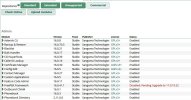
I just need to clean up this entry in Modules left over from me trying to install it through the command line not sure how to do it ? I restarted and its still there in red.
Can not install this version because PHP needs to be updated (PHP version 8.2.0 or higher is required, you have 7.4.33) and since everything is working now I did not want to possibly mess everything up.

This is the first time Sangoma has done something to FreePBX that badly broke the IncrediblePBX module. At one point, the IncrdiblePBX module had to be converted to run with PHP 8.2 so it would work with FreePBX-17. This last login screen issue wasn't just IncrediblePBX that it broke. Most people who compiled FreePBX from scratch using the open source modules had the same issue. I've always used the module manager in the GUI unless some craziness cropped up with FreePBX that forced me to drop to the command line and do a delete, update or install.(because I thought that it was said we should not upgrade through the Module Admin because it would brake incrediblepbx)
fwconsole ma remove incrediblepbx
fwconsole reload
fwconsole ma upgradeall
fwconsole reload
fwconsole ma downloadinstall https://filedn.com/lBgbGypMOdDm8PWOoOiBR7j/IncrediblePBX-Branding-Module/incrediblepbx-17.0.3.tgz
fwconsole reload
/root/sig-fix
/root/sig-fixEnvironment:
- OS: Rocky Linux 8.8
- IncrediblePBX module: 13.0.10
- FreePBX framework: 16.0.40.4
- FreePBX core: 16.0.68.20
The issue is in:
/var/www/html/admin/modules/incrediblepbx/views/login.php
The fallback stub for checkPasswordReminder() returns Promise.resolve() with no argument:
function checkPasswordReminder(currentForm) {
return Promise.resolve(); // resolves with undefined
}
Since handleMFAFunc() checks if(response) before triggering the form submit, a resolved Promise with undefined is treated as false, and the login form is never submitted. The user sees the credential dialog but clicking Continue does nothing — no POST request is ever sent to the server.
This only manifests when no MFA or password-reminder module is installed that would otherwise define a real checkPasswordReminder() function. In that case the stub is used, and the bug surfaces.
The fix is trivial:
return Promise.resolve(true);
This was discovered after significant debugging on a production system.

Link up your team and customers  Phone System Live Chat Video Conferencing
Hosted or Self-managed. Up to 10 users free forever. No credit card. Try risk free.

Check your inbox!
We’ve sent you an email. Click on the button in the email body to verify your email address – (if you can not find it, check your spam folder).
Upon verification you will be directed to the 3CX setup wizard.