FOOD FOR THOUGHT OpenVPN Client Can't Access Internet Sites

wardmundy

Nerd Uno
Joined
Oct 12, 2007
Messages
20,451
Reaction score
6,172
UPDATE: On some cell phones and on Windows and Linux platforms, you may observe that you can no longer reach your favorite web sites after enabling the OpenVPN client. Luckily there’s a simple fix that allows 10.8.0.x traffic to be sent through the OpenVPN tunnel while all other traffic is routed out of your standard network connection. Here’s the fix.

Make sure the .ovpn client config file includes the following lines:

Code:
pull-filter ignore redirect-gateway
route-nopull
route 10.8.0.0 255.255.255.0
 
UPDATE: On some cell phones and on Windows and Linux platforms, you may observe that you can no longer reach your favorite web sites after enabling the OpenVPN client. Luckily there’s a simple fix that allows 10.8.0.x traffic to be sent through the OpenVPN tunnel while all other traffic is routed out of your standard network connection. Here’s the fix.

Make sure the .ovpn client config file includes the following lines:

Code:
pull-filter ignore redirect-gateway
route-nopull
route 10.8.0.0 255.255.255.0

I already had the lines (from the sids in the MOD script -
Code:
"pull-filter ignore redirect-gateway"
# as well as the route 10.8.--
route 10.8.0.0 255.255.255.0

after adding 'route-nopull' (but while vpn already UP ) , realising need to stop openvpn to restart.

On a couple of unsuccessful stop commands and maybe a service networking restart, it blew away the route -4 table. Happily I had previously enabled ipv6 to play with, and was able to ip route add and I'm still wondering why and how I got bitten.

Found a link here - but will read further -
Overriding a pushed "route" in the client's config throws an error

Now I was happily using the vpn from my PC by routing PC > thro the RPi4b i2021 > 10.0.0.2xx Oracle-Ubuntu
And thro Pi -ipv4 > 192.168.1.1 router > inetv4. While PC inetv6 > fe80::1 router using 2a02:: /64 prefix.

I have commented out the route-nopull for now until I know what is what.

P.S. The router (ipv46) is on dynamic IPv4 with fqdn.dyn updater. so far not noticed any DN time.

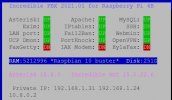
And Oh I noticed that pbxstatus ward had was testing for OVPN - which test does that use??
 
Last edited:
And Oh I noticed that pbxstatus ward had was testing for OVPN - which test does that use??
I just replaced nrservice with openvpn and adjusted the display from NR VPN to OpenVPN while deleting a space to the left of NR VPN.

As for OpenVPN routing, my test machine was Windows 11 and the route command alone didn't work. Not sure where I found the route-nopull tip, but that solved it. YMMV.
 
I just replaced nrservice with openvpn and adjusted the display from NR VPN to OpenVPN while deleting a space to the left of NR VPN.

As for OpenVPN routing, my test machine was Windows 11 and the route command alone didn't work. Not sure where I found the route-nopull tip, but that solved it. YMMV.
I reckoned on it being simples so here is a few of sed lines for the update and installer files
Code:
#!/bin/bash
#filename pbxstatus-update-for-OpenVPN
echo " "
echo "    pbxstatus-update-for-OpenVPN"
 sed -i 's/nrservice/openvpn/' /usr/local/sbin/pbxstatus
 sed -i 's/nrclient/vpn/' /usr/local/sbin/pbxstatus
 sed -i '/TOP=/s/knockd   /knockd  /' /usr/local/sbin/pbxstatus
 sed -i '/TOP=/s/ZbNR VPN/ZbOpenVPN/' /usr/local/sbin/pbxstatus

ovpnfix.JPG
 
Get 3CX - Absolutely Free!

Link up your team and customers Phone System Live Chat Video Conferencing

Hosted or Self-managed. Up to 10 users free forever. No credit card. Try risk free.

3CX
A 3CX Account with that email already exists. You will be redirected to the Customer Portal to sign in or reset your password if you've forgotten it.
Back
Top