
You are using an out of date browser. It may not display this or other websites correctly.
You should upgrade or use an alternative browser.
You should upgrade or use an alternative browser.
FYI Oracle Cloud "Always Free" not so free anymore?
- Thread starter KNERD
- Start date

ostridge
Guru
- Joined
- Jan 22, 2015
- Messages
- 1,815
- Reaction score
- 630
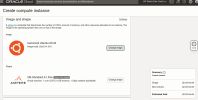
I only have one other instance running, and tried to create this one today with no other storage or boot volumes except for the one already running.

If you haven't upgraded to paid as thumbnail, - then there should have been some sort of resource warning?

KNERD
Well-Known Member
- Joined
- Mar 9, 2014
- Messages
- 2,111
- Reaction score
- 821
View attachment 4930
If you haven't upgraded to paid as thumbnail, - then there should have been some sort of resource warning
I upgraded to paid, and have built other instances before without any fee as long as I stay within the 4 core/24GB of RAM.
The one instance I have now is not occurring any fees at all with 1 Core/6GB of RAM.
I think I've seen this behavior posted before elsewhere. Don't remember if it was on the Oracle community forum or Reddit. As long as your total storage usage is under 200GB it should be free. If you're certain that one instance's boot volume is the only block storage being used then you'll need to open a ticket with their support to look into it if you actually get charged at the end of the billing cycle.
KNERD
Well-Known Member
- Joined
- Mar 9, 2014
- Messages
- 2,111
- Reaction score
- 821
I upgraded to the Paid Account so I am able to get an instance always. In addition, while I have enabled to use more regions, I cannot figure out how to even change to another region. It seems no others are available to select.@KNERD A1 instances have been in short supply in a lot of Oracle Regions. E2 instances seem to be available.
KNERD
Well-Known Member
- Joined
- Mar 9, 2014
- Messages
- 2,111
- Reaction score
- 821
I think I've seen this behavior posted before elsewhere. Don't remember if it was on the Oracle community forum or Reddit. As long as your total storage usage is under 200GB it should be free. If you're certain that one instance's boot volume is the only block storage being used then you'll need to open a ticket with their support to look into it if you actually get charged at the end of the billing cycle.
I am way under 200GB.
And this is the only thing holding data


kenn10
Well-Known Member
- Joined
- Dec 16, 2007
- Messages
- 4,711
- Reaction score
- 3,087
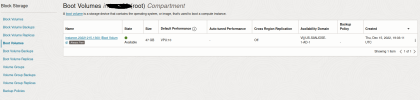
Have you gone to Storage > Block Storage > Boot volumes and made sure that old instance boot volumes are deleted? If you don't check that box when you delete an instance, the boot volume stays and eats up your free space for other instances. If you have 3 old boot volumes, the system counts those as instances.I am way under 200GB.
Last edited:
KNERD
Well-Known Member
- Joined
- Mar 9, 2014
- Messages
- 2,111
- Reaction score
- 821
If you see the screen shot I posted above, that is the most current view of the Boot Volumes.Have you gone to Storage > Block Storage > Boot volumes and made sure that old instance boot volumes are deleted? If you don't check that box when you delete an instance, the boot volume stays and eats up your free space for other instances. If you have 3 old boot volumes, the system counts those as instances.
And at @LitleBill also says, he is seeing the same $2 fee.
KNERD
Well-Known Member
- Joined
- Mar 9, 2014
- Messages
- 2,111
- Reaction score
- 821
I think I got an answer from this Reddit post from 2021
Now the question is how do we change to another region or AD?
"Finally got a straight answer from support and it's as I suspected - Always Free block storage is limited to certain ADs. Just because the the AD you choose for your compute instance is Always Free doesn't mean that it's eligible for Always Free block storage,"
Now the question is how do we change to another region or AD?

dallas
Well-Known Member
- Joined
- Oct 21, 2007
- Messages
- 1,032
- Reaction score
- 331
I’m on the free so I’m not sure… but I understood on the paid plan you can change AD in the console. On the free plan you will need to register using a different email address. But I could be wrong.Now the question is how do we change to another region or AD?
ostridge
Guru
- Joined
- Jan 22, 2015
- Messages
- 1,815
- Reaction score
- 630
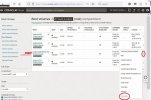
How to terminate the unattached boot volume: Goto Storage orIf you have 3 old boot volumes, the system counts those as instances.
Block Storage => Block volumes => Boot volumes
Last edited:
kenn10
Well-Known Member
- Joined
- Dec 16, 2007
- Messages
- 4,711
- Reaction score
- 3,087
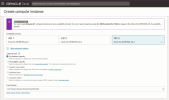
When you create an instance, you can choose from various primary availability domain locations. For example, on the East Coast locations, I frequently have to change from AD3 to AD1 or AD2 to get an A1 instance. I don't know of a way you can move an existing instance to a different location. I'm on the always free tier so I have no knowledge how to change your region.Now the question is how do we change to another region or AD?
ostridge
Guru
- Joined
- Jan 22, 2015
- Messages
- 1,815
- Reaction score
- 630
My guess Is you would need both a different email address as well as a different Credit Identity; as they did insist on card verification on signup.I'm on the always free tier so I have no knowledge how to change your region.
KNERD
Well-Known Member
- Joined
- Mar 9, 2014
- Messages
- 2,111
- Reaction score
- 821
Their documentation on creating an instance in a different region is seriously outdated. Menu items specifically mentioned seem to no longer exist.
And for changing AD, seems there is no other options.
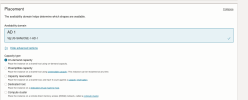
Oracle Cloud is a serious mess.
Probably time to contact support.
And for changing AD, seems there is no other options.
Oracle Cloud is a serious mess.
Probably time to contact support.
ostridge
Guru
- Joined
- Jan 22, 2015
- Messages
- 1,815
- Reaction score
- 630
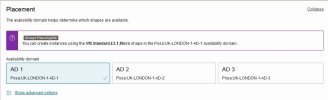
On London-1 there are 3 ADs. as well as Fault domainsTheir documentation on creating an instance in a different region is seriously outdated. Menu items specifically mentioned seem to no longer exist.
And for changing AD, seems there is no other options.
View attachment 4937
Oracle Cloud is a serious mess.
Probably time to contact support.
kenn10
Well-Known Member
- Joined
- Dec 16, 2007
- Messages
- 4,711
- Reaction score
- 3,087
Who are rapidly fleeing California and the West coast ..... https://buildremote.co/companies/companies-leaving-california/That is very weird. All those tech companies in the Silicon Valley area,
Last edited:


Forum statistics
Get 3CX - Absolutely Free!
Link up your team and customers  Phone System Live Chat Video Conferencing
Hosted or Self-managed. Up to 10 users free forever. No credit card. Try risk free.

Verify your Email
Check your inbox!
We’ve sent you an email. Click on the button in the email body to verify your email address – (if you can not find it, check your spam folder).
Upon verification you will be directed to the 3CX setup wizard.