TRY THIS Oracle Cloud with iPBX 2021 "404 not found"

KNERD

Well-Known Member
Joined
Mar 9, 2014
Messages
2,133
Reaction score
836
When visiting the web interface either by http/https and either IP address, or domain name I am getting "404 page not found."
Even gone as far as including the /admin/index.php with same result.

I have made double sure the ports are open in the Security List Details.

Checking the apache2 access log, it is empty. Nor I am not seeing anything relevant in the error log.

Anyone else got some ideas?
 
Last edited:
All of this makes me glad I used the ec2 image and custom loaded Debian. Works flawlessly for me but is a little harder to set up since you have to upload Debian to a storage bucket and then create your instance from the custom image. Sounds like the Ubuntu stuff is still too buggy.
 
Being the AMD version, and not the ARM one, I would of expected better results
 
Sounds like a firewall issue. Have you tried activating OpenVPN and accessing web via 10.8?
 
When visiting the web interface either by http/https and either IP address, or domain

Your instance subnet has a security rule to allow port 22 by default Yes?
You have ssh access Yes? via port 22 or a different port using 'putty' on yout PC.

Your Openvpn tunnel tun0 is UP Yes? If not you need to post in different thread.

Have you set up some virtual hosts for that? in
/etc/pbx/httpdconf/public.conf If No? then follow thread:

Access the webserver by fqdn

Do create some virtual hosts in /etc/pbx/httpdconf/public.conf

Make sure that your instance iptables is allowing your IPs and your fqdn
 
Last edited:
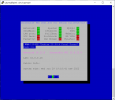
i think this could be the issue. Now all of a sudden, something has changed and now missing:


2022-06-29.png
 
Look at the next to last line
EDIT You do NOT need the externip to show up in the pbxstatus page. The external public ip is actually what you connected with, even if doing the tunnelling thingy; as the tunnel is connecting from that IP.
However:
That was one of the auto updates. have you done (from the user ubuntu directory /home/ubuntu
And the do
Code:
sudo login root
and enter your root-secure-password. That starts the updates.

In the list you should see
"" Checking for updateDEB12. INSTALLED: Public IP query for pbxstatus updated

If it still is not there you can delete the file with this one liner
Bash:
chattr -i /etc/pbx/.updateDEB12 && rm -f /etc/pbx/.updateDEB12
## and then re-run the auto installer
/root/update-IncrediblePBX

The UCP is also Down - Is that module enabled in the freepbx GUI look in -
Code:
Admin -> Module Admin
>User Control Panel      15.0.14.2    Stable      Sangoma Technologies Corporation    AGPLv3+   Enabled
 
Last edited:
Did you perhaps wander off the reservation in doing this install? Or did you follow the tutorial?

Be sure to login as root via SSH using OpenVPN once you complete the install. That will kick off the Automatic Update Utility and fix many of the known issues that have arisen.
 
Last edited:
Did you perhaps wander off the reservation in doing this install? Or did you follow the tutorial?

Be sure to login as root via SSH using OpenVPN once you complete the install. That will kick off the Automatic Update Utility and fix many of the known issues that have arisen.
I rebuilt the VPS thus OpenVPN is not needed. I missed a couple of steps on the guide.

@ostridge I was using "su -" to login. Your suggestion of "sudo login root" made the external IP come up.

Checked the firewall and all looks okay.

Let me go and check /etc/pbx/httpdconf/public.conf
 
Well, not touched this thing since I last posted, and again out of the blue SSH is blocked again.

I give up at this point.
 
and again out of the blue SSH is blocked again.

I give up at this point.
Well what exactly - how ssh from putty on widowz?
for example I have a password already set up for root user - I think that will have been 'sudo passwd root' or similar?

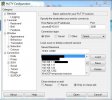
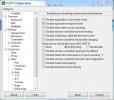
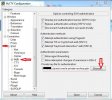
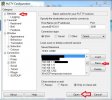
Connecting with putty see attached thumbnails(4)

Connection looks like
Bash:
Using username "ubuntu".
Authenticating with public key "imported-openssh-key"
Welcome to Ubuntu 20.04.4 LTS (GNU/Linux 5.13.0-1036-oracle aarch64)

 * Documentation:  https://help.ubuntu.com
 * Management:     https://landscape.canonical.com
 * Support:        https://ubuntu.com/advantage

  System information as of Thu  7 Jul 16:15:31 BST 2022

  System load:  0.11               Processes:               200
  Usage of /:   35.3% of 44.97GB   Users logged in:         0
  Memory usage: 3%                 IPv4 address for enp0s3: 10.0.0.207
  Swap usage:   0%                 IPv4 address for tun0:   10.8.0.1

 * Super-optimized for small spaces - read how we shrank the memory
   footprint of MicroK8s to make it the smallest full K8s around.

   https://ubuntu.com/blog/microk8s-memory-optimisation

30 updates can be applied immediately.
1 of these updates is a standard security update.
To see these additional updates run: apt list --upgradable


*** System restart required ***
Last login: Fri Jul  1 01:44:33 2022 from 192.168.1.2
ubuntu@instance-20211010-2136:~$ sudo login root
Password:
Welcome to Ubuntu 20.04.4 LTS (GNU/Linux 5.13.0-1036-oracle aarch64)

 * Documentation:  https://help.ubuntu.com
 * Management:     https://landscape.canonical.com
 * Support:        https://ubuntu.com/advantage

  System information as of Thu  7 Jul 16:15:57 BST 2022

  System load:  0.12               Processes:               204
  Usage of /:   35.3% of 44.97GB   Users logged in:         1
  Memory usage: 3%                 IPv4 address for enp0s3: 10.0.0.xx
  Swap usage:   0%                 IPv4 address for tun0:   10.8.0.1

 * Super-optimized for small spaces - read how we shrank the memory
   footprint of MicroK8s to make it the smallest full K8s around.

   https://ubuntu.com/blog/microk8s-memory-optimisation

30 updates can be applied immediately.
1 of these updates is a standard security update.
To see these additional updates run: apt list --upgradable


*** System restart required ***
Last login: Thu Jul  7 16:15:32 2022 from 192.168.1.2
ubuntu@instance-20211010-2136:~$ sudo login root
Password: [yoursecret]

## At this point you see "This update utility . . . . . . ."
 

Attachments

  • Putty-01-Tun0-Oracle.JPG
    Putty-01-Tun0-Oracle.JPG
    71.5 KB · Views: 3
  • Putty-02-Tun0-Oracle_Terminal-Features_DisableAppKeypadMode.JPG
    Putty-02-Tun0-Oracle_Terminal-Features_DisableAppKeypadMode.JPG
    81.3 KB · Views: 3
  • Putty-03-Session-SSH-Auth_PrivateKeyFileForAuth-ppk-file.JPG
    Putty-03-Session-SSH-Auth_PrivateKeyFileForAuth-ppk-file.JPG
    110.2 KB · Views: 3
  • Putty-04-Session_Save-then-Open.jpg
    Putty-04-Session_Save-then-Open.jpg
    105 KB · Views: 3
Well what exactly - how ssh from putty on widowz?
for example I have a password already set up for root user - I think that will have been 'sudo passwd root' or similar?

Connecting with putty see attached thumbnails(4)

Connection looks like
Bash:
Using username "ubuntu".
Authenticating with public key "imported-openssh-key"
Welcome to Ubuntu 20.04.4 LTS (GNU/Linux 5.13.0-1036-oracle aarch64)

 * Documentation:  https://help.ubuntu.com
 * Management:     https://landscape.canonical.com
 * Support:        https://ubuntu.com/advantage

  System information as of Thu  7 Jul 16:15:31 BST 2022

  System load:  0.11               Processes:               200
  Usage of /:   35.3% of 44.97GB   Users logged in:         0
  Memory usage: 3%                 IPv4 address for enp0s3: 10.0.0.207
  Swap usage:   0%                 IPv4 address for tun0:   10.8.0.1

 * Super-optimized for small spaces - read how we shrank the memory
   footprint of MicroK8s to make it the smallest full K8s around.

   https://ubuntu.com/blog/microk8s-memory-optimisation

30 updates can be applied immediately.
1 of these updates is a standard security update.
To see these additional updates run: apt list --upgradable


*** System restart required ***
Last login: Fri Jul  1 01:44:33 2022 from 192.168.1.2
ubuntu@instance-20211010-2136:~$ sudo login root
Password:
Welcome to Ubuntu 20.04.4 LTS (GNU/Linux 5.13.0-1036-oracle aarch64)

 * Documentation:  https://help.ubuntu.com
 * Management:     https://landscape.canonical.com
 * Support:        https://ubuntu.com/advantage

  System information as of Thu  7 Jul 16:15:57 BST 2022

  System load:  0.12               Processes:               204
  Usage of /:   35.3% of 44.97GB   Users logged in:         1
  Memory usage: 3%                 IPv4 address for enp0s3: 10.0.0.xx
  Swap usage:   0%                 IPv4 address for tun0:   10.8.0.1

 * Super-optimized for small spaces - read how we shrank the memory
   footprint of MicroK8s to make it the smallest full K8s around.

   https://ubuntu.com/blog/microk8s-memory-optimisation

30 updates can be applied immediately.
1 of these updates is a standard security update.
To see these additional updates run: apt list --upgradable


*** System restart required ***
Last login: Thu Jul  7 16:15:32 2022 from 192.168.1.2
ubuntu@instance-20211010-2136:~$ sudo login root
Password: [yoursecret]

## At this point you see "This update utility . . . . . . ."
I said BLOCKED, not getting errors.

Not touching the thing, then all of a sudden can't even getting into the system out of the blue means something is terribly wrong. So I give up. Not interested in wasting more time with that Oracle nonsense. But thanks for taking the time to respond.
 
Last edited:
@KNERD: I would only add that OpenVPN solved all of our connectivity problems with Oracle Cloud. SSH root logins have been flawless while performance is nothing short of spectacular. Never could get the other addresses to work reliably.
 
I
I would only add that OpenVPN solved all of our connectivity problems
This setup also works solidly on dynamic ipv4 addresses, via fqdn.ddns.dyn provider and with auto-updates using an updater like ddclient, or an /etc/crontab one liner.
 
Debian 10 on the Oracle Free EC2 instance is flawless. Its as fast or faster than any of my paid VPS's. I've made it my hot standby. I don't understand why Ubuntu has to be such a PITA for so many people.
 
As a work around for accessing the Oracle VM.Standard.A1.Flex , I found it useful to create an Oracle VM.Standard.E2.1.Micro shape instance, and for which access via port 22 is default; and username is 'opc'.
Next after accessing the VM.Standard.E2.1.Micro shape instance, after logging in with sudo login root or similar to the E2.1 and cd /root/ , as well
Then I made a small script sort of thus (this untested - but you get the idea, I hope? )
Bash:
#!/bin/bash
##filename=  ssh-to-oraclecloud-ubuntu@vpn-port22  #(or whatever port you set )
if [ -z "$1" ] ;then
echo "USAGE: ssh-to-oraclecloud-ubuntu@vpn-port22  /root/.ssh/ubuntu" ##where 'ubuntu' is the renamed 'private.key'
fi
echo "     Client Credentials found"
ssh -p 22 -i /root/.ssh/ubuntu [email protected]  #  where *123 is IP for your instance
else
echo "     Client Credentials not found"
exit 1
fi
 
Last edited:
I have been using Putty to access the instance. Just today. but accident, I double clicked on the instance name and was immediately logged in. Go figure. No telling what is going on with that nonsense.
 
Get 3CX - Absolutely Free!

Link up your team and customers Phone System Live Chat Video Conferencing

Hosted or Self-managed. Up to 10 users free forever. No credit card. Try risk free.

3CX
A 3CX Account with that email already exists. You will be redirected to the Customer Portal to sign in or reset your password if you've forgotten it.
Back
Top