SOLVED Problem with inbound calls from Bulk Solutions

craigb

New Member
Joined
Jan 13, 2022
Messages
20
Reaction score
0
EDIT: this should have been in the Help sub-forum. Sorry for posting it here.

I've set up a new IncrediblePBX 2025 system. It appears to be working correctly with most calls, but randomly, inbound calls fail oddly.

A caller dials one of our DID's, and the BulkVS call ladder shows that IncrediblePBX is responding and ringing, and in fact, the caller hears ringback.
However, there is no record of the call in the system logfiles (including when PJsip Debug is on. The call is not routed to the endpoint/destination on the IncrediblePBX system. The call seems to be lost in the software with no record in the systemlog file, ringing forever without actually being routed to where it should go.

However, the registration requests/responses are working correctly for the trunk, and are recorded in the logfile.

The Asterisk SIP settings have the correct External IP and local networks added. I've added the IP's of all of the BulkVS servers to the firewall with add-ip. In the local gateway/router, I've port-forwarded the SIP ports and RTP ports for the BulkVS servers, and RTP ports from any IP to the IncrediblePBX server. The gateway/router logs show nothing from BulkVS being blocked. All BulkVS server IP addresses are entered in the trunk's Match-Permit field. Our ISP has issued us a fixed IP address.

I'm seeing this behavior on both registration trunks and on our IP-Auth trunk, although it is much more prevalent on the registration trunk.
I've checked all the settings I know to check, and they all appear correct. I've deleted and re-created the trunk several times, and this issue remains.

I'm not sure what I'm missing in my troubleshooting, or what setting I have failed to set correctly. With no record of these calls in the system logfile, I'm at a loss of how to troubleshoot, and am looking for advice.

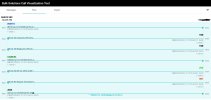
BulkVS call ladder from one of these "lost" calls attached.
 

Attachments
  • 20250128_callProg.JPG
    20250128_callProg.JPG
    113.3 KB · Views: 9
Last edited:
The call ladder that you've posted simply indicates that about 15 or 16 seconds into the call the calling party did something to cancel the call. That's a very short duration as typically the the timeout period for the calling party is usually 30 seconds or more. This might be a separate or different issue from what you're describing.

As for the fact that IPBX is not properly servicing the call - because that's basically what seems to be happening here, have you checked your inbound routes? Are they properly handling the DIDs? Proper matching of the phone numbers (10 digits, 11 digits, E164 etc.)?
 
The call was made by me, and I was next to the endpoint that should have received the call. After 4 rings with no delivery to the endpoint and no entries in the system logfile, I cancelled the call. This was one of 10 or more calls I made last night while trying to troubleshoot the issue. I see failed calls in other call ladders that are in ringing state for 30-40 seconds and longer with no entries in the systemlogfile, while the endpoint the call was supposed to go to has VM pickup after 3 rings (~18 sec). This call ladder was intended to be representative of the issue. It is not a problem with a singular call.

Since about 2/3 of the calls are routed correctly through the same trunk and inbound route, I don't think this is an inbound route issue, but I could be wrong. I don't know what is different about the calls that get "lost" and the calls that correctly route to the endpoint. Calls that work and calls that get "lost" are both coming inbound via the same Trunk and Inbound Route.
I have checked and rechecked the inbound route and trunk settings. Everything is set up for 11 digits.

If a DID is sent to an IncrediblePBX with no inbound route assigned, the call is normally sent to a system message that says that the number is not in service, and then it reads back the DID to the caller and then terminates the call. That is not happening either on either of the two currently unassigned DIDs (one on each of the IP-Auth trunk and the Registration trunk.

The oddest thing is no entries in the system log on these "lost" calls, while calls that do complete properly have normal call progress entries in the log. Even failed calls, calls where no RTP stream can be negogiated, etc. usually have entries in the system log, especially when pjsip debug is on. If a call comes in it should trigger entries on call progress in the system log. Here, we are seeing the SIP provider receive call progress messages, but there's nothing in the IncrediblePBX logs. Most strange.
 
Last edited:
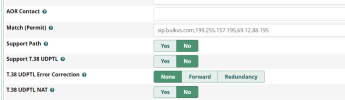
First of all, are you using registration on the trunks of IP based verification with BulkVS? If IP based registration, it sounds like you may be missing one of the BulkVS ip addresses on the Match= setting on the trunk. I simply use:
Match=sip.bulkvs.com instead of a range of IP's and don't have an issue. I also added a couple of IP addresses to handle their inbound SMS. Bulkvs has just changed some of their IP addresses but if you use the sip.bulkvs.com, it handles all that for you. If the calls come from a non-whitelisted IP, they won't get through the firewall and thus not show up in the system log.

This thread covers recent changes to BulkVS IP addresses: https://www.voip-info.org/forum/threads/changes-in-bulkvs-ip-addresses.28048/

1738098505465.png
 
I think I've captured all of the BulkVS Ip addresses in Match-Permit. These are the ones I'm using. All of these are added to IPtables with add-ip, and are port forwarded on the gateway/router as well as being in the match-permit field of each trunk:

BulkVS Ip addresses:
sip.bulkvs.com
199.255.157.198
162.249.171.198
23.190.16.198
76.8.29.198
69.12.88.198

The newest addition is 23.190.16.198. Address 69.12.88.198 will be decommissioned on Feb 11, according to the message I received from BulkVS.

Bulk VS only lists the following IP addresses in their interconnection guide.
162.249.171.198
23.190.16.198
76.8.29.198

The others are ones I've found in various help threads. In the logs for calls that work, i see the 162.249 and 76.8 addresses regularly.

Also, BulkVS is receiving SIP responses from IncrediblePBX on these "lost" calls. So the communication between BulkVS and IncrediblePBX seems to be open. I see registration messages between the servers happening while a lost call is in ringing state according to the phone I'm calling from and according to the call ladders posted by BulkVS.
 
Last edited:
Are all the DID's set to the same system trunk on the BulkVS side? If none are getting thru, then I don't think it is specifically the PBX. If the BulkVS call ladder shows the call, dig into that to see what IP address it says the call is coming from. Then make sure that is one of your whitelisted IP's.

I'm looking at one of my inbound calls and it shows a known BulkVS IP address:
1738099631179.png
 
I'll double check the firewall entered ip addresses as well. I've been assuming that the forwards/firewall was the issue for about a week now. I may have missed something in the many times I've gone over the settings.

The small non-profit I've built this system for (I'm a volunteer) has a number of DIDs from before they shrank a couple of years back.

The currently active DIDs are in the IP-Auth trunk. All the DIDs on this trunk have inbound routes that send calls to endpoints.
However, calls to the main number get "lost" about 1/8 to as much as 1/3 of the time. (One of 8 calls to one of three calls lost.) Their inbound call volume is low, less than 30/day. 95%+ of inbound calls are to the main number.

The currently unused (stored) DIDs are in the registration trunk, do not have inbound routes, and should all go to the "not in service" system message.
For testing I've built an inbound route for the first DID assigned to the registration trunk that sends the call from that DID to VM directly. That route loses 90+% of calls to the DID. Which leads me to think its firewall/forwarding/match-permit issues. But I've been unable to find my error so far.
 
What kind of firewall? What port rules do you have?
Usually when "some" calls are missing, it's an issue with a missing IP on the trunk, OR a firewall ALG misbehaving (or missing IP's from the inbound route), and sometimes if port 5061 is used instead of 5060 for pjsip weird things happen.
 
Firewall is Ubiquiti UDM-Pro running latest firmware version.
I've gone through all the IP addresses in the firewall (port forwards for 5060 from each BulkVS Ip address (listed earlier) and Port Forward of 10000-20000 from any IP to the IncrediblePBX server

I've checked all the entries in the IncrediblePBX iptables to make sure all BulkVS IP addresses are permitted for 5060.

I've checked IP addresses in firewall on IncrediblePBX server, and in Match-Permit and on firewall. All addresses above are proper in all places.

I created a test trunk group account on BulkVS this afternoon. I created a trunk on my home IncrediblePBX2021 server and the same trunk on the IncrediblePBX2025 server. If I enable the trunk on the 2021 server, things work exactly as expected - calls to DIDs with no inbound route get sent to the no service recording and entries appear in the system log. If I disable the trunk on IncPBX2021 and enable it on INCPBX2025, then the calls receive ringback instead of being sent to the no service message, there are no entries in the system log.
Somewhere in the incoming call processing there is a problem on my IncPBX2025 install.
 
I'd chance turning off iptables for just a minute and test the calls then in that case. If you see nothing in the CLI (ie when you watch live using core set verbose 3 or 10 or something, then the firewall must be blocking it). Could be something weird with fail2ban as well.
 
SIP-ALG is disabled on the UDM-Pro

I checked Fail2Ban, there are no banned IP addresses.

Is there a easy way to stop or suspend Iptables in Ubuntu 24.04.01 with the IncPBX2025 install or do I need to do the save, kill, restore routine? I see that one of the parts of the del-acct script seems to be able to do it.
 
Log in as root user or su root from another user.
sysetmctl stop iptables
systemctl stop nftables
systemctl stop fail2ban

Then run your tests. When finished testing, reboot the system.

Unless you have a corrupted install of IncrediblePBX-2025 or improper trunk settings, this will not be a problem with the PBX.

Just for your edification, I am running five IncrediblePBX-2025 systems on Debian-12 in the cloud (Rack Nerd, Vultr, and Crown Cloud instances.) I have no issues and there is no intervening router/firewall except for the firewall in IncrediblePBX. I use BulkVS for all inound calls and have never experienced problems like what you are seing. Since some calls are getting through, the issues are about 90% likely firewall/router problems. Perhaps you have NAT issues with the router or a timing issue on the trunk on the PBX side.

If you can't sort out the router issues, the cloud VM's can be had for less than $25/year. Here is a west coast Crown Cloud link: Los Angeles: https://crowncloud.net/clients/cart.php?a=add&pid=382

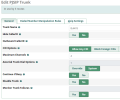
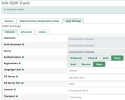
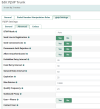
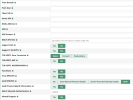
Here are screen shots of my working trunk setup using IP authentication with Bulkvs instead of registration. If you are using registration to Bulkvs, insure you have this on the advanced tab of the pjsip Bulkvs trunk:
1738149019145.png

1738146962367.png
1738147036463.png
1738147165363.png
1738147288106.png
 
Last edited:
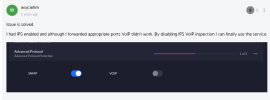
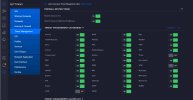
Here is something I found regarding VOIP through the UDM-Pro router. I don't know if this relates to your issue or not: Any SIP settings in the UDP-Pro are for Ubiquiti PBX and should not be used for a different PBX.
1738148038172.png
 
We are still having issues here. I have disabled SIP-ALG on the UDM pro. I also disabled Threat Protection for VoIP.

I see the screen shot you posted, but have not been able to find that screen in the UDM-Pro UI. Can you post a path to it? (Our system is on network version 9.0.108)
 

Attachments

  • 20250130-1.JPG
    20250130-1.JPG
    103.8 KB · Views: 2
Last edited:
In response to message #12, these problems are happening on an Ip-Auth trunk. There isn't any issue with authentication. This is a inbound call delivery/handling issue.

I, too believe this is a firewall/or configuration issue, but for the life of me I can't understand why some calls are delivered correctly, while other calls on the same trunk from BulkVS arriving less than a minute before or after don't get delivered. And I'm not understanding why there are no log entries for these calls, while BulkVS records responses from the PBX arriving from our public IP.

I checked with our ISP, and they claim that they do not filter or intercept any SIP traffic. But at this point I'm not so sure they are telling the truth? Unfortunately, I don't have a second ISP to try.
 
Last edited:
In response to message #12, these problems are happening on an Ip-Auth trunk. There isn't any issue with authentication. This is a inbound call delivery/handling issue.

I, too believe this is a firewall/or configuration issue, but for the life of me I can't understand why some calls are delivered correctly, while other calls on the same trunk from BulkVS arriving less than a minute before or after don't get delivered. And I'm not understanding why there are no log entries for these calls, while BulkVS records responses from the PBX arriving from our public IP.

I checked with our ISP, and they claim that they do not filter or intercept any SIP traffic. But at this point I'm not so sure they are telling the truth? Unfortunately, I don't have a second ISP to try.
We need to see actual logs from the PBX. This doesn't appear to be a firewall issue. The call ladder shows the incoming INVITE from BulkVS, if the firewall was blocking the INVITE then there wouldn't be replies being seen. The INVITE would be retransmitted until it timed out.

There are provisional replies (100 Trying and 180 Ringing) being sent back from your side which means something is responding to the INVITE, which should be the PBX. Even more so, when you hung up the call from your mobile the CANCEL request was sent (which is a new request outside the INVITE) and the PBX sent back a 200 OK to the CANCEL (which it should) and sent a 487 Request Cancelled which BulkVS ACK'd.

All of this indicates that the call not only made it to the PBX but the PBX responded properly as it should. So now we need to see what is happening to this call when it hits the PBX. You will need to do the following:

- SSH into the PBX
- Log into the Asterisk console with verbose logging by doing: asterisk -rvvvvvvvvvv
- Enable PJSIP logging with: pjsip set logger on
- Make test calls to this BulkVS DID
- Copy and paste the output from the console to pastebin or another paste service and give us the link.
 
SOLVED:

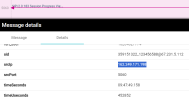
In chasing through the pcap exports from the BulkVS call ladders on failed calls, found that the user agent was listed as an ATA that is on the network, but was not part of this PBX installation. That ATA was connected to a completely different BulkVS account as a registration trunk. Apparently, despite the port forwards in the UDM, the natting was still sending some messages from BulkVS to the ATA. I deleted the settings and disabled the connection in the ATA, recycled the BulkVS trunk, and now it appears that calls aren't getting "lost" - meaning they were being sent to the ATA instead of IncrediblePBX.

This explains the responses from our fixed IP address to BulkVS, and the ringing response. They were coming from the ATA. And why the IncPBX logs showed nothing.

Thank you for all your assistance in chasing this. I had totally missed the fact that that old ATA was still connected to the network.
 
Last edited:
Get 3CX - Absolutely Free!

Link up your team and customers Phone System Live Chat Video Conferencing

Hosted or Self-managed. Up to 10 users free forever. No credit card. Try risk free.

3CX
A 3CX Account with that email already exists. You will be redirected to the Customer Portal to sign in or reset your password if you've forgotten it.
Back
Top