
You are using an out of date browser. It may not display this or other websites correctly.
You should upgrade or use an alternative browser.
You should upgrade or use an alternative browser.
TIPS Problems setting up on windows 11
- Thread starter Liquid
- Start date

dallas
Well-Known Member
- Joined
- Oct 21, 2007
- Messages
- 1,034
- Reaction score
- 332
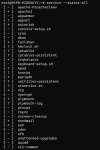
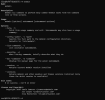
So the pbx doesn't have an IP address. You need to fix this.Also it doesnt show lan ip when doing pbxstatus
dallas
Well-Known Member
- Joined
- Oct 21, 2007
- Messages
- 1,034
- Reaction score
- 332
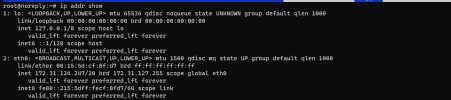
Before running the PBX installer you need to make sure that your Ubuntu install can get an IP address from your router OR you set a static IP address. When you achieve that only then run the PBX installer.
Have you read this Nerd Vittles article on WSL? https://nerdvittles.com/deploying-incredible-pbx-with-microsoft-windows-11/
Have you read this Nerd Vittles article on WSL? https://nerdvittles.com/deploying-incredible-pbx-with-microsoft-windows-11/
Last edited:
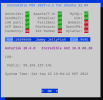
the gui is on webmin right? How can I access if it doesnt launch?login the the pbx GUI and go to Setting > Asterisk SIP Setting > NAT Settings and click Detect Network Settings and report the results.
dallas
Well-Known Member
- Joined
- Oct 21, 2007
- Messages
- 1,034
- Reaction score
- 332
No. In a web browser go to and login.the gui is on webmin right?
You don't use webmin to administer the PBX.
srtuff under nat is all blank
No. In a web browser go to and login.
You don't use webmin to administer the PBX.
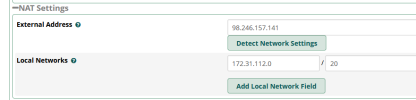
Which company do you recommend for SIP and to buy DID number?looks like you are good to go!


Forum statistics
Get 3CX - Absolutely Free!
Link up your team and customers  Phone System Live Chat Video Conferencing
Hosted or Self-managed. Up to 10 users free forever. No credit card. Try risk free.

Verify your Email
Check your inbox!
We’ve sent you an email. Click on the button in the email body to verify your email address – (if you can not find it, check your spam folder).
Upon verification you will be directed to the 3CX setup wizard.