
so right now I have two remote incredible pbx boxes connected over network using a pjsip trunk.
the trunk name is the same on both boxes and they use the same password for auth.
here is a screenshot:
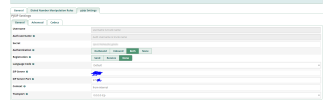
the config is the same on both machines just with a different ip.
one box has 172.16.0.0/24 subnet the other the other has 172.17.0.0/24, they are vpned together (vpn runs on the router) and can see each other just fine. (I have bgp running on my network)
to get remote BLF working on remote sites I have followed this guide, but I am yet to get remote hints working.
only thing I get is that after adding the line to "extensions_custom.conf" I get green blf light on phones and "core show hints'|grep -i (remote ext)" show "State:Idle Presence:not_set" , however if i were to call the ext or the user was using the ext the state doesnt change and It's always set to idle.
even if I were to delete all the config lines in "pjsip.endpoint_custom.conf" the ext behavior is the same, always at idle.
so what is the correct way to do this?
should I add the trunk password to the "pjsip.endpoint_custom.conf" config?
here is my conf:
trunk name is : site-to-site-link and it's running over tcp
siteA pjsip.endpoint_custom.conf:
siteA extensions_custom.conf:
siteB pjsip.endpoint_custom.conf:
siteB extensions_custom.conf:
*siteA's extensions are 1XX,2XX,3XX and siteB's extensions are 4XX,5XX,6XX.
the trunk name is the same on both boxes and they use the same password for auth.
here is a screenshot:
the config is the same on both machines just with a different ip.
one box has 172.16.0.0/24 subnet the other the other has 172.17.0.0/24, they are vpned together (vpn runs on the router) and can see each other just fine. (I have bgp running on my network)
to get remote BLF working on remote sites I have followed this guide, but I am yet to get remote hints working.
only thing I get is that after adding the line to "extensions_custom.conf" I get green blf light on phones and "core show hints'|grep -i (remote ext)" show "State:Idle Presence:not_set" , however if i were to call the ext or the user was using the ext the state doesnt change and It's always set to idle.
even if I were to delete all the config lines in "pjsip.endpoint_custom.conf" the ext behavior is the same, always at idle.
so what is the correct way to do this?
should I add the trunk password to the "pjsip.endpoint_custom.conf" config?
here is my conf:
trunk name is : site-to-site-link and it's running over tcp
siteA pjsip.endpoint_custom.conf:
[siteB]
type=endpoint

[siteB-devicestate]
type=outbound-publish
server_uri=sip:[email protected]:5070 #pjsip's udp port on remote host
event=asterisk-devicestate
@body=application/dialog-info+xml
@context=^users

[siteB]
type=asterisk-publication
devicestate_publish=siteB-devicestate
mailboxstate_publish=siteB-mwi
device_state=yes
mailbox_state=yes
@body=application/dialog-info+xml
@context=^users


[siteB]
type=inbound-publication
event_asterisk-devicestate=siteB
event_asterisk-mwi=siteB
siteA extensions_custom.conf:
[from-internal-custom]
exten =>  _[456]XX,hint,PJSIP/${EXTEN}&Custom:DND${EXTEN},CustomPresence:${EXTEN}
siteB pjsip.endpoint_custom.conf:
[siteA]
type=endpoint

[siteA-devicestate]
type=outbound-publish
server_uri=sip:[email protected]:5070 #pjsip's udp port on remote host
event=asterisk-devicestate
@body=application/dialog-info+xml
@context=^users

[siteA]
type=asterisk-publication
devicestate_publish=siteA-devicestate
mailboxstate_publish=siteA-mwi
device_state=yes
mailbox_state=yes
@body=application/dialog-info+xml
@context=^users


[siteA]
type=inbound-publication
event_asterisk-devicestate=siteA
event_asterisk-mwi=siteA
siteB extensions_custom.conf:
[from-internal-custom]
exten =>  _[123]XX,hint,PJSIP/${EXTEN}&Custom:DND${EXTEN},CustomPresence:${EXTEN}
*siteA's extensions are 1XX,2XX,3XX and siteB's extensions are 4XX,5XX,6XX.


 Phone System