SMS for iPBX with VoIP.ms, Skyetel & BulkVS

Clearly IP did some testing and they said that it is the sms module that is sending the outbound message to the app twice. Can anyone assist with determining why this would be and how to fix?

"I just tested sending one SMS from our DID to your number and it is the SMS module that is sending twice the message to the app."
 
Clearly IP did some testing and they said that it is the sms module that is sending the outbound message to the app twice. Can anyone assist with determining why this would be and how to fix?

"I just tested sending one SMS from our DID to your number and it is the SMS module that is sending twice the message to the app."
Well, this makes no sense. You are saying you are seeing duplicates of outbound messages but their testing was an inbound message to you. I think you need to clarify this with them a bit more. Also, if it is working correctly in UCP but not the app, then it seems unlikely that the SMS module is to blame. My testing is with UCP, Sangoma Phone desktop, and Sangoma Talk mobile, and these do not show duplicates either inbound or outbound. Can you clarify here: are you seeing duplicates only when you send a message outbound and that same message is copied to your other clients? Also I did not see you post the version of smsconnector you are running, which I requested in another thread.
 
Well, this makes no sense. You are saying you are seeing duplicates of outbound messages but their testing was an inbound message to you. I think you need to clarify this with them a bit more. Also, if it is working correctly in UCP but not the app, then it seems unlikely that the SMS module is to blame. My testing is with UCP, Sangoma Phone desktop, and Sangoma Talk mobile, and these do not show duplicates either inbound or outbound. Can you clarify here: are you seeing duplicates only when you send a message outbound and that same message is copied to your other clients? Also I did not see you post the version of smsconnector you are running, which I requested in another thread.
Just for my own edification, don't both Sangoma Phone/Talk pull from the server when checking for new inbound messages? How are the new inbound messages sent to the devices?
 
Well, this makes no sense. You are saying you are seeing duplicates of outbound messages but their testing was an inbound message to you. I think you need to clarify this with them a bit more. Also, if it is working correctly in UCP but not the app, then it seems unlikely that the SMS module is to blame. My testing is with UCP, Sangoma Phone desktop, and Sangoma Talk mobile, and these do not show duplicates either inbound or outbound. Can you clarify here: are you seeing duplicates only when you send a message outbound and that same message is copied to your other clients? Also I did not see you post the version of smsconnector you are running, which I requested in another thread.
They sent a test from their ID and I responded to it. Correct, my outbound is what is duplicated on the app. Inbound appear correct, it is just outbound being duplicated. I am going to clarify with them on their testing.

Sorry I missed the ask. I am using sms connector version 16.0.17

Are you using Sangoma Talk mobile with Voip.ms?
 
They sent a test from their ID and I responded to it. Correct, my outbound is what is duplicated on the app. Inbound appear correct, it is just outbound being duplicated. I am going to clarify with them on their testing.

Sorry I missed the ask. I am using sms connector version 16.0.17

Are you using Sangoma Talk mobile with Voip.ms?
How are you sending the outbound? From their app?
 
Yes, from the app.
So you send an outbound message to a number and that number receives it twice? Does it show up in the UCP or in the database tables twice? Or does it only show up twice in the Clearly app?
 
Testing outbound SMS:
- sent the word "Cheers" from Sangoma desktop app; it also appeared on mobile app (once) and was received by SMS
- sent the word "Hello" from Sangoma mobile app; it also appeared on desktop app (once) and was received by SMS


1725551036181.png
 
So you send an outbound message to a number and that number receives it twice? Does it show up in the UCP or in the database tables twice? Or does it only show up twice in the Clearly app?
No the number does not receive it twice. It only shows up in the Clearly Anywhere app as being sent twice. It does show up in the UCP correctly. No duplicates in UCP. Not sure how to check the database tables for that?
 
Update from Clearly IP:
"In the database I don't see any duplicated messages, so this confirms the issue is generated by the SMS module.

I'll touch base internally to see if something can be done"
 
@billsimon and I worked over the weekend on a VoIP.ms solution using Bill's new SMS Connector module that did not require Apache config changes, HTTPS, TLS certificates, FQDNs, and firewall adjustments to get incoming SMS messages delivered in the User Control Panel or with Sangoma and ClearlyIP SIP phones. Bill came up with a solution if you'd like to try it.

FOR NON-BUSINESS PIONEERS ONLY:

AT VoIP.ms..
.
1. Create a subaccount and trunk at VoIP.ms
2. At VoIP.ms, enable SMS on the trunk and Link SMS Messages received on this Trunk to your SubAccount
3. At VoIP.ms, enable API, create an API Password, and Whitelist the public IP address of your Incredible PBX server
4. Copy your VoIP.ms email address and API Password for use on your server's SMS setup

On Your Incredible PBX server...
1. Login to the FreePBX GUI as admin
2. Create a PJsip Trunk for VoIP.ms
3. In Advanced Settings, set Message Context to voipms-sms-in
4. In Admin -> User Management, create a password for extension 701
5. Add the following context to the end of /etc/asterisk/extensions_custom.conf
Code:
[voipms-sms-in]
exten => _.,1,NoOp(Inbound Voip.ms SMS dialplan invoked)
same => n,Set(TO=${MESSAGE_DATA(X-SMS-To)})
same => n,Set(FROM=${CUT(MESSAGE(from),\",2)})
same => n,Set(ENV(QUERY_STRING)=provider=voipms\;to=${TO}\;from=${FROM}\;message=${URIENCODE(${MESSAGE(body)})})
same => n,Set(ENV(REQUEST_METHOD)=GET)
same => n,System(php /var/www/html/smsconn/provider.php)
same => n,Set(ENV(QUERY_STRING)=)
same => n,Hangup()
;-------------------------------------------------------------------------
6. Reload your dialplan: rm /tmp/* ; fwconsole reload

Install and Configure SMS Connector Module...
1. Login to your server as root and issue the following commands:
Code:
fwconsole ma downloadinstall https://filedn.com/lBgbGypMOdDm8PWOoOiBR7j/SMSconnector/smsconnector-16.0.11.tar.gz
fwconsole reload
2. In the FreePBX GUI, navigate to Connectivity -> SMS Connector
3. Click Provider Settings and enter your email address for Username and API Secret for VoIP.ms. Click Submit.
4. In SMS Connector menu, click Add Number and enter your DID and PJsip extension 701 to associate with it.
5. Enter VoIP.ms as Provider and click Save Changes.

Using User Control Panel...
1. If you have not already done so, apply these UCP patches for Incredible PBX:
Code:
mysql -u root -ppassw0rd asterisk -e "update freepbx_settings set value = 'Latest-16' where keyword = 'MIRROR_BRAND_VERSION'; "
mysql -u root -ppassw0rd asterisk -e "update admin set value = 'true' where variable = 'need_reload'; "
rm -f /tmp/*
fwconsole reload
fwconsole ma downloadinstall ucp
rm -f /tmp/*
fwconsole reload
2. Open UCP from FreePBX GUI
3. Login as 701 with your new password
4. Click + in Upper Left of display and add SMS Module for 701.
5. When SMS Module appears on UCP console, click Start Conversation
6. Send a test message to your cellphone
7. Reply to the SMS message from your cellphone
8. Reply should appear in UCP within 20-30 seconds

View attachment 5202
Trying to implement on a new install after doing the above to send messages to clearly anywhere. in the public direction I know you have to whitelist 2267. This directory "/etc/sysconfig" does not exist in the 2027-D. How do you go about doing this step? TIA.

7. Whitelist TCP 2267 assigned for Clearly Anywhere API client connections to your server:

cd /etc/sysconfig
sed -i 's/10000:20000 -j ACCEPT/&\\n-A INPUT -p tcp -m tcp --dport 2267 -j ACCEPT/' iptables
iptables-restart
 
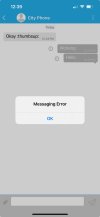
I have sms connector working on a 2027-D with PUBLIC. UCP works for sending and receiving sms from using voip.ms DID. Installed clearly anywhere and I can get the app to register and send and receive texts from both android and apple clearly anywhere app using the QR code to register the extension. However, when sending from the app it says message error, but the message does actually send and is received to my test Verizon cell phone. Any idea why I might be getting this messaging error when sending even though the message is going through?

Do you need an https:// path into the PBX for voip.ms and clearly anywhere app to work correctly?
 

Attachments

  • IMG_20241002_124008.jpg
    IMG_20241002_124008.jpg
    119.6 KB · Views: 6
Last edited:
Trying to implement on a new install after doing the above to send messages to clearly anywhere. in the public direction I know you have to whitelist 2267. This directory "/etc/sysconfig" does not exist in the 2027-D. How do you go about doing this step? TIA.

7. Whitelist TCP 2267 assigned for Clearly Anywhere API client connections to your server:

cd /etc/sysconfig
sed -i 's/10000:20000 -j ACCEPT/&\\n-A INPUT -p tcp -m tcp --dport 2267 -j ACCEPT/' iptables
iptables-restart
I edited the rules here: /etc/iptables/rules.v4 and added:
-A INPUT -p tcp -m tcp --dport 2267 -j ACCEPT
-A INPUT -p udp -m udp --dport 10000:20000 -j ACCEPT

That seems to have worked!
 
I have sms connector working on a 2027-D with PUBLIC. UCP works for sending and receiving sms from using voip.ms DID. Installed clearly anywhere and I can get the app to register and send and receive texts from both android and apple clearly anywhere app using the QR code to register the extension. However, when sending from the app it says message error, but the message does actual send and is received to my test Verizon cell phone. Any idea why I might be getting this messaging error when sending even though the message is going through?
If you care to donate a Clearly Anywhere license then I'll add the app to my lab so that I can test it alongside the Sangoma apps and UCP.
 
In my case, the quickest workaround was using a sip provider that supports messaging natively through their API. That way, I just set up a simple script on the backend to poll for incoming SMS and send replies, all without needing extra apps or hardware. Made it way easier to tie into my IPBX setup.
 
Last edited:

Members online

No members online now.

Forum statistics

Threads
26,721
Messages
174,612
Members
20,286
Latest member
lluis.riera
Get 3CX - Absolutely Free!

Link up your team and customers Phone System Live Chat Video Conferencing

Hosted or Self-managed. Up to 10 users free forever. No credit card. Try risk free.

3CX
A 3CX Account with that email already exists. You will be redirected to the Customer Portal to sign in or reset your password if you've forgotten it.
Back
Top