NEW The Taming of FusionPBX + Tutorial

Nice shirt. I would wear it. Still doesn't answer the question.
Nothing to do with CallerID. It's Verizon's SPAM algorithm that gets triggered if you make a half dozen brief test calls to one of their numbers... in this case it was my cellphone. Getting numbers unblocked is another story nightmare.
 
Nothing to do with CallerID. It's Verizon's SPAM algorithm that gets triggered if you make a half dozen brief test calls to one of their numbers... in this case it was my cellphone. Getting numbers unblocked is another story nightmare.
Ahh so this is more "Our numbers got blocked as SPAM by T-Mobile because we triggered number reputation thresholds" which makes sense. The downside to that is if T-Mobile is using a service like NoMoRobo for these checks...anyone using NoMoRobo will see those numbers as potential SPAM.

Ran into this in the past testing various services like that which resulted in me having to use a small pool of numbers to cycle through when testing plus some sacrificial ones I wanted to actually trigger the flags on.
 
It was Verizon, not T-Mobile, that blocked the incoming calls. So I'll just give the numbers back to BulkVS and get some new ones. I can play Whack-A-Mole, too.
 
AI Question of the Day
  1. Enabling the is_local Dialplan Rule:FusionPBX has a built-in is_local dialplan script (often a Lua script) that can be enabled. This rule attempts to determine if a dialed number exists as an extension in anydomain on the server and routes it internally if it does.
    • How it works: DOESN'T WORK!
      • If is_local is enabled, when a user dials an extension number, FreeSWITCH will check if that extension exists in the user's current domain's context.
      • If not found, it can then check other domain contexts for a matching extension.
      • If a match is found, the call is routed internally to that extension, even if it's in a different domain.
I
AI can be useful, but it doesn't know everything, especially on topics such as FusionPBX. When AI doesn't know something, it makes it up as if it's real; these are called hallucinations. The is_local dialplan DOES WORK, but it was not built to do what AI assumed.

The is_local dialplan has been built to do is to search inbound Destinations to see if the number being called exists on another domain or tenant. If the destination number is found on another domain, then it will send the call through inbound routes. The inbound route then identifies the domain and sends the call to where it's supposed to go.
 
Last edited:
Thanks for the heads up on FSpbx! Sounds interesting. I'm going to look into it.
Is there any trick to getting a ring group to make a call to an outside number? I have a ring group with an extension and a cell phone number but the call to the cell phone aborts when the ring group is called. I also am unable to make a trunk to trunk transfer of an incoming call. It did not work for me on FusionPBX and now, not on FSpbx either.
 
This is a thread about FusionPBX, please keep it on topic. Use a different thread for other systems.

The issue is related to caller ID restrictions. This was not an issue until the USA became very strict on Caller ID. Who is your VoIP provider?
 
This is a thread about FusionPBX, please keep it on topic. Use a different thread for other systems.

The issue is related to caller ID restrictions. This was not an issue until the USA became very strict on Caller ID. Who is your VoIP provider?
This IS about FusionPBX. The Caller-ID sent is one of my BulkVS DID numbers. It works on my other FreePBX systems but for whatever reason, every time I try to use the Ring Group with a cell phone number as one of the members, the call is rejected showing L16/L16 codec which is instead of the PCMU allowed by Bulkvs.
 
Last edited:
If it's a codec issue, you would see an error like incompatible destination. You could watch it using the following command.

sngrep -c

It's probably sending the caller's Caller ID and getting rejected. What is your version of FusionPBX?
 
Last edited:
FusionPBX 3.8., FreeSwitch 1.10.12

I would agree with you except that Bulkvs accepts the caller's caller-id passed through a FreePBX system so I doubt that is the reason on FusionPBX. I will continue research but this has been a hard stop on the use of FusionPBX for my purposes. I'm installing a fresh version now and will continue research.
 
A phone call and remote desktop would be much easier and would probably solve it faster that way. I have a Bulkvs account, so I will test it.

Test calls worked for me. The number I tested with is a phone number from Bulkvs. Made a call from a mobile number to call the Bulkvs number. The call was routed from inbound destinations to a ring group. The ring group was set up to ring a local extension and an external mobile number. The call rang the local extension and the external T-Mobile mobile number. For the ring strategy, I tried simultaneous and enterprise; both worked. I tried the confirm option on the external number, and both on and off, and both options worked.

Check these settings under Gateways to make sure you have them set like this.

Gateway: bulkvs.com
Proxy: sip.bulkvs.com
Register Transport: TCP
Caller ID in From: True
Sip CID Type: pid
Enabled: True

If you change a setting in the gateway. Then, press the FLUSH CACHE button from the Status -> SIP Status page. Then stop and start the Gateway. Make a new test call.
 
Last edited:
I have a test system set up: FusionPBX 5.3.8, FreeSwitch 1.10.12. I have a Bulkvs gateway, a North American outbound route, one inbound DID pointed at a ring group and one extension. I have not created a second domain for extensions as I would on a production system. Inbound and outbound calls work from the extension.

Same setup as yours except using registration with Bulkvs. Watching sngrep, the call comes in and rings the extension. No sign of an outgoing call to the cell phone in the sngrep output. CDR shows call failed codec L16/L16.

Likewise, if I call the ring group and answer on the extension, I cannot manually transfer the call to the cell phone because my trunk to trunk transfer does not work. If I dial the cell phone directly from the extension, the call goes through.

Also, if I forward the ring group to the cell phone number, an incoming outside call will ring the cell phone (bypassing members of the ring group.)

If I dial the ring group (9000) from the extension, it does not ring the cell phone.
 
Last edited:
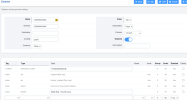
Here is a CDR image. The ring group is extension 9000. The extension in the ring group is 210. The cell phone is 770-313-xxxx. The incoming DID is 828-482-xxxx. SNGrep shows the invites to the system but never shows an outgoing call to the cell phone.

1752191619374.png

1752195245665.png
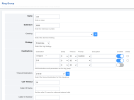
Inbound destination dialplan (parts obfuscated.)
1752195636345.png
 
Last edited:
Yes. I've tried +1200234678, 12002345678, and 2002345678. The outbound call never attempt to exit through the gateway and does not show up with SNGREP. Also, in the Dial Plan Manager under the ring group, it shows no XML commands. I don't know if that is normal or not. I believe there are LUA files or something else missing from the install.

The fact that forwarding the ring group to the cell number allows an external inbound call to call the cell number indicates that the call can route correctly. This is making me suspect the ring group is not handling the call correctly. This is a very simple setup on FusionPBX for testing. I have attached the console output with the CID and IP's obfuscated.

Here is the link to the log file: https://www.dropbox.com/scl/fi/s9of...ey=i8ykwufiwspf4cv7uz58l4jd8&st=rl4lhd1b&dl=0
 
Last edited:
@wardmundy This test system was clean installed from your instructions in this forum thread 3 days ago. Could something have changed in the FusionPBX installer or the FreeSwitch installation since you installed yours?

Perhaps @markjcrane will have some more feedback.
 
Last edited:

lots of tips on how to change the logo and stuff, not mentioning too much as some of this is apparently paid green membership stuff on the fusionpbx website.

But seeing as the information is out there on how to do this, being able to deploy Incredible something from a Nerd Vittles script would be great.
 

Members online

Latest Posts

Forum statistics

Threads
26,731
Messages
174,675
Members
20,290
Latest member
Zuhlbrittany
Get 3CX - Absolutely Free!

Link up your team and customers Phone System Live Chat Video Conferencing

Hosted or Self-managed. Up to 10 users free forever. No credit card. Try risk free.

3CX
A 3CX Account with that email already exists. You will be redirected to the Customer Portal to sign in or reset your password if you've forgotten it.
Back
Top