SOLVED VOIP.ms - TLS configuration

markd89

Member
Joined
Sep 3, 2013
Messages
128
Reaction score
18
I thought I had this fixed but it's broken again.

Outgoing calls via VOIP.ms fail with "TRUNK Dial failed due to CHANUNAVAI"

In voip.ms's console, I can see that the trunk is connected.

I turned on debug logs under Asterisk, SIP Settings, PJSIP, Enable Debug. This generates tons of logs. With what appears to be the interesting part being
"SIP/2.0 401 Unauthorized"
I'm putting redacted snip of the log below.

I gave full logs to voip.ms and they responded "Your logs don't send any INVITE attempt sent by your trunk, the only INVITE was sent by linphone
So make sure to enable sip debug for the SIP trunk only and check the INVITE sent by the pbx"

Is there a setting to send an INVITE by the trunk?

Also I don't see a debug option for just the trunk?

Any suggestions on what I'm missing?

Thanks much!
Mark

<--- Transmitting SIP response (471 bytes) to TLS:174.249.147.101:6353 --->
SIP/2.0 401 Unauthorized
Via: SIP/2.0/TLS 192.168.25.7:45030;rport=6353;received=174.249.147.101;branch=z9hG4bK.d5t5dndpp
Call-ID: LOVlPSpCZY
From: <sip:5229@my-server-ip-redacted>;tag=5hJt30NHi
To: <sip:number-I-dialed@my-server-ip-redacted>;tag=z9hG4bK.d5t5dndpp
CSeq: 20 INVITE
WWW-Authenticate: Digest realm="asterisk",nonce="1742265066/2412a40dcf868532813e78ac1b48a326",opaque="091d40ef16fc94dd",algorithm=MD5,qop="auth"
Server: FPBX-17.0.19.24(21.6.0)
Content-Length: 0
 
Your logs don't send any INVITE attempt sent by your trunk, the only INVITE was sent by linphone
This is odd... SIP 401 is authentication failure.
Why is the linphone sending the invite? Is the pbx acting as pass through? The linphone should be an extension on the pbx. Need to see more of the call log.
 
Thanks @dallas

Yes, Linphone is just an extension on the pbx. I'm attaching a full call log from start of call to the failure.

Please let me know what you see.
 

Attachments

I thought I had this fixed but it's broken again.

Outgoing calls via VOIP.ms fail with "TRUNK Dial failed due to CHANUNAVAI"

In voip.ms's console, I can see that the trunk is connected.

I turned on debug logs under Asterisk, SIP Settings, PJSIP, Enable Debug. This generates tons of logs. With what appears to be the interesting part being
"SIP/2.0 401 Unauthorized"
I'm putting redacted snip of the log below.

I gave full logs to voip.ms and they responded "Your logs don't send any INVITE attempt sent by your trunk, the only INVITE was sent by linphone
So make sure to enable sip debug for the SIP trunk only and check the INVITE sent by the pbx"

Is there a setting to send an INVITE by the trunk?

Also I don't see a debug option for just the trunk?

Any suggestions on what I'm missing?

Thanks much!
Mark

<--- Transmitting SIP response (471 bytes) to TLS:174.249.147.101:6353 --->
SIP/2.0 401 Unauthorized
Via: SIP/2.0/TLS 192.168.25.7:45030;rport=6353;received=174.249.147.101;branch=z9hG4bK.d5t5dndpp
Call-ID: LOVlPSpCZY
From: <sip:5229@my-server-ip-redacted>;tag=5hJt30NHi
To: <sip:number-I-dialed@my-server-ip-redacted>;tag=z9hG4bK.d5t5dndpp
CSeq: 20 INVITE
WWW-Authenticate: Digest realm="asterisk",nonce="1742265066/2412a40dcf868532813e78ac1b48a326",opaque="091d40ef16fc94dd",algorithm=MD5,qop="auth"
Server: FPBX-17.0.19.24(21.6.0)
Content-Length: 0
You did send your DID number or a verified callerID number voip.ms could verify, right?
 
Last edited:
The CHANUNAVAIL usually indicates a mismatch between the trunk and provider or even that the extension to trunk has a mismatch of CODECs or protocol.

I see one thing that may have a negative impact. Your Linphone is set for the Opus CODEC but voip.ms wants ulaw or gsm. It also offers g.729 which you cannot use without a license on your system. Transcoding should be done by the PBX but I'd limit my CODECs to all be the same throughout the extensions and the trunks and see if that helps.

I also see you are trying to communicate with voip.ms via TLS as opposed to UDP which may be intentional but if it is, voip.ms does not seem to like your certificate.

I don't have voip.ms so I'm not familiar with their setup otherwise. But recommend these things based on your log:
1) Limit your SIP CODEC's to ULaw/PCMU for now on Linphone and the extension on the PBX and on the trunk.
2) Make sure you have no entry on the trunk screen advanced tab in the AOR or AOR Contact fields.

This CrossTalk video might also be useful: https://www.crosstalksolutions.com/voip-ms-setup-using-pjsip-on-freepbx/

That's my 2 cents worht. Give it a try and see.
 
Thanks @kenn10 much more than 2 cents worth :)

I did as you suggested with the codecs with no luck.

Then I set the trunk to UDP and it works fine.

So it looks like the cert issue that you noticed is likely the problem. Any suggestions on how to approach that one?

Thanks much!!
Mark
 
Any suggestions on how to approach that one?
Not a clue. Probably need to consult voip.ms support or their installation instructions or Google "voip.ms freepbx pjsip tls" to see if someone else has info about it. A quick search yields:
To configure FreePBX with VoIP.ms using PJSIP and TLS 1.2, you'll need to create a sub-account, set up a DID, and configure the PJSIP trunk to use TLS 1.2 with VoIP.ms's SIP server.
 
Thanks, @kenn10

Could you please point line in the log that complains about the certificate? I've looked and I seem to be missing it.

Thanks again,
Mark
 
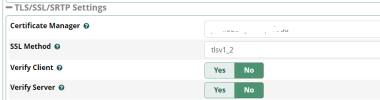
The 401-Unauthorized is the best guess but I can't be sure. I personally don't use TLS because I'm not paranoid about privacy. The fact it works with UDP points to an issue with TLS either not having a correct certificate or the version specified in the Settings > Asterisk SIP Settings > Sip Settings TAB does not match what voip.ms wants. You'll have to figure it out from there if you want to use TLS. I have no further guidance.
1742986596986.png
 
This is odd... SIP 401 is authentication failure.
This is not odd. A 401 challenge is part of the auth process for user/password. You send an INVITE with no auth details, a 401 challenge is sent back with the realm and nonce, that realm and nonce is used to generate the hash for creds and another INVITE is sent with the auth digest. Which is exactly what happens in the debug provided. INVITE -> 401 Challenge -> INVITE -> 403 Forbidden returned:

They rejected the call. Why? You'll have to ask VoIP.ms.
<--- Received SIP response (518 bytes) from TLS:208.100.60.32:5061 --->
SIP/2.0 403 Forbidden
Via: SIP/2.0/TLS redacted-my-server-ip-at-vultr:5061;branch=z9hG4bKPjd21116d4-750a-4c6e-ba62-02bd17653ef0;alias;received=redacted-my-server-ip-at-vultr;rport=48203
From: <sip:outgoing-CID@redacted-my-server-ip-at-vultr>;tag=7846d6c6-b03c-460f-a108-1e3e6286daca
To: <sip:[email protected]>;tag=as0802fe71
Call-ID: d0c543af-9d9e-4e27-87c2-201342b898c7
CSeq: 29409 INVITE
Server: voip.ms
Allow: INVITE, ACK, CANCEL, OPTIONS, BYE, REFER, SUBSCRIBE, NOTIFY, INFO, PUBLISH, MESSAGE
Supported: replaces, timer
Content-Length: 0

The CHANUNAVAIL usually indicates a mismatch between the trunk and provider or even that the extension to trunk has a mismatch of CODECs or protocol.
This is untrue. This is not the usual indication. CHANUNAVAIL can happen if the the endpoint is offline and not available. It can happen if a 403, 503, 603 or other errors are returned. Most of which involve the far side rejecting the call. The cause code mapping is important since CHANUNAVAIL can be thrown for many reasons.

-- Executing [s@macro-dialout-trunk:32] NoOp("PJSIP/5229-000000c4", "Dial failed for some reason with DIALSTATUS = CHANUNAVAIL and HANGUPCAUSE = 21") in new stack
Here's what SIP replies map back to code 21. The OP got a 403.

[COLOR=rgba(0, 0, 0, 0.87)]
AST_CAUSE_CALL_REJECTED21. Call Rejected 401, 403, 407, 603cancel, decline
[/COLOR]


So far nothing indicates an issue with TLS or codecs in all of this. VoIP.ms is rejecting the INVITE and you need to ask them why.
 
OK @markd89 @Samot can take it from here as he has more experience regarding TLS.
Nothing here so far is screaming TLS or codec issue. Those would return different responses. This is returning a 503 Service Unavailable. Could that be TLS related? Yes. It could also be for numerous other reasons.

Contact Voip.MS and find out why they are rejecting the call with a 503 reply.
 
I got to another person at voip.ms who seems more knowledgeable.

Looking at this:

From: <sip:outgoing-CID@redacted-my-server-ip-at-vultr>;tag=7846d6c6-b03c-460f-a108-1e3e6286daca
To: <sip:[email protected]>
Contact: <sip:asterisk@redacted-my-server-ip-at-vultr:5061;transport=TLS>

He says: "Make sure to send the subaccount or main account name in the from and contact header and you should not get the 403 as response from our server."

I asked if he knew what setting to change in FreePBX to do that and did not.

I'm guessing that would be one of the Trunk, PJSIP, Advanced Settings?
 
This link should help you properly setup your voip.ms trunk.
---
Update after reading Samot's message below:
In the interest of completeness and reference I thought I should amend my one-liner above.

The link shown on top actually comes from voip.ms' wiki, where there is a plain vanilla pjsip configuration for a voip.ms trunk on FreePBX. You can see that here.

At the very end of that page you will see that the link above (Chris Sherwood at Crosstalk Solutions) is given for further info (next to the youtube link).

Interestingly that setup includes an extra field (From Domain), which I believe is there because of an issue in the way voip.ms handles registration, or it did when that version of the setup was published.

To the best of my recollection when I used this material some time ago, including an IP address in there was the only way to make that work, but I no longer have access to that system so I can't verify and confirm.

That said, the next thing that I remember about the setup was that caller id name was also a requirement. So, like the original voip wiki shows a full caller id name and phone number needed to be entered in the field like "CALLER NAME" <14329876543>" with the caller name in all capital letters.
 
Last edited:
This link should help you properly setup your voip.ms trunk.
I see problems with that link. First, no provider wants your domain or IP as the From Domain it should be their domain since that is how they would auth against it. Second, support told the OP to make sure the From User and Contact User contain the subaccount (or main account) ID. This link does not show how to add those items.

@markd89 In the Advanced tab of the trunk for PJSIP, where it says From User and Contact User is where you put the subaccount details.
 

Members online

No members online now.

Forum statistics

Threads
26,700
Messages
174,476
Members
20,270
Latest member
kossolax
Get 3CX - Absolutely Free!

Link up your team and customers Phone System Live Chat Video Conferencing

Hosted or Self-managed. Up to 10 users free forever. No credit card. Try risk free.

3CX
A 3CX Account with that email already exists. You will be redirected to the Customer Portal to sign in or reset your password if you've forgotten it.
Back
Top