QUESTION Music on Hold Questions

hanksmith5

Member
Joined
Sep 23, 2011
Messages
62
Reaction score
0
Hello what bitrate does my mp3s have to be for music on hold can use them instead of the .wav format?
 
Hello what bitrate does my mp3s have to be for music on hold can use them instead of the .wav format?

I always use 8000hz 16-bit mono WAV and have no problems. Can't answer for MP3. I'd just convert them before uploading. Any reason you need MP3?
 
no perticular reason I just saw the upload file in wav or mp3 file format button on the music on hold screen and was just curious what the bitrate had to be in order for it to work. one other thing I can't figure out it is regards to music on hold, when ever I put a caller on hold the music restarts from the beginning, is there a way to hav eit not do that?
 
I used a portable version of Audacity for Windows [here]
I downloaded a .ogg file ... opened it in Audacity ...
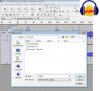
File ... Export .. Save As Type .. GSM 6.10 (WAV) mobile ... the [Save]

open.in.audacity.save.as.GSM.6.10.WAV.mobile.jpg

Then upload the .wav to Asterisk via FreePBX.

Note: files created by Saving as a Microsoft WAV signed 16bit PCM failed. FreePBX seemed to accept them ... but they never showed up.

I believe Audacity will import mp3s (verified).
 
hanksmith5 - use my method to convert .mp3 to a compatible .wav format. I think .wav works much better for VOIP/PBX/Asterisk stuff. Don't waste time with .mp3.

If you can't convert your .mp3 ... I'll convert it to GSM WAV if you link me to your .mp3 :)
 

Members online

No members online now.

Forum statistics

Threads
26,688
Messages
174,412
Members
20,259
Latest member
Fadeek86
Get 3CX - Absolutely Free!

Link up your team and customers Phone System Live Chat Video Conferencing

Hosted or Self-managed. Up to 10 users free forever. No credit card. Try risk free.

3CX
A 3CX Account with that email already exists. You will be redirected to the Customer Portal to sign in or reset your password if you've forgotten it.
Back
Top