NEW Free Oracle Cloud Instance

wardmundy

Nerd Uno
Joined
Oct 12, 2007
Messages
20,217
Reaction score
5,974
Testing free instance of Oracle Cloud now. yum -y update shows 24 updates but it's DOG SLOW (think: original Raspberry Pi slow).

42 minutes to complete the Phase I install of Incredible PBX 2020. Time slice is more like a time sliver.

More results soon...
 
Last edited:
Well, it took (not quite) forever to complete the install. Once installed, VoIP performance is fair much like first release of Raspberry Pi. Using ULAW/ALAW with no performance hogs such as PHP/MySQL apps, you'd probably be fine for home use with just conversational calls and voicemail.

For more robust apps, you can judge for yourself by dialing the News Headlines number we set up using a LocalPhone trunk (featured on NV this coming Monday):

1-843-419-1376

Performance lag has more to do with chintzy time slice rather than lack of memory which appears to be more than ample:
Code:
              total        used        free      shared  buff/cache   available
Mem:           987M        726M         86M        3.3M        174M        238M
Swap:          8.0G        100M        7.9G
 
Code:
Retrieving speedtest.net configuration...
Testing from Oracle Public Cloud...
Retrieving speedtest.net server list...
Selecting best server based on ping...
Hosted by CenturyLink (Seattle, WA) [0.54 km]: 69.897 ms
Testing download speed................................................................................
Download: 39.49 Mbit/s
Testing upload speed................................................................................................
Upload: 22.65 Mbit/s
 
Hi @wardmundy ,

I'm interested in knowing if you had to put any special parameters.

I tried to install an IncrediblePBX 2020 in Oracle Cloud :
All registrations are fine, inbound is fine...but I cannot make a single outbound call using a Sip provider (anveo, voipms, ect)

Double checked the ext ip in conf, nat params, ect

Any idea? Thanks ;-)

Code:
[2020-03-09 13:39:12] VERBOSE[24295][C-00000026] app_dial.c: Called SIP/[email protected]
[2020-03-09 13:39:12] VERBOSE[24295][C-00000026] app_dial.c: Called SIP/[email protected]
[2020-03-09 13:39:42] VERBOSE[20800][C-00000026] chan_sip.c: Got SIP response 486 "Busy Here" back from 50.22.101.14:5060
[2020-03-09 13:39:42] VERBOSE[20800][C-00000026] chan_sip.c: Got SIP response 486 "Busy Here" back from 50.22.101.14:5060


[2020-03-09 22:46:37] VERBOSE[30319][C-00000003] app_dial.c: Called SIP/voipms/1XXXXXXXXXX
[2020-03-09 22:46:37] VERBOSE[30319][C-00000003] app_dial.c: Called SIP/voipms/1XXXXXXXXXX
[2020-03-09 22:46:37] VERBOSE[2772][C-00000003] chan_sip.c: Got SIP response 503 "Service Unavailable" back from 192.175.96.73:5060
[2020-03-09 22:46:37] VERBOSE[2772][C-00000003] chan_sip.c: Got SIP response 503 "Service Unavailable" back from 192.175.96.73:5060


In the case of AnveoDirect, I have the following that worries me in the SIP trace:
v=0
o=root 1721192618 1721192618 IN IP4 XXX.XXX.XXX.XXX <=== My ext IP
s=Asterisk PBX 16.8.0
c=IN IP4 XXX.XXX.XXX.XXX
t=0 0
m=audio 12302 RTP/AVP 9 0 107 101
a=rtpmap:9 G722/8000
a=rtpmap:0 PCMU/8000
a=rtpmap:107 opus/48000/2
a=fmtp:107 useinbandfec=1
a=rtpmap:101 telephone-event/8000
a=fmtp:101 0-16
a=ptime:20
a=maxptime:20
a=ice-ufrag:BLABLA
a=ice-pwd:BLABLA
a=candidate:Ha00000e 1 UDP 2130706431 10.0.0.14 12302 typ host <=== 10.0.0.14 My internal IP
a=candidate:Ha00000e 2 UDP 2130706430 10.0.0.14 12303 typ host <=== 10.0.0.14 My internal IP
a=sendrecv
 
Last edited:
8G of swap when your machine has 1G of memory? who came up with that plan ?
 

Oracle Cloud Giving Away Ampere Arm A1 Instances Always Free​

Quad-core Ampere Altra (A1) Arm instance with just over 46GB of storage and 24GB of memory. The overall setup takes minutes to get running.

anyone got one, this seems to beat the raspberry pi into the ground on specification:
 
If you're wanting to use one of the Incredible PBX installers, don't waste your time. The Oracle Linux 7, CentOS 7, and Ubuntu 20.04 platforms all fail with dozens of errors even after commenting out all of the version and platform checks. And it's worth noting that the touted, free Ampere addition is only available with the native Oracle Linux OS.

P.S. Incredible PBX 2020 for CentOS 7 still installs without a hiccup on Vultr.
 
Last edited:
If you're wanting to use one of the Incredible PBX installers, don't waste your time. The Oracle Linux 7, CentOS 7, and Ubuntu 20.04 platforms all fail with dozens of errors even after commenting out all of the version and platform checks. And it's worth noting that the touted, free Ampere addition is only available with the native Oracle Linux OS.

P.S. Incredible PBX 2020 for CentOS 7 still installs without a hiccup on Vultr.

Strange, I have the free Ampere instance running Ubuntu 20.04
 
Are you sure? It automatically switched me back to the rot-gut instance, but maybe there's a quota issue.
 
Are you sure? It automatically switched me back to the rot-gut instance, but maybe there's a quota issue.
I just tried it and it says there is "limited availability" of instances in US-West, USA-East, and a bunch of other countries. I suspect that is why you can't get something good.
 
If you're wanting to use one of the Incredible PBX installers, don't waste your time. The Oracle Linux 7, CentOS 7, and Ubuntu 20.04 platforms all fail with dozens of errors even after commenting out all of the version and platform checks. And it's worth noting that the touted, free Ampere addition is only available with the native Oracle Linux OS.

P.S. Incredible PBX 2020 for CentOS 7 still installs without a hiccup on Vultr.

could that be down to the way oracle firewall things?


Open Firewall and Security List Ports to Allow Public Access​

Before we try to run again, let’s fix the networking so that players can reach this server through the Oracle Cloud firewall. Back in the VM details, click on the link for the subnet that was created (or that you chose).

fusionpbx install completes with:
Installation has completed.

Use a web browser to login.
domain name: https://10.0.0.160
username: admin

so there's something screwy with nat
 
Last edited:
Finally managed to get:

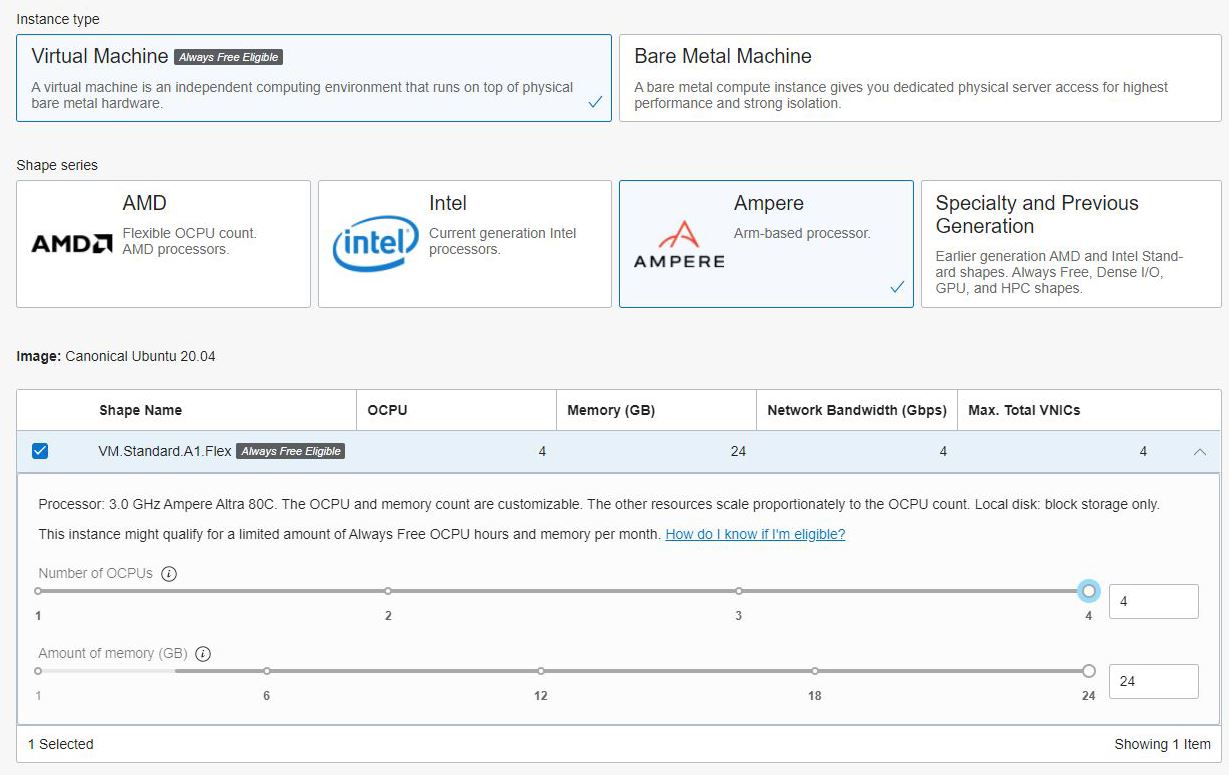
Shape: VM.Standard.A1.Flex
OCPU count: 4
Network bandwidth (Gbps): 4
Memory (GB): 24

Running Ubuntu 20.04
 
Decided, hey, why not? Got one in Toronto, 4 CPU, 24 gig. Can't be any worse than C@C, right?

Now....what to do with it....
 
Trying to install iPBX, when I got to the reboot, I couldn't reconnect. I've built an Ingress firewall for port 22, I've even tried to attach to the console with no luck. Pointers?
 
Can't be any worse than C@C, right?

I've even tried to attach to the console with no luck. Pointers?
What OS did you build on? Which IPBX are you trying to install? Is it any better than C@C?
 
It's not better if the OS doesn't boot. LoL

I followed Ward's article. It's Ubuntu minimal for ARM. Version is IncrediblePBX2021-U.

EDIT: Taking 1 more shot at it, not rebooting at the end and am going to examine iptables. I'm probably getting screwed there....
 
Last edited:

Members online

No members online now.

Forum statistics

Threads
26,687
Messages
174,410
Members
20,257
Latest member
Dempan
Get 3CX - Absolutely Free!

Link up your team and customers Phone System Live Chat Video Conferencing

Hosted or Self-managed. Up to 10 users free forever. No credit card. Try risk free.

3CX
A 3CX Account with that email already exists. You will be redirected to the Customer Portal to sign in or reset your password if you've forgotten it.
Back
Top