NEW Free Oracle Cloud Instance

copy .ovpn into /etc/

??not found or is it in the install script still todo ? Edit looking in the iPBX install script there is lots of ovpn stuff so therefore script should fix.

FWIW without the above the reload restart fails:-
Code:
systemctl status openvpn2021.service
● openvpn2021.service - openvpn2021
     Loaded: loaded (/etc/systemd/system/openvpn2021.service; enabled; vendor preset: enabled)
     Active: inactive (dead)
  Condition: start condition failed at Sun 2021-10-10 22:15:44 UTC; 52s ago
             └─ ConditionPathExists=/etc/openvpn-start was not met

Oct 10 22:13:13 instance-20211010-2136 systemd[1]: /etc/systemd/system/openvpn2021.service:12: Support for option SysVStartPriority= has been removed >
Oct 10 22:15:44 instance-20211010-2136 systemd[1]: Condition check resulted in openvpn2021 being skipped.
 
Last edited:
Just looking at the tutorial script and noticed the ' WARNING WARNNG *****'
a google for resize console window programatically came up with xterminal-and-xterm-resize-command
seems it just needs a script or something. OK no time for bells on, at least not till the long grass is almost cleared.
 
Last edited:
??not found or is it in the install script still todo ? Edit looking in the iPBX install script there is lots of ovpn stuff so therefore script should fix.

FWIW without the above the reload restart fails:-
Code:
systemctl status openvpn2021.service
● openvpn2021.service - openvpn2021
     Loaded: loaded (/etc/systemd/system/openvpn2021.service; enabled; vendor preset: enabled)
     Active: inactive (dead)
  Condition: start condition failed at Sun 2021-10-10 22:15:44 UTC; 52s ago
             └─ ConditionPathExists=/etc/openvpn-start was not met

Oct 10 22:13:13 instance-20211010-2136 systemd[1]: /etc/systemd/system/openvpn2021.service:12: Support for option SysVStartPriority= has been removed >
Oct 10 22:15:44 instance-20211010-2136 systemd[1]: Condition check resulted in openvpn2021 being skipped.
You have to create the client .ovpn script on your OpenVPN server. See our tutorial on Nerd Vittles.
 
Last edited:
Since Ubuntu is not supported anymore, my question is what does it take to have IncrediblePBX run on Debian 10 on Ampere (arm64)?

Here is a perfectly fine running instance of Debian 10 on Ampere:
Code:
root@instance-20211011-1828:~ $ hostnamectl
   Static hostname: instance-20211011-1828
         Icon name: computer-vm
           Chassis: vm
        Machine ID: bb494c8dac02485b92412b7ca0d1d043
           Boot ID: d3ce279799bf4e32b00323bfb5c5626e
    Virtualization: kvm
  Operating System: Debian GNU/Linux 10 (buster)
            Kernel: Linux 4.19.0-18-arm64
      Architecture: arm64
WARNING: Always run Incredible PBX behind a secure firewall.
root@instance-20211011-1828:~ $ cat /etc/debian_version
10.11
WARNING: Always run Incredible PBX behind a secure firewall.

..and here are the high level steps to get it going:
- from the official Debian cloud images repository download https://cloud.debian.org/images/cloud/buster/20210721-710/debian-10-generic-arm64-20210721-710.qcow2
 
- on the OCI console create a bucket (Storage -> Buckets) and upload the .qcow2 image to it
- create a custom OCI image based on the qcow2 (compute -> custom images -> import from bucket)
- launch an instance based on the custom image (from the custom image menu choose create instance)
- on the create compute instance page change the image to the custom one (just created) and the shape to Ampere; it takes less than a minute to create the instance
- once ready, login as [email protected]
- run sudo passwd to create the root password
- edit etc/ssh/sshd_config to allow root login and password login
- save and run service sshd restart and service sshd status - make sure there are no errors
- edit /root/.ssh/authorized_keys and remove all the first part of the line to where the actual key starts (ssh-rsa <snip>)
- login as root...

...sorry, it did not take some slashes in the in-line code...
 
Last edited:
...sorry, it did not take some slashes in the in-line code...
Try the \
Bash:
 tags \
(without the '\\') you can just type them in before and after code lines.

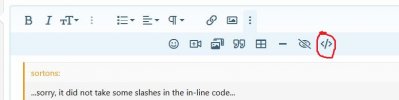
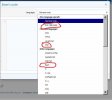
Or use the BB code icons
click second umlaut (= 3 dots)
click the forward slash in </>
Select language from dropdown
- see
 

Attachments

  • 1-ClickTheLastUmlaut.JPG
    1-ClickTheLastUmlaut.JPG
    28 KB · Views: 4
  • 2-ClickTheBbForwardSlash.JPG
    2-ClickTheBbForwardSlash.JPG
    31.8 KB · Views: 4
  • 3-ChooseLanguageFromDropdown.JPG
    3-ChooseLanguageFromDropdown.JPG
    47.4 KB · Views: 4
Last edited:
So, where am I at now after tinkering this past long weekend? Let's see:

  • 4 core, 24G ram Ampere instance created & provisioned
  • iPBX installed
  • Firewall modified before 1st reboot to allow --dport 22, *and* my primary public IP
  • GoPublic installed, again, --dport 22 & primary public IP allowed to not lose access before reboot
  • Added required Oracle IP address to allow DNS resolution to work (need to look more in to this. The firewall script clobbers stuff Oracle has in there that they say is security related)
  • Removed ClearlyIP modules I'm not using (the trunking module seems to put a load on the server, even if not in use, I've seen this on x64 hardware as well)
  • OpenVPN client configured on server and connected to primary location (my older Mitel phones don't NAT well)
  • LE cert added and used for TLS
  • 2 phones configured, 1 TLS, 1 UDP
That's where I'm at right now. Need to try transcoding to see how badly it kills CPU, and see if this can go to "production" for my house, we're not heavy users, so this will not be a stress test by any means.
 
Last edited:
I can't get Opus to work, so at this point it may be easier just to use the 2CPU, 1Gig AMD instance to run x64...
I have a micro instance (x64) running on a Debian image (as described above) for a while now. No issues whatsoever. Be prepared for the installation to take roughly the time it takes on a Pi3. After that it's alright.
Also, 3CX runs well in a micro instance with Debian (in totally unsupported mode...)
 
Anyone having trouble making an Oracle Cloud account? When I enter CC info, it comes back with "Error Processing transaction." I have tried two different CCs, and both get a $1 temporary charge.

There is a link to "Oracle Customer Service," but returns "We're having trouble finding that site."

How the heck is this guy a billionaire?
 
There is a link to "Oracle Customer Service," but returns "We're having trouble finding that site."
Oh is it this one it points to a form to complete your 'complaint.
There is also a page with some expected questions and answers perhaps

These seem to work from UK. are you having name resolution issues?

EDIT: I seem to find links to Oracle UK support. I gues we remain divided :banghead:
 
Last edited:
Anyone having trouble making an Oracle Cloud account? When I enter CC info, it comes back with "Error Processing transaction." I have tried two different CCs, and both get a $1 temporary charge.

There is a link to "Oracle Customer Service," but returns "We're having trouble finding that site."

How the heck is this guy a billionaire?
Are you using a VPN? If yes, try accessing that site directly (turn it off altogether). Once the account is setup the VPN works.
 
I guess third time is always the charm. Used a third different CC and different email address.
 
I got the account, but now it states "Out of capacity" when I try to make the ARM virtual macine
 

Members online

Forum statistics

Threads
26,687
Messages
174,410
Members
20,257
Latest member
Dempan
Get 3CX - Absolutely Free!

Link up your team and customers Phone System Live Chat Video Conferencing

Hosted or Self-managed. Up to 10 users free forever. No credit card. Try risk free.

3CX
A 3CX Account with that email already exists. You will be redirected to the Customer Portal to sign in or reset your password if you've forgotten it.
Back
Top