NEW Free Oracle Cloud Instance

If you see two lines like this instead of one
Bash:
tail /etc/iptables/rulesv4

-A INPUT -s 10.0.0.207 -j ACCEPT
#-A INPUT -s  -j ACCEPT
# your own additions go above here
COMMIT
# Generated by iptables-save v1.3.5 on Tue Apr  1 11:35:49 2014
 
Hey Everyone, first post here.
I am trying to install iPBX on Oracle cloud in one of the x86 small boxes through Oracle Cloud. I am using the most recent ubuntu 20.04 template and issued the command to download and install as soon as the machine came up. It seems like the install is hanging for me right here:

Code:
/usr/include/nodejs/deps/v8/include/v8.h:9502:16: warning: cast between incompatible function types from ‘v8::WeakCallbackInfo<Nan::ObjectWrap>::Callback’ {aka ‘void (*)(const v8::WeakCallbackInfo<Nan::ObjectWrap>&)’} to ‘Callback’ {aka ‘void (*)(const v8::WeakCallbackInfo<void>&)’} [-Wcast-function-type]

Does anyone have any suggestions on how to make it work? I am going to let it run overnight to see if it is just bogged down or truly dead. It has been on that line for a good hour or so.

Thanks for the help!
 
Hey Everyone, first post here.
I am trying to install iPBX on Oracle cloud in one of the x86 small boxes through Oracle Cloud. I am using the most recent ubuntu 20.04 template and issued the command to download and install as soon as the machine came up. It seems like the install is hanging for me right here:

Code:
/usr/include/nodejs/deps/v8/include/v8.h:9502:16: warning: cast between incompatible function types from ‘v8::WeakCallbackInfo<Nan::ObjectWrap>::Callback’ {aka ‘void (*)(const v8::WeakCallbackInfo<Nan::ObjectWrap>&)’} to ‘Callback’ {aka ‘void (*)(const v8::WeakCallbackInfo<void>&)’} [-Wcast-function-type]

Does anyone have any suggestions on how to make it work? I am going to let it run overnight to see if it is just bogged down or truly dead. It has been on that line for a good hour or so.

Thanks for the help!
Are you signed in as the root user??
 
You need to switch to the root user before running the script: sudo su root
 
I was able to get it installed! Thank you! I will provide an updated how-to for all those who care soon. I am having another issue now, I am able to log in properly to the softphone (microsip) and I can dial outgoing numbers, but I get no audio from the pbx or transmitted to the caller. I am accessing the pbx from outside the VPC over the internet. I know it is not the best practice, but I am going to harden it after everything is verified. I have a feeling this is to do with the routing of the VPC within oracle's network. I have whitelisted 10000-20000 and 6050-5061 UDP. Any thoughts?

EDIT: If I run pbxstatus, it only shows my internal IP and no entry under the public info section. The softphone is connected from an IP I have whitelisted in the firewall in iPBX.
 
Last edited:
I got it working, I hat to set the external address properly in the NAT settings of the Asterisk SIP settings.
 
/root/timezone-setup in Oracle cloud instance (ubuntu20.4) has sed statements pointing to php7.3 when php updated to 7.4
fix-timezone-setup.sh
Code:
#!/bin/bash
cd /root/
        sed -i 's|php/7.3|php/7.4|g' /root/timezone-setup
 
Last edited:
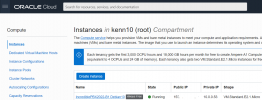
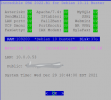
How about this in the free Oracle instance? It took a lot of twists and turns but I got Debian 10 loaded as a custom instance, made a few changes to the Oracle firewall and got it up and running.

1640820763055.png

1640821540061.png
 
Last edited:
Here is a post I found that explains how to create a clean Debian image and use it in the free Oracle instance. Debian 11 is also available from the selections.

oracle free tier compute instance vps install debian 10 buster image​

  1. Go to cdimage.debian.org/cdimage/cloud/buster and download an image, mine was debian-10-generic-amd64-20210208-542.qcow2
  2. Upload the image to object storage, create a new bucket if needed
  3. Using the uploaded object, create an OCI custom image
  4. Edit the image you created to support VM.Standard.E2.1.Micro shape
  5. Create an OCI VM instance, under Placement and hardware choose the image you have just created
  6. Define your SSH keys, or make sure to save the auto generated ones
  7. Start the instance if not started automatically
  8. Connect using ssh -i /path/to/private/key -p 22 debian@ip

    If you changed the SSH port during install, see amending OCI firewall rules
 
3. Using the uploaded object, create an OCI custom image

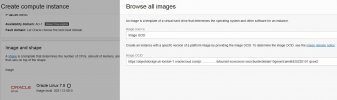
Set Image source (dropdown) to "Image OCID" (Get the OCID URL from the Storage Bucket Object by creating a
BrowseOSimages.JPG

If you exceeded the Free Trial period; and remain on the "Always Free Tier" then you get a red flash warning to the effect that you have exceeded the free custom image allowance (which is actually 0 zero).
 
If you exceeded the Free Trial period; and remain on the "Always Free Tier" then you get a red flash warning to the effect that you have exceeded the free custom image allowance (which is actually 0 zero).
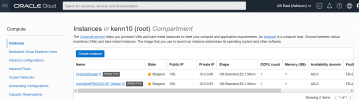
I don't understand. How many instances have you created? I have two storage buckets, one with Debian 10 and one with Debian 11. Then I'm using the free E2.1 always free instances. These instances get a bucket of free hours each which is greater than the number of hours per month. I deleted my A1 instance and use only the two free E2.1 instances. I don't remember where the header was but it stated that you could have one A1 and 2 of the E2.1.Micro instances.

1641099324820.png

This is what it says on the storage buckets page:
1641099768244.png

Custom images are billable after the free trial but you don't have to keep them once you create the E2.1 instance from them.

1641100518139.png
 
Last edited:
I don't understand. How many instances have you created? I have two storage buckets, one with Debian 10 and one with Debian 11. Then I'm using the free E2.1 always free instances. These instances get a bucket of free hours each which is greater than the number of hours per month. I deleted my A1 instance and use only the two free E2.1 instances. I don't remember where the header was but it stated that you could have one A1 and 2 of the E2.1.Micro instances.

View attachment 3835

This is what it says on the storage buckets page:
View attachment 3836

Custom images are billable after the free trial but you don't have to keep them once you create the E2.1 instance from them.

View attachment 3837

I have one VM.Standard.A1 Flex Canonical-Ubuntu-20.04-aarch64-2021.09.22-0
and so far one VM.Standard.E2.1.Micro Oracle-Linux-7.9-2021.10.20-0

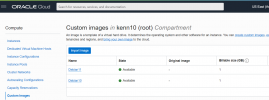
In Compute/Custom Images "No items found"

Just costing object storage for Custom Image (storage) just a few <$0.03 cents/GB/month or something but it means need a move to 'paid' - so not quite gone there.

Just wondering for cloud VM do I really need the device drivers included in the debian image?
 

When Your Trial Period Ends​

After your trial ends, your account remains active. There is no interruption to the availability of the Always Free Resources you have provisioned. You can terminate and reprovision Always Free resources as needed.

Note
If you have more Ampere A1 Compute instances provisioned than are available for an Always Free tenancy, all existing Ampere A1 Compute instances are disabled and then deleted after 30 days, unless you upgrade to a paid account. To continue using your existing Arm-based instances as an Always Free user, before your trial ends, ensure that you have no more than 4 OCPUs and 24 GB of memory in total across all the Ampere A1 Compute instances in your tenancy.

Paid resources that were provisioned with your credits during your free trial are reclaimed by Oracle unless you upgrade your account.

Pay As You Go accounts are available with no commitment. You can also contact an Oracle sales representative in your location to learn about monthly and annual flex accounts that offer discounted pricing. For more information, see Oracle Cloud Infrastructure Pricing.
 
I see they have upped the ante


Always Free cloud services​


Services you can use for an unlimited time.


  • Two Oracle Autonomous Databases with powerful tools like Oracle APEX and Oracle SQL Developer
  • Two AMD Compute VMs
  • Up to 4 instances of Arm Ampere A1 Compute
  • Block, Object, and Archive Storage; Load Balancer and data egress; Monitoring and Notifications
 
Too much competition from Azure setups and all the free services they provide
 
Which free services is least costly? -- Free is free. LOL. If you exceed free, the rates are about the same.

It looks like Azure VM's are only free for 12 months. The Oracle Cloud VM allows up to 2 "always free" VM's. The trick with Oracle is that you have to custom load Debian, CentOS or Rocky yourself but they only allow one custom operating system. So you can have 2 instances but both must be Debian or Centos or Rocky once you use one of the non-Oracle provided OS loads.

Azure offers good speech-to-text and text-to-speech services (which in my opinion are better than IBM Watson) in their "always free" services so long as you don't exceed a generous monthly allowance.
 

Members online

No members online now.

Forum statistics

Threads
26,687
Messages
174,410
Members
20,257
Latest member
Dempan
Get 3CX - Absolutely Free!

Link up your team and customers Phone System Live Chat Video Conferencing

Hosted or Self-managed. Up to 10 users free forever. No credit card. Try risk free.

3CX
A 3CX Account with that email already exists. You will be redirected to the Customer Portal to sign in or reset your password if you've forgotten it.
Back
Top