
You are using an out of date browser. It may not display this or other websites correctly.
You should upgrade or use an alternative browser.
You should upgrade or use an alternative browser.
NEW Free Oracle Cloud Instance
- Thread starter wardmundy
- Start date

dallas
Well-Known Member
- Joined
- Oct 21, 2007
- Messages
- 1,034
- Reaction score
- 332
Unrelated to lean, mean... running fwconsole reload I get this error
Edit I found the fix in another thread.
Code:
 In Cron.class.php line 281:
  proc_open(/tmp/cron.error): failed to open stream: Permission denied
reload [--json] [--dry-run] [--skip-registry-checks] [--dont-reload-asterisk]
Edit I found the fix in another thread.
Code:
fwconsole restart
rm -f /tmp/*
fwconsole reload
Last edited:

ostridge
Guru
- Joined
- Jan 22, 2015
- Messages
- 1,816
- Reaction score
- 632
Yes this seems to be down to permissions and being unable to write to 'file', '/tmp/cron.error' from the code in the array in line 280In Cron.class.php line 281:
The code following line 281 -- at line 289
// Ensure that the logfile is writable by everyone, if I created it
@chmod("/tmp/cron.error", 0777);
This permissions for the /tmp and /var/tmp directories require that the sticky bit also needs to be present
chmod 1777 /tmp /var/tmp
So the fix would be
Code:
chmod 1777 /tmp /var/tmp
# for info - the result of # ls -ld /tmp
# drwxrwxrwt 13 root root 4096 Jul 16 15:16 /tmp
# drwxrwxrwt  6 root root 4096 Jul 16 15:09 /var/tmp
# and then set permissions for cron.error
chmod 0777 /tmp/cron.error
# ( -rwxrwxrwx 1 asterisk asterisk    0 Jul 14 12:03 cron.error  )
# and  for good measure -
fwconsole restart
rm -f /tmp/*
fwconsole reload
Last edited:
ostridge
Guru
- Joined
- Jan 22, 2015
- Messages
- 1,816
- Reaction score
- 632
Try thisI've just put my toe into the water and set up an Oracle Cloud Instance. I like to remove the stuff I don't use by using this http://nerdvittles.com/turning-incredible-pbx-into-a-lean-mean-asterisk-machine/ tutorial.
My question is will I compromise my Oracle pbx in any way by doing this?
You may find this easier for removal of : -
Removing-telephone-and-web-reminders-and-exten-123.
Enjoy.
dallas
Well-Known Member
- Joined
- Oct 21, 2007
- Messages
- 1,034
- Reaction score
- 332
I've been able to register an external extension but (of course) there is no audio when calling. I need to install OpenVPN server on the Oracle pbx. Is this tutorial still relevant? https://nerdvittles.com/introducing-openvpn-for-incredible-pbx-2020/
ostridge
Guru
- Joined
- Jan 22, 2015
- Messages
- 1,816
- Reaction score
- 632
I've been able to register an external extension but (of course) there is no audio when calling. I need to install OpenVPN server on the Oracle pbx. Is this tutorial still relevant? https://nerdvittles.com/introducing-openvpn-for-incredible-pbx-2020/
The short answer is yes
The long answer is that tutorial includes the "openvpn-install-mod" a script that adds the extra lines into the client-config (to do with networking.)
The simpler tutorials are found in the IncrediblePBX Tiki Wiki see at bottom of page:-
VPN: Creating an OpenVPN Server with Incredible PBX
VPN: Creating and Deploying OpenVPN Clients
VPN: Deploying OpenVPN with Incredible PBX
I created my openvpn server on my cloud instance, thus allowing, the 'clients' to be
1) configured locally on my RaspberryPi RPi4b recommended to be needed for processing the encryption loading
The RPi needs a static private IP and a static PublicIP OR a programme that updates your FQDN at your DDNS provider..
2) set up a client on your PC (otherwise need to configure Routes for the RPI4b to allow access to the tun0 )
3) Other INTERNAL phones can connect through a local RPi iPBX / Asterisk server OR to the cloud through a VPN tunnel
4) For your EXTERNAL (to your network) phones.
So start with creating the openvpn server
for each required 'client' you re-run the openvpn-install script and it will simply create the client config files separately.
Copy those files to the clients and do openvpn-start.
Work from the tutorials not from this overview.
Before installing a VPN, consider that the solution to this problem could be as trivial as setting firewall rules and specifying the public IP address in the Asterisk SIP Settings screen.there is no audio when calling. I need to install OpenVPN server

wardmundy
Nerd Uno
- Joined
- Oct 12, 2007
- Messages
- 20,459
- Reaction score
- 6,188
That certainly works if you don't have users with dynamic IP addresses or traveling users.Before installing a VPN, consider that the solution to this problem could be as trivial as setting firewall rules and specifying the public IP address in the Asterisk SIP Settings screen.
He's already got (some) SIP signaling working, just no audio. Otherwise, I wouldn't have mentioned it. @dallas if you go with openvpn obviously you should lock down the SIP so that it's not exposed.That certainly works if you don't have users with dynamic IP addresses or traveling users.
wardmundy
Nerd Uno
- Joined
- Oct 12, 2007
- Messages
- 20,459
- Reaction score
- 6,188
SIP is locked down on all Incredible PBX platforms. PUBLIC implementations require an FQDN for access. Standard implementations require an IP whitelist entry in the Incredible PBX firewall using /root/add-ip or /root/add-fqdn.
Last edited:
dallas
Well-Known Member
- Joined
- Oct 21, 2007
- Messages
- 1,034
- Reaction score
- 332
@billsimon you are correct. I did install openvpn. I couldn't register to the vpn's IP I had to register to the external IP. The network setting did not have the external IP. With the vpn down I can now register and get audio.consider that the solution to this problem could be as trivial as setting firewall rules and specifying the public IP address in the Asterisk SIP Settings screen.
wardmundy
Nerd Uno
- Joined
- Oct 12, 2007
- Messages
- 20,459
- Reaction score
- 6,188
@dallas: If you couldn't register an extension to your PBX using the OpenVPN address of the server, then there is something fundamentally wrong with your OpenVPN setup. We register using OpenVPN addresses exclusively and have never had a problem with any of our three dozen servers used for testing.
Be sure you have filled out the NAT Settings section in SIP Settings to include your 10.8.0.0/24 Local Network and make certain you're using ULAW exclusively to avoid codec mismatches. The Asterisk CLI will then tell you what the problem is using the OpenVPN address when you make a call.
Be sure you have filled out the NAT Settings section in SIP Settings to include your 10.8.0.0/24 Local Network and make certain you're using ULAW exclusively to avoid codec mismatches. The Asterisk CLI will then tell you what the problem is using the OpenVPN address when you make a call.
Last edited:

tbrummell
Guru
- Joined
- Jan 8, 2011
- Messages
- 1,280
- Reaction score
- 341
Has anybody bothered to look at the IPtables rules on these VM's *before* installing iPBX and comparing the after install rules? And then read Oracle's man pages regarding said rules? They say their rules must remain in place for the VM to work properly. I don't think the iPBX installer is smart enough to deal with the existing rule set, that's when I gave up on iPBX on Oracle instance.
wardmundy
Nerd Uno
- Joined
- Oct 12, 2007
- Messages
- 20,459
- Reaction score
- 6,188
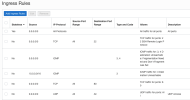
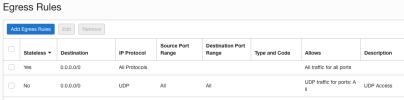
@tbrummell: Here are the Oracle Cloud rules that we use without problems. Some are redundant due to earlier experimentation.
wardmundy
Nerd Uno
- Joined
- Oct 12, 2007
- Messages
- 20,459
- Reaction score
- 6,188
If you used our installer, those IPtables rules are the Travelin' Man 3 defaults which include whitelisting of the 10.8 subnet.No, IPtables on the VM itself.
Search the installer for #IPtables Setup to review how the IPtables rules are configured.
Last edited:
tbrummell
Guru
- Joined
- Jan 8, 2011
- Messages
- 1,280
- Reaction score
- 341
I think I was doing this before you had provided a working solution. So if you've worked through, and managed to keep, the Oracle required iptables rules, good on ya! Maybe I should free up some room in my account and try again.
wardmundy
Nerd Uno
- Joined
- Oct 12, 2007
- Messages
- 20,459
- Reaction score
- 6,188
Absolutely. Oracle Cloud is the best performing low-cost platform out there.I think I was doing this before you had provided a working solution. So if you've worked through, and managed to keep, the Oracle required iptables rules, good on ya! Maybe I should free up some room in my account and try again.
By the way, you can configure the Oracle firewall rules in any way you like (see above). You just can't disable their firewall. Our setup basically lets everything in and out of their firewall and uses the Incredible PBX firewall for protection.
Last edited:
I've followed the tutorials, and compared your screenshots to my Oracle firewall, but still can't get Vitelity calls routed to the Oracle instance. Endpoints are connected. I checked the routing on the Vitelity portal. I'm sure I'm missing something simple.Absolutely. Oracle Cloud is the best performing low-cost platform out there.
By the way, you can configure the Oracle firewall rules in any way you like (see above). You just can't disable their firewall. Our setup basically lets everything in and out of their firewall and uses the Incredible PBX firewall for protection.
ostridge
Guru
- Joined
- Jan 22, 2015
- Messages
- 1,816
- Reaction score
- 632
unless its 40 degrees C at the local datacentre lolAbsolutely. Oracle Cloud is the best performing


Forum statistics
Get 3CX - Absolutely Free!
Link up your team and customers  Phone System Live Chat Video Conferencing
Hosted or Self-managed. Up to 10 users free forever. No credit card. Try risk free.

Verify your Email
Check your inbox!
We’ve sent you an email. Click on the button in the email body to verify your email address – (if you can not find it, check your spam folder).
Upon verification you will be directed to the 3CX setup wizard.