
ostridge
Guru
- Joined
- Jan 22, 2015
- Messages
- 1,816
- Reaction score
- 632
I guess there must have been an issue?had Oracle close my account after 4 hours... gave up on it...

I guess there must have been an issue?had Oracle close my account after 4 hours... gave up on it...


They NAT it magically. You only need to open ports on the firewall group, or whatever they call it.. It is not clear how to forward traffic from the public IP address to the private one.

Yeah. You need to put the ports you want to allow into the network security group. If you change the default port for ssh, etc., you put it there. The first thing I did after spinning up the instance was to change the sshd_config file in etc/ssh/ to allow root logging in by password. After that, it was a lot easier to finish setting things up.I think you need to use a Network Security Group
Login to oraclecloud dashboardI have installed iPBX 2021 on the AMD Cloud instance. Upon reboot, I now cannot access to SSH port 22.
I see there is a VNC to access the VPS. According to the Oracle Cloud docs, it states you do not need credentials to access the VPS shell, but what see on the screen that is not true. It is asking for username and password. No password has ever seen set.
Anyone know how to access?
| No | 0.0.0.0/0 | TCP | All | 22 | TCP traffic for ports: 22 SSH Remote Login Protocol |
ssh key file is present
Load key ".ssh/ubuntu": Permission denied
Permission denied (publickey).Did you create & save your keys during commissioning of the VPS? If yes, connect with the keys and enter a username of ubuntu. If no, well, I don't know.Anyone know how to access?

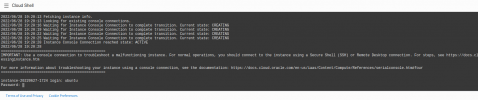

Now copy the public IP address of your server which, together with your private key, you’ll need to login. From a Terminal window on your desktop PC, login to your server using the following commands where ssh-key-2022-05-24.key is the filename of your private key and 159.201.201.173 is the public IP address of your instance:
chmod 0600 ssh-key-2022-05-24.key
ssh -i ssh-key-2022-05-24.key [email protected]
Once you’re logged in, let’s configure the root account which you will need to install Incredible PBX. Begin by setting up a very secure password for root.
sudo passwd root
su root
cd ~
wget http://incrediblepbx.com/IncrediblePBX2021-Oracle.sh
chmod +x IncrediblePBX2021-Oracle.sh
./IncrediblePBX2021-Oracle.sh
Yes, I skipped the "sudo password root"Sounds like you skipped the very first steps:
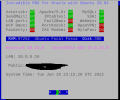
Jun 28 18:47:25 instance-20220628-1533 fail2ban-server[31555]: 2022-06-28 18:47:25,126 fail2ban [31555]: ERROR Failed during configuration: Have not found any log file for sshd jail
Jun 28 18:47:25 instance-20220628-1533 fail2ban-server[31555]: 2022-06-28 18:47:25,133 fail2ban [31555]: ERROR Async configuration of server failed
first steps:
sudo passwd root
su root
cd ~

I don't see why. That just removes the add-ons included in IncrediblePBX without touching the firewall.My question is will I compromise my Oracle pbx in any way by doing this?
Link up your team and customers  Phone System Live Chat Video Conferencing
Hosted or Self-managed. Up to 10 users free forever. No credit card. Try risk free.

Check your inbox!
We’ve sent you an email. Click on the button in the email body to verify your email address – (if you can not find it, check your spam folder).
Upon verification you will be directed to the 3CX setup wizard.


