NEW Free Oracle Cloud Instance

I signed up for an account months ago, but never got around to using it. I been playing around with it for a couple of days now. I can see why the confusion.

The labeling of things is a bit confusing compared to other VPS providers.

I started up a AMD one(1GB RAM 1 core) . It seems they provide a private IP address, but looking at the server, the public IP address is not attached to the system. Not sure what they doing there. It is not clear how to forward traffic from the public IP address to the private one.
 
. It is not clear how to forward traffic from the public IP address to the private one.
They NAT it magically. You only need to open ports on the firewall group, or whatever they call it.
 
At a minimum you need to open ports in the Default Security list. Really I think you need to use a Network Security Group though. Take it with a grain of salt though, I only stumbled through until I made stuff work.
 
I think you need to use a Network Security Group
Yeah. You need to put the ports you want to allow into the network security group. If you change the default port for ssh, etc., you put it there. The first thing I did after spinning up the instance was to change the sshd_config file in etc/ssh/ to allow root logging in by password. After that, it was a lot easier to finish setting things up.
 
Finally got it up. I guess doing such a thing is not a bad idea for security reasons.
 
I have installed iPBX 2021 on the AMD Cloud instance. Upon reboot, I now cannot access to SSH port 22.

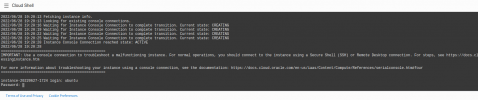
I see there is a VNC to access the VPS. According to the Oracle Cloud docs, it states you do not need credentials to access the VPS shell, but what see on the screen that is not true. It is asking for username and password. No password has ever seen set.

Anyone know how to access?
 
I have installed iPBX 2021 on the AMD Cloud instance. Upon reboot, I now cannot access to SSH port 22.

I see there is a VNC to access the VPS. According to the Oracle Cloud docs, it states you do not need credentials to access the VPS shell, but what see on the screen that is not true. It is asking for username and password. No password has ever seen set.

Anyone know how to access?
Login to oraclecloud dashboard
clickon virtual cloud networks
click on the subnet
click on Default security lists

Do you have something like
No0.0.0.0/0TCPAll22TCP traffic for ports: 22 SSH Remote Login Protocol

OR maybe you changed ssh access to the year of your birth or something else in which case 22 should be "$thatyear"
Is port 22 or something definately open in the cloud subnet?

What error message do you get?


At the moment I got annother error:
Code:
ssh key file is present
Load key ".ssh/ubuntu": Permission denied
Permission denied (publickey).
anyone know what this one is telling us I think I need to be root?
 
Last edited:

Instance access​

For the Shape: VM.Standard.E2.1.Micro -
You connect to a running Linux instance using a Secure Shell (SSH) connection. You'll need the private key from the SSH key pair that was used to create the instance.

Public IP address: nnn.nnn.nnn.nnn You can get this from this instance on Oraclecloud dashboard
Username: opc


Instance access​

Otherwise IF its for Shape: VM.Standard.A1.Flex -

You connect to a running Linux instance using a Secure Shell (SSH) connection. You'll need the private key from the SSH key pair that was used to create the instance.

Public IP address: nnn.nnn.nnn.nnn You can get this from that instance on Oraclecloud dashboard
Username: ubuntu

We need more specific information here so we know How and from what are you trying to connect and is it through a tun0, or via interweb. From your linux, or from PUTTY?
 
Last edited:
Sorry, but everyone here is incorrect.
How would I have been able to INSTALL iPBX 2021 if I did not have access to SSH port 22 ?

I mentioned I no longer have access to SSH after a reboot. I then asked about VNC access, not SSH access.
The server is clearly running, and I am able to get to a login prompt from their web based VNC (they are calling Cloud Shell) , but as I mentioned, it is asking for a password which was never set because the Oracle Cloud requires the use of keys.


1656444094728.png

They do have a guide on getting a remote desktop set up using the VNC Client software, but still that requires access to SSH port 22

Maybe I have found something:


Update: The correct Cloud Shell access without the password is located in the upper right corner:

1656447410894.png

However, sudo is not functioning, and I don't know the root password.
 
Last edited:
Sounds like you skipped the very first steps:
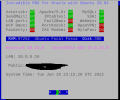
Now copy the public IP address of your server which, together with your private key, you’ll need to login. From a Terminal window on your desktop PC, login to your server using the following commands where ssh-key-2022-05-24.key is the filename of your private key and 159.201.201.173 is the public IP address of your instance:

chmod 0600 ssh-key-2022-05-24.key
ssh -i ssh-key-2022-05-24.key [email protected]

Once you’re logged in, let’s configure the root account which you will need to install Incredible PBX. Begin by setting up a very secure password for root.

sudo passwd root
su root
cd ~
wget http://incrediblepbx.com/IncrediblePBX2021-Oracle.sh
chmod +x IncrediblePBX2021-Oracle.sh
./IncrediblePBX2021-Oracle.sh
 
Sounds like you skipped the very first steps:
Yes, I skipped the "sudo password root"

Thanks for pointing that out, but still does not explain why no more access to SSH.

Thanks! I will redo the server again.
 
And here it is

Screenshot from 2022-06-28 18-15-46.png


Seems not all is well , though

Jun 28 18:47:25 instance-20220628-1533 fail2ban-server[31555]: 2022-06-28 18:47:25,126 fail2ban [31555]: ERROR Failed during configuration: Have not found any log file for sshd jail
Jun 28 18:47:25 instance-20220628-1533 fail2ban-server[31555]: 2022-06-28 18:47:25,133 fail2ban [31555]: ERROR Async configuration of server failed

The log auth.log was missing, but I added it with "touch."
 
Last edited:
first steps:
sudo passwd root
su root
cd ~

When you ssh back in to 10.8.0.1 or the 10.0.0.123
then do
$ su root
# cd ~
That fails to start the auto update because root is still NOT su

Better (after key auth) to do
$ sudo login root
Password:
This autostarts the ~/update-Incrediblepbx and the pbxstatus without further cd command, and drop you out to the prompt below and as su
root@incrediblepbx:~#

I note also that the root password in the Oracle Linux shell requires one special character (but ubuntu doesnot ).
 
My question is will I compromise my Oracle pbx in any way by doing this?
I don't see why. That just removes the add-ons included in IncrediblePBX without touching the firewall.
 

Members online

No members online now.

Forum statistics

Threads
26,687
Messages
174,410
Members
20,257
Latest member
Dempan
Get 3CX - Absolutely Free!

Link up your team and customers Phone System Live Chat Video Conferencing

Hosted or Self-managed. Up to 10 users free forever. No credit card. Try risk free.

3CX
A 3CX Account with that email already exists. You will be redirected to the Customer Portal to sign in or reset your password if you've forgotten it.
Back
Top