TIPS Fresh Install of IPBX2020 - low disk space

DoctorJ

Member
Joined
Jul 14, 2015
Messages
81
Reaction score
18
Just finished installing IPBX2020 on a 50GB DigitalOcean droplet. I couldn't access the server via SSH on part 2 of the install - perhaps because I'm using running an Unbound DNS server with pihole at home? Nonetheless, finished the install from the DO console and then added my FQDN. SSH access worked again.

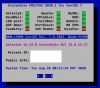
My install shows less than 1GB of remaining disk space on the pbxstatus. Did something go wrong? I'd rather reinstall than set everything up - only to have to repeat the process.

I also noticed the hostname change. Can I simply change it back to my FQDN using the following?

Code:
sudo nano /etc/sysconfig/network

Thanks.
 

Attachments

  • Screen Shot 2020-08-25 at 8.12.07 AM.png
    Screen Shot 2020-08-25 at 8.12.07 AM.png
    30 KB · Views: 9
Look in /tmp and /var/log for large files. Something came unglued. And, yes, you can change the FQDN as desired. Also change it in /etc/hosts and /etc/hostname AND issue command: hostname my.FQDN.com.
 
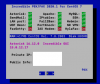
Here's what happened. The status GUI seems to be reading devtmpfs
 

Attachments

  • Screen Shot 2020-08-25 at 9.47.42 AM.png
    Screen Shot 2020-08-25 at 9.47.42 AM.png
    18.4 KB · Views: 17
  • Screen Shot 2020-08-25 at 10.07.24 AM.png
    Screen Shot 2020-08-25 at 10.07.24 AM.png
    27.7 KB · Views: 16
Destroyed droplet. Created brand new install. This time all from SSH. I think problem starts after logging in first time --> there's about 10 minutes of module updates.
 
So the issue is that the menu display of pbxstatus is misleading. But everything is working right?
 
So the issue is that the menu display of pbxstatus is misleading. But everything is working right?
this happens to me too. The pbxstatus lists the wrong disk size and wrong available space but in fact everything is actually working correctly.
 
To be honest I turn pbxstatus off because I need to query using an SSH shell script to work with our monitoring system, and the status gets in the way of it working properly. You might be better to simply ignore it and setup a script that runs periodically (cron) to check the drive space on the actual drives and just lets you know if they fill up.
 
Don't pay much attention to the figures from the status gui applet. Many things are hard coded and not properly updated/maintained. Frankly it is a piece of code that doesn't deserve to be part of the package. But in the absence of anything better it is there.
 
Fair enough. Yes, everything is working. For some reason, the status gui applet seems to be reading the tempfs file system space. It seems that CentOS 7 creates multiple temporary file systems, as opposed to CentOS 6 and below, so perhaps this is the issue. I'm happy to leave it alone - but being only moderately experienced in linux and PBX (learned most of it through these forums), I just didn't want to spend time configuring the whole PBX only to have to reinstall.
 

Members online

No members online now.

Forum statistics

Threads
26,688
Messages
174,412
Members
20,259
Latest member
Fadeek86
Get 3CX - Absolutely Free!

Link up your team and customers Phone System Live Chat Video Conferencing

Hosted or Self-managed. Up to 10 users free forever. No credit card. Try risk free.

3CX
A 3CX Account with that email already exists. You will be redirected to the Customer Portal to sign in or reset your password if you've forgotten it.
Back
Top