SOLVED Errors on Incredible PBX 2021 Dashboard

pbxdan

New Member
Joined
Jun 26, 2021
Messages
10
Reaction score
5
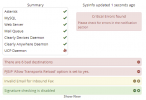
I have these critical errors on my dashboard...Are they anything I need to be concerned about?
When I do a pbxstatus command, UCP Daemon is running.

1624758518336.png
 
In order, the 6 bad destinations 'sort of' tell me that you deleted the included extensions 701-705 -- 701 was used in IVRs -- now the pbx does not know what to do.

The PJSIP transports, I don't know as all my extensions are CHAN_SIP -- I do not know how to convert and make PJ work so more than one endpoint rings, wish I did. -- No tutorials on a strictly PJSIP setup that I know of (I need 1 Extension with a max of 4 endpoints)

Third is a statement that you have not provided an email on an extension that can detect faxes.

Fourth is just fine on an IncrediblePBX -- sig checking would throw warning at you constantly as FreePBX doesn't like some of our modules in the Incredible build.

To find out what to fix on 1, 2,and 3 click the small minus sign and it explains where you need to correct the errors on 3 and 4 you can hide those by clicking the X instead

Someone else will have to explain #2 better than I can.
 
"PJSIP Allow Transports Reload option set to yes" message is something that I saw a couple of times when I was experimenting with PJSIP.
When you first setup your PBX it is indeed set to NO, but the GUI itself actually switches it to YES when you play around with the PJSIP settings, although I am not sure if it's a bug or conditional outcome under some configuration scenario.
In any event you can turn it off at Settings > Asterisk Sip Settings > Tab: Sip Settings (chan_pjsip) > Header: Misc PJSIP Settings > Toggle: Allow Transports Reload > Set it to NO
It won't bug you again unless you go back fiddling your settings ;)
 
When I do a pbxstatus command, UCP Daemon is running.
It takes a little time for the UCP status to complete its startup procedure.
Your Dashboard shows sysinfo updated 1 second ago - too early to check for the UCP - you might try and click 'Dashboard' again.

If you click on there are 6 bad destinations you will see the message in full which may provide a clue? Incoming by default goes to ring group 777 and this rings all five extensions. So if you deleted those, you need to set up the default (all/all) incoming route to point to that 777 ring group, and then config your ring group to ring whatever extensions you want.

Allow Transports - well there is a fix for that but
You have not said which version you are running. If you login over ssh (using putty for example)
Let the auto update run, and pbxstatus should then show the needed info such as
Code:
Incredible PBX 2020.3 for Raspberry Pi 3B
 Asterisk: UP      Apache: UP     MySQL: UP
      Exim: UP      IPtables: UP         SSH: UP
LAN port: UP    Fail2Ban: UP   Webmin: UP
UCP Dmon: UP   PortKnock: UP   NR VPN: UP
FaxGetty: DN   IAX Modem: DN  HylaFax: DN

RAM:77696  *Raspbian 10 buster*  Disk:261G
Asterisk 16.18.0   Incredible GUI 15.0.12.68

 Private IP: 192.168.1.242 192.168.1.24
      Public: xxx.xxx.xxx.xx

In the menuselect.makeopts used during the asterisk compile, of menu.select. As far as I know it is benign, but you could try running the update script
Code:
/root/update-asteriskxx 
# or is it (on your instance)
/root/upgrade-asteriskxx
 
Thank you all for the feedback/suggestions. I have addressed all the issues :thumbsup:
 

Members online

No members online now.

Forum statistics

Threads
26,688
Messages
174,412
Members
20,259
Latest member
Fadeek86
Get 3CX - Absolutely Free!

Link up your team and customers Phone System Live Chat Video Conferencing

Hosted or Self-managed. Up to 10 users free forever. No credit card. Try risk free.

3CX
A 3CX Account with that email already exists. You will be redirected to the Customer Portal to sign in or reset your password if you've forgotten it.
Back
Top