
You are using an out of date browser. It may not display this or other websites correctly.
You should upgrade or use an alternative browser.
You should upgrade or use an alternative browser.
GOOD NEWS Incredible PBX 2022 Images
- Thread starter wardmundy
- Start date


wardmundy
Nerd Uno
- Joined
- Oct 12, 2007
- Messages
- 20,217
- Reaction score
- 5,974
I will check.I think this time I'm joining the CrownCloud bandwagon with the Debian version of ipbx2021 as my latest test bench.
(Do they offer a deal for a higher tier like 2GB RAM and 40GB storage?)
I use the filestore option within the GUI and sync to dropbox once a week.1 snapshot and no daily backups?
Is there a reliable strategy for taking dailies to offsite and restoring if/when needed?
wardmundy
Nerd Uno
- Joined
- Oct 12, 2007
- Messages
- 20,217
- Reaction score
- 5,974
@Halea: Here you go...
We've generated plans for the 2GB-40GB SSD VPSes,
LA-2G-40G-SSD: https://crowncloud.net/clients/cart.php?a=add&pid=666
ATL-2G-40G-SSD: https://crowncloud.net/clients/cart.php?a=add&pid=667
DE-2G-40G-SSD: https://crowncloud.net/clients/cart.php?a=add&pid=668
NL-2G-40G-SSD: https://crowncloud.net/clients/cart.php?a=add&pid=669
We've generated plans for the 2GB-40GB SSD VPSes,
LA-2G-40G-SSD: https://crowncloud.net/clients/cart.php?a=add&pid=666
ATL-2G-40G-SSD: https://crowncloud.net/clients/cart.php?a=add&pid=667
DE-2G-40G-SSD: https://crowncloud.net/clients/cart.php?a=add&pid=668
NL-2G-40G-SSD: https://crowncloud.net/clients/cart.php?a=add&pid=669

Halea
Well-Known Member
- Joined
- Aug 12, 2016
- Messages
- 1,130
- Reaction score
- 874
Thank you @wardmundy for brokering additional deals. I like the fact that they kept the same price for doubling the resources and halving the time.
I've just got one of the ATL-2G-40G-SSD.
I am able to get going with a stock Debian 10 install. So the account seems to be set properly.
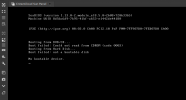
When I choose IncrediblePBX 2021 over Debian 10 (application image install), the VM gets installed and I can bring it up, but the following message shows up on the console:
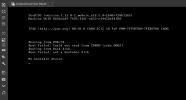
There is no CD/DVD mounted in the panel drive, so the first message is a non issue. But the second one seems to indicate that the boot loader is not there or properly set.
I'll take a break for the evening and try again tomorrow. if it still doesn't work I'll build it using your scripts.
Update:
Before calling the day off I thought I should give a try with the Rocky 8 version, and that worked fine:
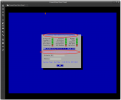
Thank you Ward!
I've just got one of the ATL-2G-40G-SSD.
I am able to get going with a stock Debian 10 install. So the account seems to be set properly.
When I choose IncrediblePBX 2021 over Debian 10 (application image install), the VM gets installed and I can bring it up, but the following message shows up on the console:
There is no CD/DVD mounted in the panel drive, so the first message is a non issue. But the second one seems to indicate that the boot loader is not there or properly set.
I'll take a break for the evening and try again tomorrow. if it still doesn't work I'll build it using your scripts.
Update:
Before calling the day off I thought I should give a try with the Rocky 8 version, and that worked fine:
Thank you Ward!
Attachments
Last edited:

kenn10
Well-Known Member
- Joined
- Dec 16, 2007
- Messages
- 4,630
- Reaction score
- 3,002
If I recall correctly, when I installed from scratch on Crown Cloud vps with Debian 10, it had Debian 10.11 and then I upgraded to 10.12. At this point, I guess the differences between 10.7 and 10.12 are pretty inconsequential in regards to IncrediblePBX.
Halea
Well-Known Member
- Joined
- Aug 12, 2016
- Messages
- 1,130
- Reaction score
- 874
Upgrading to 10.2 was without any issues. But my setup ended up with some php files which are not upgradeable, although at this stage it's not an issue for me.
@wardmundy : Is there any particular reason IncrediblePBX was built on an xfs file system?
I am quite satisfied by the CPU performance of this VPS, but not too impressed by its storage performance. I wonder if it might have something to do with xfs (which is famously slow with large number of small files).
In addition to the performance issue, xfs partitions can't be made smaller once they are created. So, the way the VM is made it can't be resized to make the system partition smaller so that an additional partition is made for other things.
If it's just this particular template, it's fine I can go back to stock Debian and rebuild IncrediblePBX with your scripts. I hope it's not a CC restriction (choice of partition type).
Overall I like Crowncloud. The snapshot feature is quite handy, but I wish it could be made on a live system.
@wardmundy : Is there any particular reason IncrediblePBX was built on an xfs file system?
I am quite satisfied by the CPU performance of this VPS, but not too impressed by its storage performance. I wonder if it might have something to do with xfs (which is famously slow with large number of small files).
In addition to the performance issue, xfs partitions can't be made smaller once they are created. So, the way the VM is made it can't be resized to make the system partition smaller so that an additional partition is made for other things.
If it's just this particular template, it's fine I can go back to stock Debian and rebuild IncrediblePBX with your scripts. I hope it's not a CC restriction (choice of partition type).
Overall I like Crowncloud. The snapshot feature is quite handy, but I wish it could be made on a live system.
Halea
Well-Known Member
- Joined
- Aug 12, 2016
- Messages
- 1,130
- Reaction score
- 874
Made a snapshot of the current VM, which works nicely btw. Installed CC's stock Debian 11. Just set the root password and immediately installed xfce4 and gparted so that I can poke around the partition structure comfortably.
It indeed installs the system on an ext4 partition by default. That's excellent. I assume it would have been the same had I installed Debian 10. But I decided to live dangerously, so I'm moving to 11
I didn't install IncrediblePBX yet, but bare-bones Debian flies on this quad core, 2GB RAM, 40GB SSD VM.
I'll run some benchmarks tomorrow and install the PBX. I wonder if the scripts will cough because xfce will be already installed.
It indeed installs the system on an ext4 partition by default. That's excellent. I assume it would have been the same had I installed Debian 10. But I decided to live dangerously, so I'm moving to 11
I didn't install IncrediblePBX yet, but bare-bones Debian flies on this quad core, 2GB RAM, 40GB SSD VM.
I'll run some benchmarks tomorrow and install the PBX. I wonder if the scripts will cough because xfce will be already installed.
Halea
Well-Known Member
- Joined
- Aug 12, 2016
- Messages
- 1,130
- Reaction score
- 874
I had to install IncrediblePBX (Debian 11 vintage) a couple of times on CC, first after installing Xfce and next without deviating from the letter of Ward's method.
In both cases I got the PBX installed with the User Control Panel not properly functioning.
During one of the installs I had saved the console log. I scrutinized it without seeing any obvious errors or anything indicating that something went wrong. Anyway...
The good news, at least for me is that Ward's script installs IncrediblePBX on a Debian system already setup with Xfce. I know in the past I had installed it directly on Xubuntu (stock Ubuntu + Xfce) after making a tiny bit of adjustment in the script, but I had never tried to do the same on Debian.
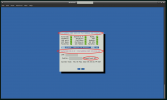
I'm posting below a screenshot (the last one, I promise!) showing a summary of where I stand with my experiments and testing with two comparable VMs, one from CrownCloud, one from RackNerd.
It includes benchmarks that you can see and interpret for yourselves. It shows the partition layouts at the time the VMs were made.
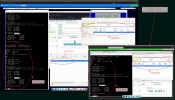
The other good news is that both VMs perform well in terms of actually running calls through them. I think I tried both with up to 30 calls simultaneously and a dozen live MOH channels while Xfce active, even running some live Timeshift snaps and they both behaved great.
I hope IncrediblePBX will continue to be made and maintained for Debian in the foreseeable future.
This was also an opportunity for me to play with Rocky 8, much like I had spent time with Centos in a previous life. I wasn't particularly impressed or disappointed by this new clone of RedHat.
My vested interest in Debian (and a couple of its derivatives) is simply too much to consider it for any serious use.
In both cases I got the PBX installed with the User Control Panel not properly functioning.
During one of the installs I had saved the console log. I scrutinized it without seeing any obvious errors or anything indicating that something went wrong. Anyway...
The good news, at least for me is that Ward's script installs IncrediblePBX on a Debian system already setup with Xfce. I know in the past I had installed it directly on Xubuntu (stock Ubuntu + Xfce) after making a tiny bit of adjustment in the script, but I had never tried to do the same on Debian.
I'm posting below a screenshot (the last one, I promise!) showing a summary of where I stand with my experiments and testing with two comparable VMs, one from CrownCloud, one from RackNerd.
It includes benchmarks that you can see and interpret for yourselves. It shows the partition layouts at the time the VMs were made.
The other good news is that both VMs perform well in terms of actually running calls through them. I think I tried both with up to 30 calls simultaneously and a dozen live MOH channels while Xfce active, even running some live Timeshift snaps and they both behaved great.
I hope IncrediblePBX will continue to be made and maintained for Debian in the foreseeable future.
This was also an opportunity for me to play with Rocky 8, much like I had spent time with Centos in a previous life. I wasn't particularly impressed or disappointed by this new clone of RedHat.
My vested interest in Debian (and a couple of its derivatives) is simply too much to consider it for any serious use.
kenn10
Well-Known Member
- Joined
- Dec 16, 2007
- Messages
- 4,630
- Reaction score
- 3,002
kenn10
Well-Known Member
- Joined
- Dec 16, 2007
- Messages
- 4,630
- Reaction score
- 3,002
From the FreePBX forums: at https://issues.freepbx.org/browse/F....issuetabpanels:comment-tabpanel&showAll=true
Bill Simon added a comment - 18/Oct/21 3:48 PM - edited
Yannik FYI- the node daemon is used mostly for commercial modules, which aren't available to us on Debian. This would be a more critical argument should Debian ever be supported for commercial modules.
My judgment is that the open source UCP which does not have ties to commercial modules like SMS does not benefit from the node daemon. Also discussion with lgaetz on the forum: https://community.freepbx.org/t/what-is-lost-by-disabling-ucp-node-daemon/78580 (please add to the discussion if you have opinions)
On my Debian install I have disabled it with "fwconsole setting NODEJSENABLED 0". This only prevents the ucp node server from running, but still runs the fastagi server (which you would probably want) - and the fastagi code is simple and will run on current node versions.
The only issue I see is that UCP install throws a bunch of errors about the node part, but still installs the web parts.
kenn10
Well-Known Member
- Joined
- Dec 16, 2007
- Messages
- 4,630
- Reaction score
- 3,002
@Halea This might interest you: https://www.debugpoint.com/2022/05/xebian-review-2022/
Halea
Well-Known Member
- Joined
- Aug 12, 2016
- Messages
- 1,130
- Reaction score
- 874
Thanks @kenn10 . I tried to trace the problem with UCP and ended up with nodejs issues. Interestingly, similar issues come up on the tracer when I do the same with Debian 10, but there the daemon seems to be up.
Regarding xebian, it's an interesting distro. It is based on Debian Sid, which is the "unstable" branch.
Using Sid on a regular basis would be like hopping around in a minefield on one leg with your eyes blindfolded and hands tied behind your back.
I occasionally pull the latest version of my favorite packages from there and test them myself before using them in my normal production environment. Most require wrappers to be built to solve dependency issues.
But this is how I've been using the most recent version of gparted in ubuntu 14.04 which otherwise would only allow a much older version. Sometimes it's a tad better than adjusting the source code and recompiling the whole thing yourself.
I don't use any Debian Sid based distro, but I do use Debian Testing quite a bit. Even then, to have better control of my environment I build my machine by installing Debian Testing, then Xfce myself. I have a simple script which configures Xfce to my exact specs.
If I were to use an off the shelf distro to do the same I would probably use SolydX-EE which is a very polished Debian Testing + Xfce distro.
There is also SolydX, which is Debian Stable + Xfce. And it is most suitable for production environment / office use.
In our R&D environment, for a longtime we used Ubuntu in its various flavors. But to limit variability we have been shifting back to pure Debian for some time now. Our servers remain largely built on Ubuntu.
Our own products are all built on Debian.
My personal favorite is still MX Linux for home use and Ubuntu Studio for my music studio.
Regarding xebian, it's an interesting distro. It is based on Debian Sid, which is the "unstable" branch.
Using Sid on a regular basis would be like hopping around in a minefield on one leg with your eyes blindfolded and hands tied behind your back.
I occasionally pull the latest version of my favorite packages from there and test them myself before using them in my normal production environment. Most require wrappers to be built to solve dependency issues.
But this is how I've been using the most recent version of gparted in ubuntu 14.04 which otherwise would only allow a much older version. Sometimes it's a tad better than adjusting the source code and recompiling the whole thing yourself.
I don't use any Debian Sid based distro, but I do use Debian Testing quite a bit. Even then, to have better control of my environment I build my machine by installing Debian Testing, then Xfce myself. I have a simple script which configures Xfce to my exact specs.
If I were to use an off the shelf distro to do the same I would probably use SolydX-EE which is a very polished Debian Testing + Xfce distro.
There is also SolydX, which is Debian Stable + Xfce. And it is most suitable for production environment / office use.
In our R&D environment, for a longtime we used Ubuntu in its various flavors. But to limit variability we have been shifting back to pure Debian for some time now. Our servers remain largely built on Ubuntu.
Our own products are all built on Debian.
My personal favorite is still MX Linux for home use and Ubuntu Studio for my music studio.


Get 3CX - Absolutely Free!
Link up your team and customers  Phone System Live Chat Video Conferencing
Hosted or Self-managed. Up to 10 users free forever. No credit card. Try risk free.

Verify your Email
Check your inbox!
We’ve sent you an email. Click on the button in the email body to verify your email address – (if you can not find it, check your spam folder).
Upon verification you will be directed to the 3CX setup wizard.