PIONEERS Faxing with Incredible PBX 2027

wardmundy

Nerd Uno
Joined
Oct 12, 2007
Messages
20,437
Reaction score
6,151
PIONEERS: I think we've got inbound faxing sorted out for Incredible PBX 2027 platforms.
If you want to take it for a spin, here's the drill. First, be sure you have a trunk/DID that supports faxing.
HINT: All VoIP.ms trunks work just fine.

1. Log into Linux CLI as root and issue these commands:
Code:
apt install libtiff-tools -y
# For Rocky 8, yum install libtiff libtiff-tools -y
sed -i '/^\[custom-fax/,/^$/d' /etc/asterisk/extensions_custom.conf
echo '
[custom-fax-iaxmodem]
exten => s,1,Answer
exten => s,n,Wait(1)
exten => s,n,Verbose(3,Incoming Fax)
exten => s,n,Set(FAXEMAIL=)     ; fax email address of recipient
exten => s,n,Set(FAXDEST=/tmp)  ; folder where faxes will be stored
exten => s,n,Set(tempfax=${STRFTIME(,,%C%y%m%d%H%M)})
exten => s,n,ReceiveFax(${FAXDEST}/${tempfax}.tif)
exten => s,n,System(/usr/bin/tiff2pdf -o "${FAXDEST}/${tempfax}.pdf" "${FAXDEST}/${tempfax}.tif")
exten => s,n,System(/usr/bin/echo "Incoming fax is attached." | /usr/bin/mail -s "Incoming FAX Received" -A "${FAXDEST}/${tempfax}.pdf" "${FAXEMAIL}")
exten => s,n,Hangup

' >> /etc/asterisk/extensions_custom.conf

2. Set your email destination address for incoming faxes replacing [email protected] below:
Code:
sed -i 'FAXEMAIL=|[email protected]|' /etc/asterisk/extensions_custom.conf
fwconsole ma downloadinstall fax
rm /tmp/*
fwconsole reload

3. In the FreePBX GUI, check to be sure you still have a Custom Destination called Fax (HylaFax). If not, create it:
Code:
Target: custom-fax-iaxmodem,s,1
Description: Fax (HylaFax)
Return: No

4. Download and install the Fax module for FreePBX:
Code:
fwconsole ma downloadinstall fax
fwconsole reload

5. In the FreePBX GUI, modify each of your Inbound Routes to support incoming faxes from the DIDs you'll be using for inbound faxes. In the new Fax tab, edit the settings as shown below, save the settings, and reload your dialplan.
Code:
 Yes
 SIP
 No
 5
 Custom Destinations
  Fax (HylaFax)

Send a test fax to your DID while watching the Linux CLI for issues: https://faxzero.com/
 
Last edited:
It works but I did get the following errors in the CLI. I don't know what T.30 is. The call went out on Skyetel and came in on BulkVS. The fax was received and emailed as expected.

Code:
 -- Executing [fax@from-pstn:1] NoOp("PJSIP/BulkVS-00000004", "Fax detected!") in new stack
    -- Executing [fax@from-pstn:2] Goto("PJSIP/BulkVS-00000004", "custom-fax-iaxmodem,s,1") in new stack
    -- Goto (custom-fax-iaxmodem,s,1)
    -- Executing [s@custom-fax-iaxmodem:1] Answer("PJSIP/BulkVS-00000004", "") in new stack
    -- Executing [s@custom-fax-iaxmodem:2] Wait("PJSIP/BulkVS-00000004", "1") in new stack
    -- Executing [s@custom-fax-iaxmodem:3] Verbose("PJSIP/BulkVS-00000004", "3,Incoming Fax") in new stack
    -- Incoming Fax
    -- Executing [s@custom-fax-iaxmodem:4] Set("PJSIP/BulkVS-00000004", "[email protected]") in new stack
    -- Executing [s@custom-fax-iaxmodem:5] Set("PJSIP/BulkVS-00000004", "FAXDEST=/tmp") in new stack
    -- Executing [s@custom-fax-iaxmodem:6] Set("PJSIP/BulkVS-00000004", "tempfax=202301211608") in new stack
    -- Executing [s@custom-fax-iaxmodem:7] ReceiveFAX("PJSIP/BulkVS-00000004", "/tmp/202301211608.tif") in new stack
    -- Channel 'PJSIP/BulkVS-00000004' receiving FAX '/tmp/202301211608.tif'
       > 0x7f06a83726d0 -- Strict RTP learning complete - Locking on source address 67.231.5.79:47744
[2023-01-21 16:08:59] WARNING[375420][C-00000005]: res_fax_spandsp.c:461 spandsp_log: WARNING T.30 ECM carrier not found
[2023-01-21 16:08:59] WARNING[375420][C-00000005]: res_fax_spandsp.c:461 spandsp_log: WARNING T.30 ECM carrier not found
[2023-01-21 16:08:59] WARNING[375420][C-00000005]: res_fax_spandsp.c:461 spandsp_log: WARNING T.30 ECM carrier not found
[2023-01-21 16:08:59] WARNING[375420][C-00000005]: res_fax_spandsp.c:461 spandsp_log: WARNING T.30 ECM carrier not found
[2023-01-21 16:08:59] WARNING[375420][C-00000005]: res_fax_spandsp.c:461 spandsp_log: WARNING T.30 ECM carrier not found
[2023-01-21 16:08:59] WARNING[375420][C-00000005]: res_fax_spandsp.c:461 spandsp_log: WARNING T.30 ECM carrier not found
    -- Executing [s@custom-fax-iaxmodem:8] System("PJSIP/BulkVS-00000004", "/usr/bin/tiff2pdf -o "/tmp/202301211608.pdf" "/tmp/202301211608.tif"") in new stack
    -- Executing [s@custom-fax-iaxmodem:9] System("PJSIP/BulkVS-00000004", "/usr/bin/echo "Incoming fax is attached." | /usr/bin/mail -s "Incoming FAX Received" -A "/tmp/202301211608.pdf"
 
It works but I did get the following errors in the CLI. I don't know what T.30 is. The call went out on Skyetel and came in on BulkVS. The fax was received and emailed as expected.

Code:
 -- Executing [fax@from-pstn:1] NoOp("PJSIP/BulkVS-00000004", "Fax detected!") in new stack
    -- Executing [fax@from-pstn:2] Goto("PJSIP/BulkVS-00000004", "custom-fax-iaxmodem,s,1") in new stack
    -- Goto (custom-fax-iaxmodem,s,1)
    -- Executing [s@custom-fax-iaxmodem:1] Answer("PJSIP/BulkVS-00000004", "") in new stack
    -- Executing [s@custom-fax-iaxmodem:2] Wait("PJSIP/BulkVS-00000004", "1") in new stack
    -- Executing [s@custom-fax-iaxmodem:3] Verbose("PJSIP/BulkVS-00000004", "3,Incoming Fax") in new stack
    -- Incoming Fax
    -- Executing [s@custom-fax-iaxmodem:4] Set("PJSIP/BulkVS-00000004", "[email protected]") in new stack
    -- Executing [s@custom-fax-iaxmodem:5] Set("PJSIP/BulkVS-00000004", "FAXDEST=/tmp") in new stack
    -- Executing [s@custom-fax-iaxmodem:6] Set("PJSIP/BulkVS-00000004", "tempfax=202301211608") in new stack
    -- Executing [s@custom-fax-iaxmodem:7] ReceiveFAX("PJSIP/BulkVS-00000004", "/tmp/202301211608.tif") in new stack
    -- Channel 'PJSIP/BulkVS-00000004' receiving FAX '/tmp/202301211608.tif'
       > 0x7f06a83726d0 -- Strict RTP learning complete - Locking on source address 67.231.5.79:47744
[2023-01-21 16:08:59] WARNING[375420][C-00000005]: res_fax_spandsp.c:461 spandsp_log: WARNING T.30 ECM carrier not found
[2023-01-21 16:08:59] WARNING[375420][C-00000005]: res_fax_spandsp.c:461 spandsp_log: WARNING T.30 ECM carrier not found
[2023-01-21 16:08:59] WARNING[375420][C-00000005]: res_fax_spandsp.c:461 spandsp_log: WARNING T.30 ECM carrier not found
[2023-01-21 16:08:59] WARNING[375420][C-00000005]: res_fax_spandsp.c:461 spandsp_log: WARNING T.30 ECM carrier not found
[2023-01-21 16:08:59] WARNING[375420][C-00000005]: res_fax_spandsp.c:461 spandsp_log: WARNING T.30 ECM carrier not found
[2023-01-21 16:08:59] WARNING[375420][C-00000005]: res_fax_spandsp.c:461 spandsp_log: WARNING T.30 ECM carrier not found
    -- Executing [s@custom-fax-iaxmodem:8] System("PJSIP/BulkVS-00000004", "/usr/bin/tiff2pdf -o "/tmp/202301211608.pdf" "/tmp/202301211608.tif"") in new stack
    -- Executing [s@custom-fax-iaxmodem:9] System("PJSIP/BulkVS-00000004", "/usr/bin/echo "Incoming fax is attached." | /usr/bin/mail -s "Incoming FAX Received" -A "/tmp/202301211608.pdf"
T.30 is a PSTN fax protocol. T.38 is usually used for IP.
 
Yeah, really want T.38.
That opens another can of worms. BulkVS initially sent it in T.38 but that errored out. I turned off T.38 on the trunk group so that it would work. I have always been able to use my analog Printer/Copier/Fax in analog over ulaw without issues. Since this is not involving a fax machine per se, investigation/consultation may be needed for correct trunk settings.

The trunks are all PJSIP.
 
Pretty sure iaxmodem can't do t.38, you will need to pass-throgh from asterisk to a T38 compliant endpoint or just back-off to T30.
 
Inbound fax is built-in and it's pretty simple to get it working (in spite of all the screenshots I am about to post). You don't need any of the third party or custom dialplan stuff, and also, it will negotiate T.38 if you want that (personally I don't usually, but that's a different topic).

Prereq: install spandsp library and ghostscript (might already be done) - apt install libspandsp-dev ghostscript

Asterisk build, make menuselect: ensure res_fax, res_pjsip_t38, res_fax_spandsp are all selected. Complete the build.

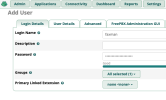
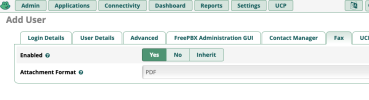
FreePBX: make a new user in Admin->User Management or edit an existing user who is to receive faxes. Ensure there is an email address listed in the User Details tab.

1674493943785.png

1674493967602.png


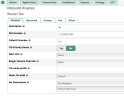
Then make/update an Inbound Route. For a dedicated fax line, just set the destination to Fax Recipient:

1674494088978.png


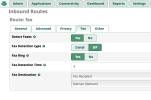
If it's a multi-use line and you want to route voice calls and fax calls separately, set the destination to a voice target and then go to the Fax tab in the inbound route and enable fax detection:

1674494162587.png


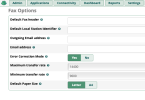
Finally, you can make some tweaks to the fax config in Settings-> Fax Configuration:

1674494229704.png

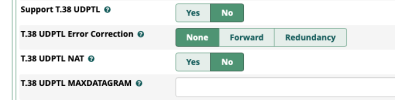
and you can adjust T.38 settings on the PJSIP trunk (Advanced tab):

1674494314068.png
 
Last edited:
@billsimon I don't see res_fax_chandsp in the menuselect. Is it bundled with res_fax? This is on Asterisk 20.1.
 
FYI: Incredible PBX 2027 builds include all the missing pieces except:
Code:
Debian/Ubuntu: apt install libtiff-tools -y
Rocky 8: yum install libtiff libtiff-tools -y

See the remaining steps in my post above.
 
Should be there. Keep scrolling. It's under ---Extended---
Yes it is. Sorry. I missed that portion. So IncrediblePBX 2027 is already installing the correct Asterisk modules but apt install libspandsp-dev ghostscript is still needed.
 
So IncrediblePBX 2027 is already installing the correct Asterisk modules but apt install libspandsp-dev ghostscript is still needed.
res_fax_spandsp won't be available for selection unless it detects libspandsp-dev already installed. And if it detects it, it automatically builds that module. So when you say "is already installing the correct Asterisk modules" yes it should build the fax modules as long as spandsp is detected on the system.

And my mistake, you don't need ghostscript for receiving faxes and converting to PDF. tiff2pdf does that and it's installed with the command Ward listed.
 
FYI: Incredible PBX 2027 builds include all the missing pieces except:
Code:
Debian/Ubuntu: apt install libtiff-tools -y
Rocky 8: yum install libtiff libtiff-tools -y

See the remaining steps in my post above.
Your steps aren't making a lot of sense to me. Why are you writing custom dialplan that duplicates what is already built in to the FreePBX dialplan and is managable in the gui?
 
It looks like Hylafax is getting in the way of this working on my systems.
 
Hylafax needs a modem (or more) to talk too, iaxmodem is feasible, (t38modem is unfortunately long gone) so it just won't be able to cooperate with asterisk channels. The advantage is hylafax (thus avantfax) can both receive AND send given a working modem. Asterisk , not so much.

(The down side is IAXMODEM is limited to T30)
 
Last edited:
Your steps aren't making a lot of sense to me. Why are you writing custom dialplan that duplicates what is already built in to the FreePBX dialplan and is managable in the gui?
Because we already had a working fax solution in place for a decade. And it was easier to walk folks through tweaking it rather than starting over.

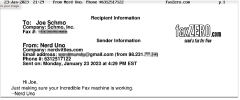
Screen Shot 2023-01-23 at 4.37.45 PM.png
 
Last edited:
I love that Joe Schmo is communicating with Nerd Uno.


Pretty sure that Nerd Uno can also reply to Joe Schmo using a still working using a near 50 year old protocol :-)
 
I used a 9v battery and a ground return over one wire with a carbon granule mike and an earpiece to talk to my nerd buddy similarly equipped three streets away. (Physics rules)

Three streets away was done with an unwound 22g transformer winding , it lasted for weeks
 
I had some references to fax handling in my extensions_custom.conf file. Once I commented those out, the inbound faxing works as expected. That's the only functionality I've actually wanted since for out-faxing, I have a multifunction printer/fax. I prefer to receive a fax in email to dealing with a piece of paper.
 

Forum statistics

Threads
26,825
Messages
175,326
Members
20,377
Latest member
fulyalizm
Get 3CX - Absolutely Free!

Link up your team and customers Phone System Live Chat Video Conferencing

Hosted or Self-managed. Up to 10 users free forever. No credit card. Try risk free.

3CX
A 3CX Account with that email already exists. You will be redirected to the Customer Portal to sign in or reset your password if you've forgotten it.
Back
Top