SOLVED User Control Panel FAILS

serevin

New Member
Joined
Apr 16, 2023
Messages
8
Reaction score
2
Hi all,

I installed Incredible PBX 2027 on a Debian 11 VM.

So far, all is running, just UCP is not working, none of the users can log in.

I activated UCP Node in the Advanced Settings, but this changes just the Status of UCP in the Dashboard overview to UCP Node is not running

1681667717417.png

I tried to install ucpnode , but getting the error :
fwconsole ma install ucpnode
sh: 1: icu-config: not found
icu is not installed. You need to run: yum install icu libicu-devel
Unable to install module ucpnode:
- Failed to run installation scripts

ICU self is installed, but it looks like that the command icu-config is deprecated in the latest version of libicu-dev

libicu-dev is already the newest version (67.1-7)

is there a workaround, as a PBX System without a working User Control Panel is not really useful.

Thanx
Daniel
 
UCP is not working

Code:
UCP Node Server Stable Sangoma Technologies Corporation  Commercial Not Installed (Available online: 14.0.1.1)
It is a commercial offering and UCP node can be uninstalled it is not required for the User Control Panel to work.

Is apache2 serving the DocumentRoot /var/www/html/ucp
Can you or the users see the logon screen from a web browser by pointing browser
to your server's http://your-fqdn-example.com NOT the corresponding IP address
Is there a virtual host for ucp in /etc/pbx/httpdconf/public.conf

The following Kudos to @billsimon and verified by @wardmundy post
https://www.voip-info.org/forum/threads/access-the-webserver-via-fqdn
Code:
##File = /etc/pbx/httpdconf/public.conf
# Edit below where in UPPER case = MYNAME@ (x3 places) ; MY-IPv4-ADDRESS ; MY-FQDN-DOMAIN.TLD .
# https://www.voip-info.org/forum/threads/access-the-webserver-via-fqdn.24952/post-151578

<VirtualHost *:80>
ServerAdmin [email protected]
ServerName MY-IPv4-ADDRESS
Redirect 403 /
UseCanonicalName Off
UserDir disabled
</VirtualHost>

<VirtualHost *:80>
ServerAdmin [email protected]
ServerName MY-FQDN-DOMAIN.TLD
DocumentRoot /var/www/html/ucp
ErrorLog /var/log/apache2/error.log
CustomLog /var/log/apache2/access_log common
</VirtualHost>

<VirtualHost *:80>
ServerAdmin [email protected]
ServerName 10.8.0.1
DocumentRoot /var/www/html
ErrorLog /var/log/apache2/error.log
CustomLog /var/log/apache2/access_log common
</VirtualHost>

# when done reload with # systemctl restart apache2
 
Last edited:
Hi Guru,

I can reach the login screen for UCP, that was never an issue.. Just none of the users can login. It says always a error occurred, see the system log fo details (there are no log entries) and all the users have access to ucp given from me in the admin panel..
 
have access to ucp given from me in the admin panel..
By that I get that you mean
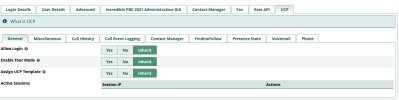
1. Admin>UserManagement>User Edit
___on UCP-Tab>General-Tab>Allow Login ?
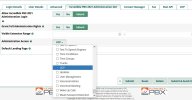
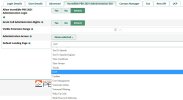
Or Perhaps
2. you gave Admin Rights to The UCP under the IncrediblePBX 20nn Administration GUI-Tab ?useredit--UCP-General_AllowLogin.JPGUCP_AdminRights.JPGUCP can be admin Landing Page.jpg
 
Hi ostridge.

i tried variant 1 and 2 and with both i am only getting

1681709101073.png

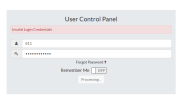
when i try to login with the wrong password, UCP even recognize the user and tells Invalid login credentials

1681709210486.png

Its really weird, that it is not working

Daniel
 
I agree there is a problem. My UCP password has always been my voice mail password. I went to the User Management screen and changed the password and UCP would not work. I used User Management to change the password back to my original one and UCP would not work. Finally, I went to the extension and changed my voicemail password back to the original and it does not work. There is clearly a bug someplace. None of my systems are allowing UCP login (I don't use it so I had not noticed.) I am running UCP version 16.0.38.

Please log your error with FreePBX at https://issues.freepbx.org/secure/Dashboard.jspa . You will need to create a login at that site before you can log a ticket.
 
Last edited:
@serevin @kenn10:

Two of the hidden beauties of Incredible PBX are (1) we maintain honeypots around the world with many different versions of operating systems, Asterisk, and FreePBX AND (2) thanks to @Tonyclewis & Co., we can control and backrev module releases when a bug rears its ugly head. Such is the case here, and it has now been addressed.

UCP 16.0.36 worked fine. UCP 16.0.39 blows up.

Here's the fix. Go into Module Admin, choose Check Online. Then select User Control Panel module and click Force Download and Downgrade. Problem solved.
 
@serevin @kenn10:

Two of the hidden beauties of Incredible PBX are (1) we maintain honeypots around the world with many different versions of operating systems, Asterisk, and FreePBX AND (2) thanks to @Tonyclewis & Co., we can control and backrev module releases when a bug rears its ugly head. Such is the case here, and it has now been addressed.

UCP 16.0.36 worked fine. UCP 16.0.39 blows up.

Here's the fix. Go into Module Admin, choose Check Online. Then select User Control Panel module and click Force Download and Downgrade. Problem solved.
Works like it should!
 
I just upgraded to ucp 16.0.38 on a FreePBX Distro (Sangoma) system and a Debian 11 system without the UCP node server running and in both cases can log in to UCP fine.
 
I just upgraded to ucp 16.0.38 on a FreePBX Distro (Sangoma) system and a Debian 11 system without the UCP node server running and in both cases can log in to UCP fine.
They apparently pulled 16.0.39. We didn't have a version 16.0.38 to test so we dropped back to one we could verify was working.
 
16.0.39 blew up for me this morning so it wasn't a mirage.
 
16.0.39 blew up for me this morning so it wasn't a mirage.
Was that a special ClearlyIP version? FreePBX repos don't have it. I don't doubt you installed it, but I doubt Sangoma went to the trouble of hacking up their repo to remove all evidence of it.
 
Are you on the Sangoma payroll now?? Doesn't require much hacking to delete a file. :cowboy:

Three people have reported it blew up for them. How many witnesses do we need??
 
That's not how code repositories work.

I'm not on Sangoma payroll. I'm an open source contributor who is interested in fixing bugs. I can't reproduce the bug posted here on an ordinary install of OSS FreePBX so I guess it's an IncrediblePBX bug. Good luck.
 
@billsimon: No luck required. It's fixed. Apparently you don't know how repositories work either. Nobody has tampered with the ClearlyIP repos. The only difference from Sangoma's is the keys.

 
OK, it's fixed where? OP didn't specify the ucp version, @kenn10 said he was having the problem with ucp 16.0.38, and you said you had the problem with 16.0.39 and then rolled back. What's fixed? What version?

Also you are confusing mirrors and code repositories. I'm not talking about mirrors. In a git repo every commit is logged & history is kept. If you revert a change or delete a file there's a log of that. It's a big pain to remove history and in fact Sangoma doesn't try to hide when they revert changes. That's not good software development practice.

For ucp 16.0.39 to get to a mirror it first has to be committed and tagged and have some history in the code repository. It doesn't. That's why I was asking whether there was a separate branch from ClearlyIP where they released a 16.0.39 and then pushed it to their mirrors which you are using.
 
Get 3CX - Absolutely Free!

Link up your team and customers Phone System Live Chat Video Conferencing

Hosted or Self-managed. Up to 10 users free forever. No credit card. Try risk free.

3CX
A 3CX Account with that email already exists. You will be redirected to the Customer Portal to sign in or reset your password if you've forgotten it.
Back
Top