GO HERE Clearly Devices module install on IPBX 2027U fails

kameleon

Member
Joined
Jul 22, 2009
Messages
111
Reaction score
15
I am installing (attempting to install) the Clearly Devices module on my Incredible PBX 2027-U server. When I go to the module admin and process the change to add it I am met with an error screen. The error is:
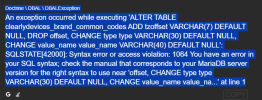
PBX error 1.png
(I tried doing the code tags but that kept the post from being able to be posted)

I googled the error but nothing specific to FreePBX or IPBX that I can find and I don't want to do generic fixes hoping it will do it. Any input on this?
 
Open a ticket with ClearlyIP. They have excellent customer support.
I did not even think of that since I do not have any ClearlyIP devices yet. Just preparing the PBX to get some to test. I will do that now. Thanks!
 
I wanted to update this for anyone looking in the future:

Clearly Support is AWESOME! I am not even a paying customer yet and they offered to help me fix the module install problem. Their support was quick to respond and when the basic troubleshooting steps still produced the same error they offered to remote in and see what was going on. Turns out there was an issue with the first module installation attempt I did that input fields in the database that needed to be removed before the new version could be installed. About to order a phone for testing and if the pre-sales support is anything to go by I know I am in good hands!
 
Some of the ClearlyIP folks are former FreePBX programmers and really know their stuff. As I said before, their support is excellent. I don't think you will be disappointed. ClearlyIP also helps to support the IncrediblePBX project.
 

Members online

No members online now.

Forum statistics

Threads
26,687
Messages
174,410
Members
20,257
Latest member
Dempan
Get 3CX - Absolutely Free!

Link up your team and customers Phone System Live Chat Video Conferencing

Hosted or Self-managed. Up to 10 users free forever. No credit card. Try risk free.

3CX
A 3CX Account with that email already exists. You will be redirected to the Customer Portal to sign in or reset your password if you've forgotten it.
Back
Top