What do you mean you don't see them loaded?Hi,
About what you said above, I am using registration not IP authorization. But as you said, it does not anyway.
For the "localnet" setting, I am using sip not pjsip. However, I don't see either chan_sip.conf or chan_pjsip conf files are loaded. Do I need to force them to load before I can modify anything?
All I did so far was added three iptables rules for three of their server ip addresses:
iptables -I INPUT -p udp -s 162.249.171.198 -m udp --dport 5060 -j ACCEPT
iptables -I INPUT -p udp -s 23.190.16.198 -m udp --dport 5060 -j ACCEPT
iptables -I INPUT -p udp -s 76.8.29.198 -m udp --dport 5060 -j ACCEPT
This may be insurfficient? Is there anything else that I can do? Please advise. Thanks!

You are using an out of date browser. It may not display this or other websites correctly.
You should upgrade or use an alternative browser.
You should upgrade or use an alternative browser.
FOOD FOR THOUGHT A lot of Inbound calls getting a busy signal from Bulk VS
- Thread starter LitleBill
- Start date
twinclouds
Guru
- Joined
- Feb 20, 2010
- Messages
- 91
- Reaction score
- 12
Actually, I checked module chan_sip and it is loaded. However, when I looking at the .conf files, there is no chan_sip.conf. I thought I need to check/modify the chan_sip.conf file to make sure the localnet was handled correctly. Maybe I am wrong.What do you mean you don't see them loaded?
I checked sip.conf. There is a localnet setting and it is pointed to 192.168.x.0 which is my localnet. Is this sufficient?
Last edited:

dallas
Well-Known Member
- Joined
- Oct 21, 2007
- Messages
- 1,023
- Reaction score
- 318
What version of asterisk PBX are you using? If it's IncrediblePBX you don't need to touch config files.Actually, I checked module chan_sip and it is loaded. However, when I looking at the .conf files, there is no chan_sip.conf. I thought I need to check/modify the chan_sip.conf file to make sure the localnet was handled correctly. Maybe I am wrong.
I checked sip.conf. There is a localnet setting and it is pointed to 192.168.x.0 which is my localnet. Is this sufficient?
twinclouds
Guru
- Joined
- Feb 20, 2010
- Messages
- 91
- Reaction score
- 12
I am just using plain Asterisk.
I checked sip.conf. I specified localnet correctly.
After studied how sip registration works, I think that the problem of Asterisk does not respond to DID call invites is most likely caused by NAT port binding time of sip registration. However, if it is the case, I am puzzled why this does not affect other voip providers such as voip.ms.
I checked sip.conf. I specified localnet correctly.
After studied how sip registration works, I think that the problem of Asterisk does not respond to DID call invites is most likely caused by NAT port binding time of sip registration. However, if it is the case, I am puzzled why this does not affect other voip providers such as voip.ms.

kenn10
Well-Known Member
- Joined
- Dec 16, 2007
- Messages
- 4,645
- Reaction score
- 3,012
@twinclouds said: I am just using plain Asterisk.
If you're using plain Asterisk without FreePBX, you're pretty much on your own. Most on here don't deal with straight Asterisk and that would be better addressed by Digium's Asterisk forum.
That said, Bulkvs does require a short registration interval of about 25 seconds and a qualify frequency of 23 seconds. You'll have to figure that out for a configuration file.
Last edited:
twinclouds
Guru
- Joined
- Feb 20, 2010
- Messages
- 91
- Reaction score
- 12
Thanks. I agree with you. Right now, I even don't think it is an Asterisk problem. It looks like to be caused by router's NAT binding time. The thing puzzles me is why other voip service providers, e.g., voip.ms have different behaviors on the same Asterisk server. But for now, I don't think I will not spent too much time on this. Thank you all anyway!If you're using plain Asterisk without FreePBX, you're pretty much on your own. Most on here don't deal with straight Asterisk and that would be better addressed by Digium's Asterisk forum.
That said, Bulkvs does require a short registration interval of about 25 seconds and a qualify frequency of 23 seconds. You'll have to figure that out for a configuration file.
dallas
Well-Known Member
- Joined
- Oct 21, 2007
- Messages
- 1,023
- Reaction score
- 318
Because they all make their own rules about how they implement SIP.The thing puzzles me is why other voip service providers, e.g., voip.ms have different behaviors on the same Asterisk server.
Last edited:
twinclouds
Guru
- Joined
- Feb 20, 2010
- Messages
- 91
- Reaction score
- 12
Still, it is interesting how they are able to by-pass router's NAT binding.Because they all make their own rules about how they implement SIP.

LitleBill
Active Member
- Joined
- May 10, 2023
- Messages
- 146
- Reaction score
- 26
 27 replies
and I still have no idea what's causing the 401 Unauthorized

It stopped happening I believe but should I be worried that it will happen again?
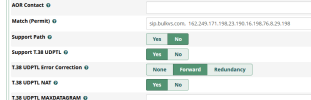
I did put sip.bulkvs.com in front of all IP's
Trunk PJSIP Advanced settings - Match Permit
and rebooted VPS,
those are the only 2 things I did so far. Bulkvs says it's my issue.
Last edited:
You have the Authentication set to just Outbound, right?
and I still have no idea what's causing the 401 Unauthorized
It stopped happening I beliece but should I be worried that it will happen again?
I did put sip.bulkvs.com front of all IP's
Trunk PJSIP Advanced settings - Match Permit
and rebooted VPS,
those are the only 2 things I did sofar. Bulkvs thinks it's my issue.
View attachment 5869

krzykat
Telecom Strategist
- Joined
- Aug 2, 2008
- Messages
- 3,208
- Reaction score
- 1,288
Did you get this resolved? I had issues with BVS a little while ago and it was all related to them having new IP's, and one they didn't publicize that I found traffic coming in from. If you're doing much of this, I can't recommend enough VoipMonitor. It is what allowed me to track exactly what the problem was in very short order.
LitleBill
Active Member
- Joined
- May 10, 2023
- Messages
- 146
- Reaction score
- 26
Did you get this resolved? I had issues with BVS a little while ago and it was all related to them having new IP's, and one they didn't publicize that I found traffic coming in from. If you're doing much of this, I can't recommend enough VoipMonitor. It is what allowed me to track exactly what the problem was in very short order.
I appreciate you asking,
I believe that once I added the new IP's and removed the old IP's it somehow sorted itself out.
Where would I look for more information on VoipMonitor?
Would I install it on the same vps server as the PBX or just run it when needed

wardmundy
Nerd Uno
- Joined
- Oct 12, 2007
- Messages
- 20,238
- Reaction score
- 5,987
Can you posted the correct IPs to whitelist?? BulkVS has been a mess for a lot of us.Did you get this resolved? I had issues with BVS a little while ago and it was all related to them having new IP's, and one they didn't publicize that I found traffic coming in from. If you're doing much of this, I can't recommend enough VoipMonitor. It is what allowed me to track exactly what the problem was in very short order.
You mean the instructions under your account don't work?Can you posted the correct IPs to whitelist?? BulkVS has been a mess for a lot of us.
Here's the SRV record for sip.bulkvs.com which would resolve all these records by just putting sip.bulkvs.com in the Match field.Step 5: Inbound calls will be sent to your system IP from one of the IPs listed below. Please whitelist the following IPs on your system.
SIP Proxy / SRV Record: sip.bulkvs.com
Supported Codecs: G.711u, G729a, T.38 (Pass Through where available)
DTMF Support: RFC2833 and Inband(G.711u)
SIP Port: 5060
IP Addresses:
162.249.171.198
23.190.16.198
76.8.29.198
Here's how those individual records resolve, see how it is the three IPs they have listed.root@proxy01-east:/var/lib/cvn# dig @8.8.8.8 SRV _sip._udp.sip.bulkvs.com
;; ANSWER SECTION:
_sip._udp.sip.bulkvs.com. 281 IN SRV 3 7 5060 la-198.bulkvs.com.
_sip._udp.sip.bulkvs.com. 281 IN SRV 2 5 5060 nyc-198.bulkvs.com.
_sip._udp.sip.bulkvs.com. 281 IN SRV 1 5 5060 dal-198.bulkvs.com.
la-198.bulkvs.com - 23.190.16.198
nyc-198.bulkvs.com - 162.249.171.198
dal-198.bulkvs.com - 76.8.29.198
Back in January they sent out a notice that the old 69.12.88.198 (Decommissioned) to 23.190.16.198 (New) and they would be updating their SRV records. If you used SRV, the update went with out a hitch. If you used the IPS, you needed to make the update.
kenn10
Well-Known Member
- Joined
- Dec 16, 2007
- Messages
- 4,645
- Reaction score
- 3,012
On the PBX trunk for the match field, just use sip.bulkvs.com. For most use cases, it is best to us IP Authentication unless you have a dynamic IP address from your ISP.Can you posted the correct IPs to whitelist?? BulkVS has been a mess for a lot of us.
If you have a dynamic IP address, use their instructions for registration. Your wall will be sent and received over the one IP of the registration trunk.
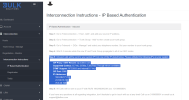
On the firewall, these are the current ip's from Bulkvs documentation and they are correct.
Step 5: Inbound calls will be sent to your system IP from one of the IPs listed below. Please whitelist the following IPs on your system.
SIP Proxy / SRV Record: sip.bulkvs.com
Supported Codecs: G.711u, G729a, T.38 (Pass Through where available)
DTMF Support: RFC2833 and Inband(G.711u)
SIP Port: 5060
IP Addresses:
162.249.171.198
23.190.16.198
76.8.29.198
kenn10
Well-Known Member
- Joined
- Dec 16, 2007
- Messages
- 4,645
- Reaction score
- 3,012
BulkVS is quite vigilant at notification of new or changing IP addresses. Pay attention to emails from them and the changing IP's aren't a surprise. Make sure you have a correct notification email on file with them.
There isn't. It sounds like @krzykat missed the announcement and didn't catch it until almost 40 days after the change.


Get 3CX - Absolutely Free!
Link up your team and customers  Phone System Live Chat Video Conferencing
Hosted or Self-managed. Up to 10 users free forever. No credit card. Try risk free.

Verify your Email
Check your inbox!
We’ve sent you an email. Click on the button in the email body to verify your email address – (if you can not find it, check your spam folder).
Upon verification you will be directed to the 3CX setup wizard.