FOOD FOR THOUGHT A lot of Inbound calls getting a busy signal from Bulk VS

Thank you @kenn10 for the reminder

I am sure @krzykat isn't the only one who missed that announcement. I am one of those who just want to set it up and forget it .
I have gone through the FreePBX documentation on the BVS website and it was so many years behind I couldn't get it to work and even their support reply looked like they probably haven't noticed that FreePBX or asterisk got updated :) . I think it might have been chan_sip, and I guess when they wrote their documentation, pjsip wasn't around yet?

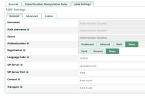
I always appreciated screenshot so let me pay back with some.

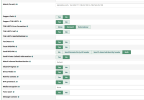
These are the settings that seem to work now @krzykat or anyone else who can use these
1750451041353.png

PJSIP Settings
General tab

1750451041353.png

Advanced
pjsip Settings
 
@Samot: Yep. I've got those. I thought @krzykat mentioned there might be another one.
Hi Ward, sorry for being tardy, let me look that up and reply back. But Samot - NO - there was an IP that came across that was NOT listed. When contacting bulkVS - when I told them what IP they were sending from the reply was "Oh - that shouldn't be happening". But you need to have proper tools like VoipMonitor to be able to see and troubleshoot these types of items. It's truly a wonderful tool to diagnose everything from what IP's data is sent from, to what useragent is used, to seeing the call quality at the blink of an eye - it has MOS scores, you can see latency, packetloss, and even listen to the call per leg if desired. I remember many many years ago, we used to listen to a call that a client complained on to see what they were hearing, now we just read the numbers.

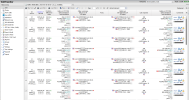
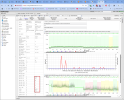
Examples of Voipmonitor (and if anyone has a real tough issue and wants to pass things through my VM server to tell you whats going on, I'll do it if I have time)

1751299333897.png
 
Here's a perfect example of how this tool can be used - carrier saying no issues - no dropped packets, and speed via speedtest was good. So without this tool you just get into a pissing contest with internet provider. But THIS shows them it is their fault, and gives you a LITTLE ammo you can fight with them on:

1751299681691.png
 
Found an email related to that IP:
---- on Fri, 14 Feb 2025 13:36:14 -0500 "Randall Powell"<[email protected]> wrote ----

Yes, we got that email and that’s what made me look into detail as I did have to add the new 23.190.16.198 to our servers and while looking for items without replies, is when I found this inbound record that was from instead IP 104.223.17.204 and I wondered if I missed another one.


Time: 10:37:02 02-14-25

Time Zone: EST

From Number: 5555236511

To Number: 5555888289

Description of Issue: Call came in from IP 104.223.17.204


PCAP enclosed
 
I don't recall BulkVS ever using that IP.
Nor had I. They were very surprised - I didn't get the entire detail, but seems like it was a temporary thing on their side. They knew the IP and said "You got a call from that??" Anyhow, I haven't included that on new servers lately and no issues. But the big point I was trying to make is just how valuable voipmonitor is, and that when you have connectivity issues, it tells you about everything - the IP being attempted, the codec being used, the port, the useragent, Its also GREAT for analyzing honeypot items. You can really learn a lot.
 

Members online

No members online now.

Forum statistics

Threads
26,705
Messages
174,510
Members
20,272
Latest member
voipgreene
Get 3CX - Absolutely Free!

Link up your team and customers Phone System Live Chat Video Conferencing

Hosted or Self-managed. Up to 10 users free forever. No credit card. Try risk free.

3CX
A 3CX Account with that email already exists. You will be redirected to the Customer Portal to sign in or reset your password if you've forgotten it.
Back
Top