
You are using an out of date browser. It may not display this or other websites correctly.
You should upgrade or use an alternative browser.
You should upgrade or use an alternative browser.
PIONEERS Awesome FS PBX
- Thread starter hecatae
- Start date


wardmundy
Nerd Uno
- Joined
- Oct 12, 2007
- Messages
- 20,409
- Reaction score
- 6,124
This new image appears to work:
1. Login to your Proxmox server as root using SSH
2. Change to the /var/lib/vz/dump directory
3. Download the fspbx image (3.9GB) using wget from here:
wget https://filedn.com/lBgbGypMOdDm8PWOoOiBR7j/Proxmox/vzdump-qemu-fspbx-0.9.57.vma.zst
4. Create a new virtual machine using a unique VM-ID number (e.g. 888): qmrestore vzdump-qemu-fspbx-0.9.57.vma.zst 888
5. Start the virtual machine from the Proxmox console
6. Login to the new virtual machine using SSH (root:password)
7. Read and follow the new Getting Started instructions in the /root directory
8. pbxstatus will show what's running
9. Delete the nerd user account: userdel nerd
1. Login to your Proxmox server as root using SSH
2. Change to the /var/lib/vz/dump directory
3. Download the fspbx image (3.9GB) using wget from here:
wget https://filedn.com/lBgbGypMOdDm8PWOoOiBR7j/Proxmox/vzdump-qemu-fspbx-0.9.57.vma.zst
4. Create a new virtual machine using a unique VM-ID number (e.g. 888): qmrestore vzdump-qemu-fspbx-0.9.57.vma.zst 888
5. Start the virtual machine from the Proxmox console
6. Login to the new virtual machine using SSH (root:password)
7. Read and follow the new Getting Started instructions in the /root directory
8. pbxstatus will show what's running
9. Delete the nerd user account: userdel nerd
Last edited:
@wardmundy, I can assure you nothing has changed about how the .env file works since the inception of FS PBX. It's controlled by the underlying Laravel framework, and we haven't changed the version in over a year. Are you getting the infamous 419 error? Please, read the article to make sure you didn't miss a step.
https://github.com/nemerald-voip/fspbx/wiki/Troubleshooting-Error-419-(Page-Expired)
Perhaps it is as easy as you forgot to run the command after you made changes
php artisan config:cache
I also highly recommend staying on the latest version. Many community-reported bugs have been fixed all around, and it is more stable than ever right now.
https://github.com/nemerald-voip/fspbx/wiki/Troubleshooting-Error-419-(Page-Expired)
Perhaps it is as easy as you forgot to run the command after you made changes
php artisan config:cache
I also highly recommend staying on the latest version. Many community-reported bugs have been fixed all around, and it is more stable than ever right now.
wardmundy
Nerd Uno
- Joined
- Oct 12, 2007
- Messages
- 20,409
- Reaction score
- 6,124
1. Login to your Proxmox server as root using SSH
2. Change to the /var/lib/vz/dump directory
3. Download the fspbx image (4.1GB) using wget from here:
wget https://filedn.com/lBgbGypMOdDm8PWOoOiBR7j/Proxmox/vzdump-qemu-fspbx-0.9.66.vma.zst
4. Create a new VM using a unique VM-ID number (e.g. 777): qmrestore vzdump-qemu-fspbx-0.9.66.vma.zst 777
5. Start the virtual machine from the Proxmox console and login to obtain IP address
6. Login to the new virtual machine using SSH (root:password)
7. apt install mailutils -y
8. Read and follow the Getting Started instructions in the /root directory
2. Change to the /var/lib/vz/dump directory
3. Download the fspbx image (4.1GB) using wget from here:
wget https://filedn.com/lBgbGypMOdDm8PWOoOiBR7j/Proxmox/vzdump-qemu-fspbx-0.9.66.vma.zst
4. Create a new VM using a unique VM-ID number (e.g. 777): qmrestore vzdump-qemu-fspbx-0.9.66.vma.zst 777
5. Start the virtual machine from the Proxmox console and login to obtain IP address
6. Login to the new virtual machine using SSH (root:password)
7. apt install mailutils -y
8. Read and follow the Getting Started instructions in the /root directory
Last edited:
wardmundy
Nerd Uno
- Joined
- Oct 12, 2007
- Messages
- 20,409
- Reaction score
- 6,124
We'll keep this updated on the FS PBX Wiki.

hecatae
resident hecatae
- Joined
- Feb 7, 2014
- Messages
- 1,063
- Reaction score
- 322
Installed fine on a 2GB RAM, 2GB SWAP 32GB EXT4 SSD Epyc Ryzen VPS
Code:
Tasks: 138 total,   1 running, 137 sleeping,   0 stopped,   0 zombie
%Cpu(s):  0.5 us,  0.5 sy,  0.0 ni, 98.8 id,  0.0 wa,  0.0 hi,  0.2 si,  0.0 st
MiB Mem :   1930.4 total,   1060.6 free,    601.0 used,    492.4 buff/cache
MiB Swap:   2048.0 total,   1517.6 free,    530.4 used.   1329.4 avail Mem
Last edited:
wardmundy
Nerd Uno
- Joined
- Oct 12, 2007
- Messages
- 20,409
- Reaction score
- 6,124
Use the Gmail Smarthost setup documented in the FSpbx tutorial:so the VPS I've got this on has a permanently disabled port 25, any way to work around this apart from get another VPS?
Activating a Gmail SmartHost For Outgoing Email
We’ve found the easiest way to assure that outbound email gets delivered reliably is to implement a Gmail SmartHost for Postfix. To deploy this, you will need a Gmail account and a Gmail App Password, not your standard Gmail password. You can obtain a Gmail App Password for your account here. Once you have your Gmail account name and app password in hand, issue the following commands:
Code:
cd /root
# accept the defaults during Postfix install
apt install postfix
mkdir /etc/pbx
wget https://filedn.com/lBgbGypMOdDm8PWOoOiBR7j/FusionPBX/enable-gmail-smarthost-with-postfix
chmod +x enable*
./enable*
# insert your gmail account name and APP password when prompted
wget https://filedn.com/lBgbGypMOdDm8PWOoOiBR7j/FusionPBX/mailtest
chmod +x mailtest
nano -w mailtest
# insert a destination email address for testing and save mailtest
./mailtestwardmundy
Nerd Uno
- Joined
- Oct 12, 2007
- Messages
- 20,409
- Reaction score
- 6,124
Making A Backup
1) SSH in to server
2) then: cd /var/www/fspbx
3) then simply type: "php artisan fspbx:backup" without quotes and it runs a backup.
4) Download the folder /var/backups/fspbx - it now contains the files...
1) SSH in to server
2) then: cd /var/www/fspbx
3) then simply type: "php artisan fspbx:backup" without quotes and it runs a backup.
4) Download the folder /var/backups/fspbx - it now contains the files...
wardmundy
Nerd Uno
- Joined
- Oct 12, 2007
- Messages
- 20,409
- Reaction score
- 6,124
Performing A Restore
From @pbxgeek:
We don't have an official restore script. The backup archive is best used for disaster recovery or off-site backups. A more straightforward way to restore your server is to install a new version of FS PBX and then restore the database from the backup folder. Our latest version of the backup script grabs your faxes, recordings and voicemail folder too. Those can be copied manually into the respective folders.
The backup script can also be enabled to run daily. Go to Default Settings -> Scheduled Jobs and enable it.
FS PBX supports full database replication and file sync between two or more servers in a cluster. It's a master to master replication, which allows you to have one server on standby. Most of our clients set up their infrastructures this way to eliminate any possible downtime. You can think of this as a backup, also in case one server becomes unoperational. Synchonizeion is real-time, so your data is always present on all nodes.
See https://www.pbxforums.com/threads/backup-restore.8702/
From @pbxgeek:
We don't have an official restore script. The backup archive is best used for disaster recovery or off-site backups. A more straightforward way to restore your server is to install a new version of FS PBX and then restore the database from the backup folder. Our latest version of the backup script grabs your faxes, recordings and voicemail folder too. Those can be copied manually into the respective folders.
The backup script can also be enabled to run daily. Go to Default Settings -> Scheduled Jobs and enable it.
FS PBX supports full database replication and file sync between two or more servers in a cluster. It's a master to master replication, which allows you to have one server on standby. Most of our clients set up their infrastructures this way to eliminate any possible downtime. You can think of this as a backup, also in case one server becomes unoperational. Synchonizeion is real-time, so your data is always present on all nodes.
See https://www.pbxforums.com/threads/backup-restore.8702/
hecatae
resident hecatae
- Joined
- Feb 7, 2014
- Messages
- 1,063
- Reaction score
- 322
Can dsiprouter connect to fs pbx the same way it connects to fusionpbx?
 www.pbxforums.com
DSIPRouter
@Mack Hendricks I see the profile post about the following: https://github.com/dopensource/dsiprouter Could you please explain what it does a little, for example I see a picture that shows multiple PBX how does this work? I know FusionPBX in a multiserver environment creates challenges that I...
www.pbxforums.com
hecatae
resident hecatae
- Joined
- Feb 7, 2014
- Messages
- 1,063
- Reaction score
- 322
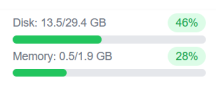
So I've been watching FS PBX eat 0.1GB of disk space every few days.
If this is just logs, then should there be a cron job compacting these?
System's been up 8 days, and I've seen 0.2GB of space disappear since install, with no extensions or anything:

If this is just logs, then should there be a cron job compacting these?
System's been up 8 days, and I've seen 0.2GB of space disappear since install, with no extensions or anything:
New documentation for Setting up DISA on FSPBX:

www.pbxforums.com

DISA for FSPBX?
Would there be a step by step tutorial on setting up DISA in FSPBX? I would like to call in with my cell phone on a dedicated DID and then have FSPBX give me a dial tone to call out using a different caller ID.
www.pbxforums.com
hecatae
resident hecatae
- Joined
- Feb 7, 2014
- Messages
- 1,063
- Reaction score
- 322
Now up to 13.8G used of SSD, anyone got any ideas on where to track this down, I cannot put FS PBX into production with this error as I'll have no disk space left within a year with no users, extensions or devices or gateways added.

kenn10
Well-Known Member
- Joined
- Dec 16, 2007
- Messages
- 4,712
- Reaction score
- 3,087
Ask @pbxgeek to comment.Now up to 13.8G used of SSD, anyone got any ideas on where to track this down, I cannot put FS PBX into production with this error as I'll have no disk space left within a year with no users, extensions or devices or gateways added.
I've been running the test system on a 4Gb memory, 60 Gb disk on Colo Crossing and I'm not seeing disk usage being consumed. Of 60 Gb, I still have 40 Gb available. What do you see in the variety of /var/log files on your system?
By comparison, my FusionPBX production system has used only 5.7 Gb total disk so perhaps FS PBX is not properly clearing out log files or is recording too much logging data info into them.
Last edited:


Forum statistics
Get 3CX - Absolutely Free!
Link up your team and customers  Phone System Live Chat Video Conferencing
Hosted or Self-managed. Up to 10 users free forever. No credit card. Try risk free.

Verify your Email
Check your inbox!
We’ve sent you an email. Click on the button in the email body to verify your email address – (if you can not find it, check your spam folder).
Upon verification you will be directed to the 3CX setup wizard.