NEW The Taming of FusionPBX + Tutorial

Debian 13 is now supported:
 
1766489319165.png

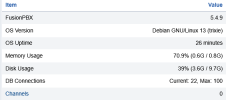
Installs fine in 10GB SSD and 1GB RAM plus 1 CPU.
 
Debian 13 is now supported:

So, I have installed FusionPBX on several Debian 13 bases. No audio when calling into a conference bridge. Normally that is my first litmus test of system functionality. Set up an extension, set up a conference bridge, call into bridge. No audio, but the call connects into the bridge and stays up.. Used the install script on the fusionpbx website. I have tried the cd* and ultra* music-on-hold profiles, to no avail.

Is there anything at fs_cli I should be looking for?

Outbound calls 2 way audio works great otherwise.
 
So, I have installed FusionPBX on several Debian 13 bases. No audio when calling into a conference bridge. Normally that is my first litmus test of system functionality. Set up an extension, set up a conference bridge, call into bridge. No audio, but the call connects into the bridge and stays up.. Used the install script on the fusionpbx website. I have tried the cd* and ultra* music-on-hold profiles, to no avail.

Is there anything at fs_cli I should be looking for?

Outbound calls 2 way audio works great otherwise.
Is this 5.5.7?
 
Also. While testing this, 5.5.6 On Debian 13, I thought maybe DTMF wasn't working right. I called a toll free number and my DTMF wasn't breaking the IVR.

Luckily I retested on 8042221111 and it echoed back good DTMF testing.

Thank You testcall.com
 
New Issue, for conversation purposes.

I have several Yealink Phones. T46Us and T48G. They are registered to FusionPBX. When I do Status::Registrations::Checkbox a registered line::Select UNREGISTER. The extension should simply unregister on the phone, I'd expect. Instead, the phone reboots 100%.

That is not the expected behaviour. Is it? No output on fs_cli. So I think there is supposed to be a phone unregister command instead of a phone reboot command.

There is also a REBOOT command on this page as well... When I click it, while a phone is checked, the phone reboots, as expected.

fs_cli output:
2026-02-12 11:14:43.785662 98.80% [NOTICE] switch_cpp.cpp:1466 [event_notify] command reboot [email protected] vendor yealink

@markjcrane
 
Last edited:
@herbertshades Wish granted. I'm not opinionated on this one. If you upgrade to latest 5.5 code or master branch UNREGISTER will only unregister, and it will not reboot the endpoint. The REBOOT button will continue to reboot the phone.
 
@herbertshades For no audio in a conference... I would ask if your PBX is behind NAT? Hosting services like Amazon or Google hosting? Or is your server on a public IP address? The more NAT is involved, the more it has a chance to interfere with audio.

Are the Yealink phones provisioned with FusionPBX or manually set up? If manually, then you may not have rport set to true or enabled.
 
@herbertshades here is a handy upgrade script to get you up to FusionPBX 5.5.7

Code:
#!/bin/bash
cd /var/www/fusionpbx
git stash
git pull
git checkout 5.5
git branch
git pull
mkdir /var/run/fusionpbx
chown -R www-data:www-data /var/run/fusionpbx
php /var/www/fusionpbx/core/upgrade/upgrade.php --schema
php /var/www/fusionpbx/core/upgrade/upgrade.php --defaults
php /var/www/fusionpbx/core/upgrade/upgrade.php --types
php /var/www/fusionpbx/core/upgrade/upgrade.php --optional
php /var/www/fusionpbx/core/upgrade/upgrade.php --permissions
php /var/www/fusionpbx/core/upgrade/upgrade.php --services
nginx -t && nginx -s reload
 
@herbertshades here is a handy upgrade script to get you up to FusionPBX 5.5.7

Code:
#!/bin/bash
cd /var/www/fusionpbx
git stash
git pull
git checkout 5.5
git branch
git pull
mkdir /var/run/fusionpbx
chown -R www-data:www-data /var/run/fusionpbx
php /var/www/fusionpbx/core/upgrade/upgrade.php --schema
php /var/www/fusionpbx/core/upgrade/upgrade.php --defaults
php /var/www/fusionpbx/core/upgrade/upgrade.php --types
php /var/www/fusionpbx/core/upgrade/upgrade.php --optional
php /var/www/fusionpbx/core/upgrade/upgrade.php --permissions
php /var/www/fusionpbx/core/upgrade/upgrade.php --services
nginx -t && nginx -s reload
Dang it @kenn10 - Thank You!

As I ran these commands, a few threw up errors. Here is what was the absolute clean run.
Code:
#!/bin/bash
cd /var/www/fusionpbx
git config --global --add safe.directory /var/www/fusionpbx
git stash
git pull
git checkout 5.5
git branch
git pull
mkdir /var/run/fusionpbx
chown -R www-data:www-data /var/run/fusionpbx
php /var/www/fusionpbx/core/upgrade/upgrade.php --schema
php /var/www/fusionpbx/core/upgrade/upgrade.php --defaults
php /var/www/fusionpbx/core/upgrade/upgrade.php --types
git config --global --add safe.directory /var/www/fusionpbx/app/language_model
php /var/www/fusionpbx/core/upgrade/upgrade.php --optional
php /var/www/fusionpbx/core/upgrade/upgrade.php --permissions
php /var/www/fusionpbx/core/upgrade/upgrade.php --services
nginx -t && nginx -s reload

I will report on the results shortly. Oh, and I haven't forgotten my commit to document the IMT setup.
 
Last edited by a moderator:
I probably created the safe.directory previously because I haven't run into that error on current upgrades. Good catch for the script.

Obviously, on the checkout command, you will change 5.5 to 5.6 when released and so forth.
 
@herbertshades For no audio in a conference... I would ask if your PBX is behind NAT? Hosting services like Amazon or Google hosting? Or is your server on a public IP address? The more NAT is involved, the more it has a chance to interfere with audio.

Are the Yealink phones provisioned with FusionPBX or manually set up? If manually, then you may not have rport set to true or enabled.

No NAT. In one setup, I have the PBX on VLAN X and the phones in VLAN Y. This is typical setup for our environment. The PBX set up on Debian 12, with the Yealink phones, conference works, PSTN works. Debian 13 is where the conference doesn't work, although calls to the PSTN work fine. In a different setup all both the servers on Debian 12 and 13 are on the same LAN segment as the phones. Conference and PSTN work on Debian 12. On Debian 13, pstn works, conference no.

I will re-run setup on Debian 13 and ensure I am on 5.5.7; and report.
 
Dang it @kenn10 - Thank You!

As I ran these commands, a few threw up errors. Here is what was the absolute clean run.
Code:
#!/bin/bash
cd /var/www/fusionpbx
git config --global --add safe.directory /var/www/fusionpbx
git stash
git pull
git checkout 5.5
git branch
git pull
mkdir /var/run/fusionpbx
chown -R www-data:www-data /var/run/fusionpbx
php /var/www/fusionpbx/core/upgrade/upgrade.php --schema
php /var/www/fusionpbx/core/upgrade/upgrade.php --defaults
php /var/www/fusionpbx/core/upgrade/upgrade.php --types
git config --global --add safe.directory /var/www/fusionpbx/app/language_model
php /var/www/fusionpbx/core/upgrade/upgrade.php --optional
php /var/www/fusionpbx/core/upgrade/upgrade.php --permissions
php /var/www/fusionpbx/core/upgrade/upgrade.php --services
nginx -t && nginx -s reload

I will report on the results shortly. Oh, and I haven't forgotten my commit to document the IMT setup.
Upgrade worked great for me on our 3 servers. On our primary server with HostMedia U.K. in London that includes free weekly backups, we're up to 17 extensions in 3 states including 4 cellphones (2 iPhones and 2 Android phones), 4 tablets, and 3 iMacs plus some DAP devices as well as Yealink and Polycom/OBi phones. Audio is flawless using desktop phones and both Groundwire and Zoiper 5.
 
Last edited:
Update ... Reinstalled Debian 13, installed FusionPBX anew, good to version 5.5.7.
Set up extension, setup conference. Called into conference. On audio from Conference, but audio is good going into FusionPBX according to trusty tcpdump, which isn't installed by default :(.

Anywho, looking at fs_cli, I see this ....
=========================

2026-02-15 00:04:16.854780 97.77% [NOTICE] mod_dptools.c:1406 Channel [sofia/internal/[email protected]] has been answered
2026-02-15 00:04:16.854780 97.77% [DEBUG] switch_channel.c:3914 (sofia/internal/[email protected]) Callstate Change RINGING -> ACTIVE
2026-02-15 00:04:16.854780 97.77% [DEBUG] sofia.c:7493 Channel sofia/internal/[email protected] entering state [completed][200]
EXECUTE [depth=0] sofia/internal/[email protected] conference([email protected]@default+flags{''})
2026-02-15 00:04:16.874783 97.77% [DEBUG] mod_conference.c:3458 using channel sound prefix: /usr/share/freeswitch/sounds/en/us/callie
2026-02-15 00:04:16.874783 97.77% [DEBUG] sofia.c:7493 Channel sofia/internal/[email protected] entering state [ready][200]
2026-02-15 00:04:16.874783 97.77% [DEBUG] mod_conference.c:229 Setup timer success interval: 20 samples: 160
2026-02-15 00:04:16.874783 97.77% [DEBUG] conference_member.c:1804 Raw Codec Activation Success L16@16000hz 1 channel 20ms
2026-02-15 00:04:16.874783 97.77% [DEBUG] conference_member.c:1851 Raw Codec Activation Success L16@8000hz 1 channel 20ms
2026-02-15 00:04:16.874783 97.77% [DEBUG] switch_core_codec.c:250 sofia/internal/[email protected] Push codec L16:100
2026-02-15 00:04:16.874783 97.77% [WARNING] mod_sndfile.c:281 Error Opening File [/usr/share/freeswitch/sounds/en/us/callie/conference/conf-alone.wav] [System error : No such file or directory.]
2026-02-15 00:04:16.894782 97.77% [DEBUG] conference_member.c:106 sofia/internal/[email protected] binding '9' to 'energy up'
2026-02-15 00:04:16.894782 97.77% [INFO] switch_ivr_async.c:221 Digit parser mod_conference: Setting realm to 'conf'
2026-02-15 00:04:16.894782 97.77% [DEBUG] switch_ivr_async.c:346 Digit parser mod_conference: binding 9/conf/0 callback: 0x7fb78ca725e0 data: 0x7fb7240ea400
2026-02-15 00:04:16.894782 97.77% [DEBUG] conference_member.c:106 sofia/internal/[email protected] binding '8' to 'energy equ'
2026-02-15 00:04:16.894782 97.77% [DEBUG] switch_ivr_async.c:346 Digit parser mod_conference: binding 8/conf/0 callback: 0x7fb78ca725e0 data: 0x7fb7240ea430
2026-02-15 00:04:16.894782 97.77% [DEBUG] conference_member.c:106 sofia/internal/[email protected] binding '7' to 'energy dn'
2026-02-15 00:04:16.894782 97.77% [DEBUG] switch_ivr_async.c:346 Digit parser mod_conference: binding 7/conf/0 callback: 0x7fb78ca725e0 data: 0x7fb7240ea460
2026-02-15 00:04:16.894782 97.77% [DEBUG] conference_member.c:106 sofia/internal/[email protected] binding '3' to 'vol talk up'
2026-02-15 00:04:16.894782 97.77% [DEBUG] switch_ivr_async.c:346 Digit parser mod_conference: binding 3/conf/0 callback: 0x7fb78ca725e0 data: 0x7fb7240ea490
2026-02-15 00:04:16.894782 97.77% [DEBUG] conference_member.c:106 sofia/internal/[email protected] binding '2' to 'vol talk zero'
2026-02-15 00:04:16.894782 97.77% [DEBUG] switch_ivr_async.c:346 Digit parser mod_conference: binding 2/conf/0 callback: 0x7fb78ca725e0 data: 0x7fb7240ea4c0
2026-02-15 00:04:16.894782 97.77% [DEBUG] conference_member.c:106 sofia/internal/[email protected] binding '1' to 'vol talk dn'
2026-02-15 00:04:16.894782 97.77% [DEBUG] switch_ivr_async.c:346 Digit parser mod_conference: binding 1/conf/0 callback: 0x7fb78ca725e0 data: 0x7fb7240ea4f0
2026-02-15 00:04:16.894782 97.77% [DEBUG] conference_member.c:106 sofia/internal/[email protected] binding '6' to 'vol listen up'
2026-02-15 00:04:16.894782 97.77% [DEBUG] switch_ivr_async.c:346 Digit parser mod_conference: binding 6/conf/0 callback: 0x7fb78ca725e0 data: 0x7fb7240ea520
2026-02-15 00:04:16.894782 97.77% [DEBUG] conference_member.c:106 sofia/internal/[email protected] binding '5' to 'vol listen zero'
2026-02-15 00:04:16.894782 97.77% [DEBUG] switch_ivr_async.c:346 Digit parser mod_conference: binding 5/conf/0 callback: 0x7fb78ca725e0 data: 0x7fb7240ea550
2026-02-15 00:04:16.894782 97.77% [DEBUG] conference_member.c:106 sofia/internal/[email protected] binding '4' to 'vol listen dn'
2026-02-15 00:04:16.894782 97.77% [DEBUG] switch_ivr_async.c:346 Digit parser mod_conference: binding 4/conf/0 callback: 0x7fb78ca725e0 data: 0x7fb7240ea580
2026-02-15 00:04:16.894782 97.77% [DEBUG] conference_loop.c:1347 Setup timer soft success interval: 20 samples: 160 from codec G722
2026-02-15 00:04:16.894782 97.77% [ERR] mod_local_stream.c:883 Unknown source default
2026-02-15 00:04:16.914785 97.77% [NOTICE] switch_core_media.c:15999 Activating write resampler
2026-02-15 00:04:16.974782 97.77% [DEBUG] switch_rtp.c:7710 Correct audio ip/port confirmed.
2026-02-15 00:04:17.094783 97.77% [DEBUG] conference_member.c:1804 Raw Codec Activation Success L16@16000hz 1 channel 20ms
2026-02-15 00:04:17.094783 97.77% [DEBUG] conference_member.c:1851 Raw Codec Activation Success L16@8000hz 1 channel 20ms
2026-02-15 00:04:17.114785 97.77% [DEBUG] conference_loop.c:1347 Setup timer soft success interval: 20 samples: 160 from codec G722
2026-02-15 00:04:18.914785 97.60% [ERR] mod_local_stream.c:883 Unknown source default
2026-02-15 00:04:20.934784 97.60% [ERR] mod_local_stream.c:883 Unknown source default
2026-02-15 00:04:22.954782 97.53% [ERR] mod_local_stream.c:883 Unknown source default
2026-02-15 00:04:24.974785 97.50% [ERR] mod_local_stream.c:883 Unknown source default
2026-02-15 00:04:26.474788 97.50% [NOTICE] sofia.c:1065 Hangup sofia/internal/[email protected] [CS_EXECUTE] [NORMAL_CLEARING]
2026-02-15 00:04:26.474788 97.50% [INFO] conference_loop.c:1668 Channel leaving conference, cause: NORMAL_CLEARING
2026-02-15 00:04:26.474788 97.50% [DEBUG] mod_conference.c:2521 sofia/internal/[email protected] skip receive message [UNBRIDGE] (channel is hungup already)
2026-
========================

... I am concerned about the line that reads ...

2026-02-15 00:04:16.874783 97.77% [WARNING] mod_sndfile.c:281 Error Opening File [/usr/share/freeswitch/sounds/en/us/callie/conference/conf-alone.wav] [System error : No such file or directory.]

Looking at the directory structure, this is what I see ...
root@FusionOnDeb13:~# cd /usr/share/freeswitch/sounds/
root@FusionOnDeb13:/usr/share/freeswitch/sounds# ls -al
total 12
drwxr-xr-x 3 www-data www-data 4096 Feb 14 12:18 .
drwxr-xr-x 7 www-data www-data 4096 Feb 14 12:18 ..
drwxr-xr-x 3 www-data www-data 4096 Feb 14 12:18 music

root@FusionOnDeb13:/usr/share/freeswitch/sounds#

Is something breaking when installing on Debian 13, but not on Debian 12?

Doing a simple find / -name conf-alone.wav gives no results.
 
Are you creating a conference (Applications > Conferences) or are you creating a conference room (Applications > Conference Center) ?? A conference works fine and everyone can talk to each other but if you create a conference room, the moderator must press the * key to unmute participants. At least that is how it works for me on Debian-12.

I see the sound file on my system so if you don't have it in the directory I show below, post over on the FusionPBX site. Keep in mind there are 4 subdirectories under /usr/share/freeswitch/sounds/en/us/callie/conference/ , i.e., 8000,16000,32000,48000 which are used according to the CODEC you are using. I use g,722 internally. If you have your default CODECs set to something unusual like OPUS and don't have other things set in Default Settings for FusionPBX, you might run into issues.

The fact that there is not one of the 4 subdirectories in front of conf-alone.wav makes me suspect something is awry with your install on Debian-13 and need to post on their forum for @markjcrane to examine. He does not monitor this forum as frequently as his own.

Code:
/usr/share/freeswitch/sounds/en/us/callie/conference/16000# ls
conf-alone.wav                          conf-enter_conf_pin.wav  conf-is-locked.wav                conf-members_in_conference.wav        conf-pin.wav
conf-bad-pin.wav                        conf-entry_sound.wav     conf-is-unlocked.wav              conf-muted.wav                        conf-qna_mode.wav
conf-conference_is_full.wav             conf-exit_sound.wav      conf-kicked.wav                   conf-number_of_listeners.wav          conf-unmuted.wav
conf-conference_is_in_qna_mode.wav      conf-goodbye.wav         conf-listener_in_conference.wav   conf-one_other_member_conference.wav  conf-welcome.wav
conf-conference_will_start_shortly.wav  conf-has_joined.wav      conf-listeners_in_conference.wav  conf-one_other_person_conference.wav  conf-you_are_already_muted.wav
conf-enter_conf_number.wav              conf-has_left.wav        conf-locked.wav                   conf-other_persons_conference.wav     conf-you_are_now_bidirectionally_muted.wav
 
Last edited:
Are you creating a conference (Applications > Conferences) or are you creating a conference room (Applications > Conference Center) ?? A conference works fine and everyone can talk to each other but if you create a conference room, the moderator must press the * key to unmute participants. At least that is how it works for me on Debian-12.

I see the sound file on my system so if you don't have it in the directory I show below, post over on the FusionPBX site. Keep in mind there are 4 subdirectories under /usr/share/freeswitch/sounds/en/us/callie/conference/ , i.e., 8000,16000,32000,48000 which are used according to the CODEC you are using. I use g,722 internally. If you have your default CODECs set to something unusual like OPUS and don't have other things set in Default Settings for FusionPBX, you might run into issues.

The fact that there is not one of the 4 subdirectories in front of conf-alone.wav makes me suspect something is awry with your install on Debian-13 and need to post on their forum for @markjcrane to examine. He does not monitor this forum as frequently as his own.

Code:
/usr/share/freeswitch/sounds/en/us/callie/conference/16000# ls
conf-alone.wav                          conf-enter_conf_pin.wav  conf-is-locked.wav                conf-members_in_conference.wav        conf-pin.wav
conf-bad-pin.wav                        conf-entry_sound.wav     conf-is-unlocked.wav              conf-muted.wav                        conf-qna_mode.wav
conf-conference_is_full.wav             conf-exit_sound.wav      conf-kicked.wav                   conf-number_of_listeners.wav          conf-unmuted.wav
conf-conference_is_in_qna_mode.wav      conf-goodbye.wav         conf-listener_in_conference.wav   conf-one_other_member_conference.wav  conf-welcome.wav
conf-conference_will_start_shortly.wav  conf-has_joined.wav      conf-listeners_in_conference.wav  conf-one_other_person_conference.wav  conf-you_are_already_muted.wav
conf-enter_conf_number.wav              conf-has_left.wav        conf-locked.wav                   conf-other_persons_conference.wav     conf-you_are_now_bidirectionally_muted.wav

I finally got posting permissions on pbxforums! I will post there.

I am doing Application::: Conference.

This only happens (the malfunction) on Debian 13. I can install umpteen times on Debian 12 and it works great.

Thank You @kenn10
 

Members online

Forum statistics

Threads
26,715
Messages
174,595
Members
20,282
Latest member
lahensd
Get 3CX - Absolutely Free!

Link up your team and customers Phone System Live Chat Video Conferencing

Hosted or Self-managed. Up to 10 users free forever. No credit card. Try risk free.

3CX
A 3CX Account with that email already exists. You will be redirected to the Customer Portal to sign in or reset your password if you've forgotten it.
Back
Top