accessing voicemail from an outside number

ampster

Member
Joined
Oct 22, 2008
Messages
49
Reaction score
1
using rasp pi incrediblepbx 2021

I want to call from an outside number to get a dialtone (for example, DISA etc) in order to access extension voicemail using *97 or *98
DISA does not work for me - it only dials externally not internally.
3CX has an extension 9999 to call from outiide to do this.

Am I missing an obvious way to do this on incrediblepbx ...?

Anthony
 
For voicemail? Press * during the voicemail greeting.
 
DISA does not work for me - it only dials externally not internally.
The DISA screen lets you set a context. Change it to from-internal and it will let you call an internal number. I typically set up an extension for voice mail and point a DID to it so you can call in from outside.

Here's how I do it:
1) Edit the /etc/asterisk/extensions_custom.conf file and add these lines to the bottom:
Code:
[custom-Vmail-Login]
exten => s,1,Ringing
exten => s,2,Answer
exten => s,3,Wait(1)
exten => s,4,Playback(voice-mail-system)
exten => s,5,VoiceMailMain
exten => s,6,Macro(hangupcall)

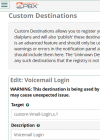
2) From the GUI, go to Admin -> Custom Destinations and add one like this:
1632513648478.png
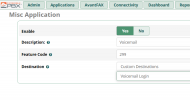
3) Save the custom application and then go to Applications -> Misc Applications and add one like this:

1632513756991.png

4) Login to the Linux prompt and type:
ASP.net:
fwconsole reload
fwconsole restart

You now have an extension to dial for a voice mail login prompt. You can point a DID at it or put it on an IVR or dial it from DISA. I used extension 299 in this example but the feature code can be any number in your local dial plan.
 
The DISA screen lets you set a context. Change it to from-internal and it will let you call an internal number. I typically set up an extension for voice mail and point a DID to it so you can call in from outside.

Here's how I do it:
1) Edit the /etc/asterisk/extensions_custom.conf file and add these lines to the bottom:
Code:
[custom-Vmail-Login]
exten => s,1,Ringing
exten => s,2,Answer
exten => s,3,Wait(1)
exten => s,4,Playback(voice-mail-system)
exten => s,5,VoiceMailMain
exten => s,6,Macro(hangupcall)

2) From the GUI, go to Admin -> Custom Destinations and add one like this:
View attachment 3626
3) Save the custom application and then go to Applications -> Misc Applications and add one like this:

View attachment 3629

4) Login to the Linux prompt and type:
ASP.net:
fwconsole reload
fwconsole restart

You now have an extension to dial for a voice mail login prompt. You can point a DID at it or put it on an IVR or dial it from DISA. I used extension 299 in this example but the feature code can be any number in your local dial plan.
Like to do a little something similar. I will create a blind backdoor. Let's say you have an IVR - press 1 for sale, 2 for accounting, etc. .... I'll add some really strange one like 933 - then password protect it - and I call it "backdoor" - it then goes to the backdoor IVR such as @kenn10 has and it can allow them to listen to voicemail, reroute calls, change call flow, etc.
 
Get 3CX - Absolutely Free!

Link up your team and customers Phone System Live Chat Video Conferencing

Hosted or Self-managed. Up to 10 users free forever. No credit card. Try risk free.

3CX
A 3CX Account with that email already exists. You will be redirected to the Customer Portal to sign in or reset your password if you've forgotten it.
Back
Top