
You are using an out of date browser. It may not display this or other websites correctly.
You should upgrade or use an alternative browser.
You should upgrade or use an alternative browser.
PIONEERS Awesome FS PBX
- Thread starter hecatae
- Start date
Make sure to remove and add the setting again. It needs to write new values into the DBI ran the upgrade procedure but no dice. Still cuts thru on the cell phone upon answer.
As discussed on GitHub, this may be more of a FreeSWITCH concern.@pbxgeek OK. The next change you made fixed it. Thanks!
I also found one moreextension bugfeature possibility that is reported in your issues list as #176.
According to the documentation at: https://github.com/nemerald-voip/fspbx/wiki/Troubleshooting-Error-419-(Page-Expired) The following should be corrected at: https://nerdvittles.com/icing-on-the-cake-meet-fs-pbx-its-fusionpbx-on-steroids/
Instead of:
From the command line, update the Environment Configuration of your FS PBX server: nano -w .env with the following entries using your server’s actual FQDN instead of fspbx.yourdomain.com:
APP_URL=https://fspbx.yourdomain.com
SESSION_DOMAIN=fspbx.yourdomain.com
SANCTUM_STATEFUL_DOMAINS=fspbx.yourdomain.com
Next, refresh the FS PBX configuration cache: php artisan config:cache.
Then login to the FQDN of your server with your browser using the Username and Password credentials above.
Should be:
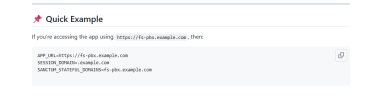
Instead of:
From the command line, update the Environment Configuration of your FS PBX server: nano -w .env with the following entries using your server’s actual FQDN instead of fspbx.yourdomain.com:
APP_URL=https://fspbx.yourdomain.com
SESSION_DOMAIN=fspbx.yourdomain.com
SANCTUM_STATEFUL_DOMAINS=fspbx.yourdomain.com
Next, refresh the FS PBX configuration cache: php artisan config:cache.
Then login to the FQDN of your server with your browser using the Username and Password credentials above.
Should be:

kenn10
Well-Known Member
- Joined
- Dec 16, 2007
- Messages
- 4,712
- Reaction score
- 3,087
You might want to modify those instructions to indicate the directory where the .env file is located:
Code:
cd /var/www/fspbxAccording to the documentation at: https://github.com/nemerald-voip/fspbx/wiki/Troubleshooting-Error-419-(Page-Expired) The following should be corrected at: https://nerdvittles.com/icing-on-the-cake-meet-fs-pbx-its-fusionpbx-on-steroids/
Instead of:
From the command line, update the Environment Configuration of your FS PBX server: nano -w .env with the following entries using your server’s actual FQDN instead of fspbx.yourdomain.com:
APP_URL=https://fspbx.yourdomain.com
SESSION_DOMAIN=fspbx.yourdomain.com
SANCTUM_STATEFUL_DOMAINS=fspbx.yourdomain.com
Next, refresh the FS PBX configuration cache: php artisan config:cache.
Then login to the FQDN of your server with your browser using the Username and Password credentials above.
Should be:
View attachment 6112You might want to modify that to indicate the directory where the .env file is found.
Last edited:
This configuration works seamlessly with external IPs, local IPs, domains, and reverse proxies. As long as the .env file is correctly configured and the browser request matches those settings, error 419 will not occur.
A 419 error generally points to misconfigured settings, but it also reflects the security safeguards in place. While it may feel inconvenient to edit the .env file immediately after installation, this step is necessary because network environments vary from server to server. If the installation takes place on a server with an external IP and no firewall, the system will typically work out of the box since the external IP is prioritized during setup.
That said, most deployments ultimately involve a custom domain, making updates to the .env file inevitable and an expected part of the installation process.
A 419 error generally points to misconfigured settings, but it also reflects the security safeguards in place. While it may feel inconvenient to edit the .env file immediately after installation, this step is necessary because network environments vary from server to server. If the installation takes place on a server with an external IP and no firewall, the system will typically work out of the box since the external IP is prioritized during setup.
That said, most deployments ultimately involve a custom domain, making updates to the .env file inevitable and an expected part of the installation process.
It's a requirement to install and update he system. To compile all the assets, Node.js requires a lot of RAM. Those assets are what make FS PBX user-friendly and look so nice. Generally speaking, if you can install and then downgrade, then you don't need more than 1 GB to run it. But when it's time to upgrade, you will need 4 GB again.@pbxgeek is the VM memory requirement of 4 GB a hard requirement for FS PBX or could it live on 1 or 2 GB for small systems with say 10 extensions?
If there are any Node.js experts here, and they can suggest how to optimize the memory for compiling the assets, I would be very interested in hearing it.

wardmundy
Nerd Uno
- Joined
- Oct 12, 2007
- Messages
- 20,409
- Reaction score
- 6,124
Last edited:
wardmundy
Nerd Uno
- Joined
- Oct 12, 2007
- Messages
- 20,409
- Reaction score
- 6,124
Haven't tried this, but someone should test if the Google Machine is correct...It's a requirement to install and update he system. To compile all the assets, Node.js requires a lot of RAM. Those assets are what make FS PBX user-friendly and look so nice. Generally speaking, if you can install and then downgrade, then you don't need more than 1 GB to run it. But when it's time to upgrade, you will need 4 GB again.
If there are any Node.js experts here, and they can suggest how to optimize the memory for compiling the assets, I would be very interested in hearing it.
Use swap space (virtual memory) on a Linux VPS
If you are installing a Linux-based operating system, you can use a portion of your hard drive to create a "swap file" to act as temporary virtual memory. This is a software solution and is different from physical RAM.
- Pros: It can help complete an installation that requires more memory than your 1GB of physical RAM.
- Cons: Swap space is significantly slower than physical RAM and can cause performance issues if used long-term.
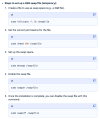
- Best practice: You can create a temporary swap file and only activate it when you need it for the installation.
kenn10
Well-Known Member
- Joined
- Dec 16, 2007
- Messages
- 4,712
- Reaction score
- 3,087
I tried it on Rack Nerds and created a 4 GB swap on a 1 GB memory system but the install bombed out even so.Haven't tried this, but someone should test if the Google Machine is correct...
I do have a 4 GB instance on Colo Crossing running my test FS PBX but it appears over-subscribed and the network is terrible. VOIP calls break up and stutter.
kenn10
Well-Known Member
- Joined
- Dec 16, 2007
- Messages
- 4,712
- Reaction score
- 3,087
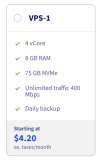
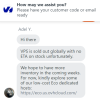
Apparently, OVH has no VPS- available when you go to get one. You cannot select any of the locations. I chatted with them and got this so you can scrap that deal.
Rack Nerds does offer this for $43.88/year but no automatic backups.
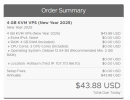
Rack Nerds does offer this for $43.88/year but no automatic backups.
Last edited:
I also tried the SWAP file, but it was unsuccessful last time. There should be some way to mitigate the issue but I curently don't know of one.Haven't tried this, but someone should test if the Google Machine is correct...
Use swap space (virtual memory) on a Linux VPS
If you are installing a Linux-based operating system, you can use a portion of your hard drive to create a "swap file" to act as temporary virtual memory. This is a software solution and is different from physical RAM.
- Pros: It can help complete an installation that requires more memory than your 1GB of physical RAM.
- Cons: Swap space is significantly slower than physical RAM and can cause performance issues if used long-term.
- View attachment 6123
- Best practice: You can create a temporary swap file and only activate it when you need it for the installation.

Halea
Well-Known Member
- Joined
- Aug 12, 2016
- Messages
- 1,158
- Reaction score
- 903
@kenn10 : Open a ticket with ColoCrossing, tell them about your performance issues and ask them to move your VPS to a node with less activity. I did it a few months ago on a dirt cheap instance for which I truly had very low expectations. Yet they were nice enough to find a better machine and since things have worked far better for that instance.I tried it on Rack Nerds and created a 4 GB swap on a 1 GB memory system but the install bombed out even so.
I do have a 4 GB instance on Colo Crossing running my test FS PBX but it appears over-subscribed and the network is terrible. VOIP calls break up and stutter.
Those guys amaze me so much that to show my appreciation I ended up by getting a dedicated server even though I didn't need one!

kenn10
Well-Known Member
- Joined
- Dec 16, 2007
- Messages
- 4,712
- Reaction score
- 3,087
Thanks! I've just submitted the ticket. I'll see how it goes.Open a ticket with ColoCrossing

hecatae
resident hecatae
- Joined
- Feb 7, 2014
- Messages
- 1,063
- Reaction score
- 322
The moved one of mine really quicklyThanks! I've just submitted the ticket. I'll see how it goes.
kenn10
Well-Known Member
- Joined
- Dec 16, 2007
- Messages
- 4,712
- Reaction score
- 3,087
They moved mine within 10 minutes. The new one is much faster and, so far, no dropped packets. I'm rebuilding FS PBX on it as time allows for further testing..The moved one of mine really quickly
wardmundy
Nerd Uno
- Joined
- Oct 12, 2007
- Messages
- 20,409
- Reaction score
- 6,124
Interesting. After installation on Proxmox, you can reduce the RAM setting to 1GB with 1GB swap, and it runs just fine...It's a requirement to install and update he system. To compile all the assets, Node.js requires a lot of RAM. Those assets are what make FS PBX user-friendly and look so nice. Generally speaking, if you can install and then downgrade, then you don't need more than 1 GB to run it. But when it's time to upgrade, you will need 4 GB again.
If there are any Node.js experts here, and they can suggest how to optimize the memory for compiling the assets, I would be very interested in hearing it.

Thanks for confirming. I’d still suggest sticking with 4GB for now to make sure updates run smoothly. We’re releasing updates and new features almost daily, and FS PBX is in very active development. This pace will continue until every FusionPBX page is replaced—and until users stop requesting new features (the latter will probably never happen ).Interesting. After installation on Proxmox, you can reduce the RAM setting to 1GB with 1GB swap, and it runs just fine...
View attachment 6134


Forum statistics
Get 3CX - Absolutely Free!
Link up your team and customers  Phone System Live Chat Video Conferencing
Hosted or Self-managed. Up to 10 users free forever. No credit card. Try risk free.

Verify your Email
Check your inbox!
We’ve sent you an email. Click on the button in the email body to verify your email address – (if you can not find it, check your spam folder).
Upon verification you will be directed to the 3CX setup wizard.