

voipRookie
Member
- Joined
- Oct 17, 2010
- Messages
- 90
- Reaction score
- 9
I just got my BeagleBone Black with a 16GB microSD setup and I noticed the status command is not displaying a value for free disk space.
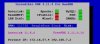
I made the following change to /usr/bin/status so the amount of free disk space will be displayed. I replaced all off these lines:
with this line:
After this change, the status command shows the amount of free disk space.
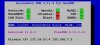
I have no idea if this change will also work on Raspberry PI or with other sizes of disks so, YMMV.
I made the following change to /usr/bin/status so the amount of free disk space will be displayed. I replaced all off these lines:
Code:
DISK=`df -h | grep -m 2 ^ | tail -1 | cut -f 8 -d " "`
if [ -z "$DISK" ]; then
DISK=" `df -h | grep -m 2 ^ | tail -1 | cut -f 7 -d " "`"
fi
with this line:
Code:
DISK=`df -h | grep -m 2 ^ | tail -1 | awk -F' ' '{print $4}'`After this change, the status command shows the amount of free disk space.
I have no idea if this change will also work on Raspberry PI or with other sizes of disks so, YMMV.


 Phone System